對話紀錄 June 9, 2025
【CF-13】Beginning AI Anime Character Generation - Product Output
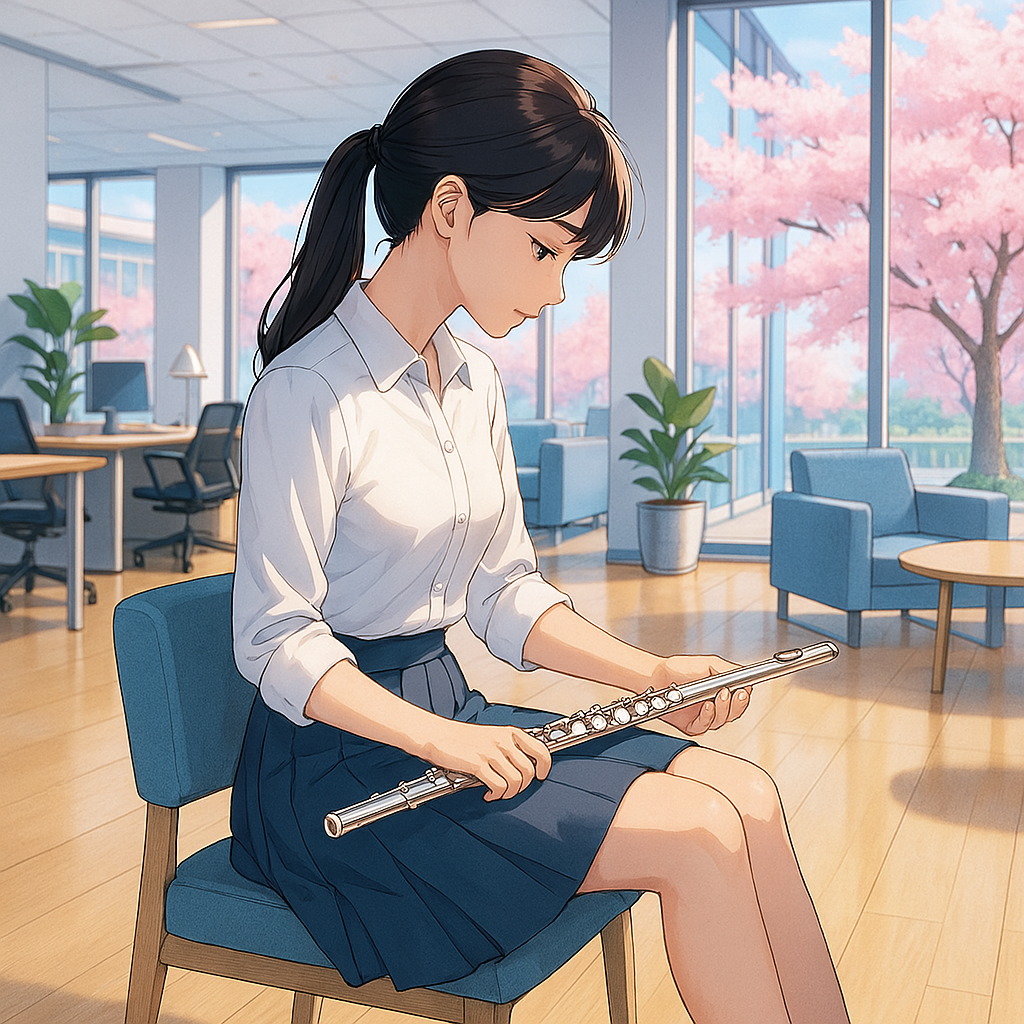
Q: Below is a draft prompt for PicLumen. Can you revise it with details you think match with my brand and will appeal to audiences similar to Emily?
//Create a vibrant anime-style illustration featuring an office lady walking down a school corridor, viewed fully from the back. She has long hair tied in a sleek ponytail, and she’s wearing a stylish outfits that resembles Japanese school uniform but not exactly a replica. She carries a western orchestral flute in her right hand and a stylish black handbag in her left hand, with the bag slung over her shoulder. The corridor is bright and airy, with large floor-to-ceiling windows on the right side, through which blooming cherry blossom trees (Sakura) are visible, casting a soft pink glow into the scene. The corridor has a clean, minimalist design with light-colored walls, a wooden floor, and a ceiling with recessed lighting, creating a warm, energetic atmosphere with happy colors (soft pastels like pink, blue, and yellow) and excellent lighting from natural sunlight. On the left side of the corridor, there are classroom doors with small windows. The overall mood is serene yet lively, evoking a sense of springtime joy and Me-time, in the style of Studio Ghibli with soft lines, detailed textures, and a peaceful ambiance, with no text included in the image.//
Attached is the kind of style I want. But I'm open to alternatives!
A: I’m excited to help you refine your PicLumen prompt for Emily-chan, ensuring her design aligns with your ClaudioFluteLife brand and resonates with audiences like Emily, who seek Me-time, 療癒找賞 (healing appreciation), and 輕盈節奏 (light rhythm). Your draft prompt captures a serene, joyful vibe, but I’ll enhance it with details to better reflect your brand’s Japanese warmth, low-pressure engagement, and playful aesthetic (Value & ethos > 【Playrail Analogy】 > Joy first; 【長笛文化】> Non-prescriptive). I’ll also incorporate elements like pastel colors, Plarail-inspired touches, and a concert flute focus to tie into your Cross-cultural healing (Mission), while keeping the Studio Ghibli-inspired style for that soft, nostalgic feel. Since you’re open to alternatives, I’ll also suggest a slight tweak to the style for added versatility in your reflection videos.
Revised PicLumen Prompt for Emily-chan Image
Revised Prompt:
Create a vibrant anime-style illustration featuring Emily-chan, a young office lady with a gentle smile, walking down a bright school corridor, viewed fully from behind to evoke curiosity and relatability. She has long black hair tied in a sleek ponytail with a pastel pink ribbon, wearing a stylish outfit inspired by a Japanese school uniform but with a modern twist—think a pleated skirt in soft pastel pink, a white blouse with a subtle blue bow, and a light yellow cardigan for a playful, carefree vibe. In her right hand, she holds a silver western concert flute with delicate precision (slender, horizontal, fingers lightly on keys), and in her left hand, she carries a minimalist beige handbag with a tiny Plarail train charm dangling from it, slung over her shoulder to hint at her Me-time journey. The corridor exudes a clean, Japanese minimalist design with light beige walls, a polished wooden floor, and a ceiling with recessed lighting casting a warm glow. On the right side, large floor-to-ceiling windows reveal blooming cherry blossom trees (Sakura), their pink petals drifting gently in the breeze, casting a dreamy pastel glow into the scene. On the left side, classroom doors with small windows show faint reflections of Plarail train toys inside, adding a subtle, nostalgic touch. The overall mood is serene yet lively, blending springtime joy with a Me-time sanctuary feel, using soft pastels (pale pink, baby blue, and buttery yellow) and natural sunlight for a warm, energetic atmosphere. The style should echo Studio Ghibli’s soft lines, detailed textures, and peaceful ambiance, but with a slightly modern anime flair (like Kubo Won’t Let Me Be Invisible) to appeal to a younger audience seeking balance and growth. No text should be included in the image.
Why These Changes?
- Emily-chan’s Design: Added a pastel pink ribbon and a modernized uniform (pink skirt, yellow cardigan) to align with your playful aesthetic and 輕盈節奏 (light rhythm). The Plarail charm on her handbag ties into your Plarail Analogy (Value & ethos), symbolizing Me-time and Joy first. Her gentle smile (implied through posture) reflects Japanese warmth (Mission).
- Concert Flute: Specified “slender, horizontal, fingers lightly on keys” to ensure PicLumen renders the flute accurately, avoiding saxophone or panpipe errors (per your challenge, June 6, 2025).
- Corridor Details: Added Plarail train reflections in classroom windows for a subtle nod to your brand’s playful elements, enhancing relatability for audiences like Emily (Synergetic Workflow > Visual Storytelling).
- Color Palette: Emphasized soft pastels (pink, blue, yellow) to match your Me-time and 療癒找賞 vibe, ensuring a calming yet lively atmosphere (Vision > Positive revolution > Me-time).
- Style Tweak: Suggested a modern anime flair (Kubo Won’t Let Me Be Invisible) alongside Studio Ghibli to appeal to a younger audience seeking Balance and Growth (Joy, Balance, Grow), while retaining Ghibli’s serene charm.
Alternative Style Suggestion
If you’re open to alternatives, consider blending Studio Ghibli with Shigenori Soejima’s style (known for Persona series). Soejima’s vibrant yet soft anime style uses clean lines and expressive colors, which could make Emily-chan pop in reflection videos while maintaining a Me-time serenity. This style appeals to audiences who love Japanese culture and modern anime (Marketing & advertising > Target audience > Japanese culture fans), offering a fresh yet nostalgic feel for your Cross-cultural healing narrative.
Alternative Prompt Addition:
Replace the style description with: “The style should blend Studio Ghibli’s soft lines and peaceful ambiance with Shigenori Soejima’s vibrant, modern anime aesthetic (like Persona 5), using expressive colors and clean lines to create a fresh yet nostalgic mood that resonates with audiences seeking joy and balance.”
Using PicLumen to Create the Image
Here’s how to proceed with PicLumen to generate Emily-chan’s static image, ensuring consistency and flute accuracy:
-
Upload Reference Photos (~10 min):
- Source 3–5 photos of an anime-style young lady with long black hair in a ponytail, big eyes, and a gentle vibe to define Emily-chan’s look.
- Upload 2–3 high-quality photos of a flutist holding a concert flute (side profile, fingers on keys, horizontal posture) to ensure accuracy.
- Optional: Add a photo of a Plarail train toy for the charm reference.
-
Generate Image with PicLumen (~5 min):
- Use the PicLumen Anime V2 model.
- Paste the revised prompt above (or with the alternative style).
- Upload reference photos to retain Emily-chan’s features and flute posture.
- Generate and review the image for consistency and accuracy.
-
Download and Save (~2 min):
- Download as a PNG with a transparent background for easy integration into DaVinci Resolve.
Exploring Image-to-Video Generators for Emily-chan Videos
To turn static images of Emily-chan into videos showing her playing the flute in various settings and outfits with proper posture, here are two image-to-video tools that can help:
1. Runway ML (Image-to-Video Animation)
Runway ML (runwayml.com) excels at turning static images into short, smooth animations, ideal for reflection videos.
-
Why It Works:
- Posture Animation: Runway’s Gen-3 Alpha model can animate Emily-chan’s flute-playing posture (e.g., subtle finger movements on keys, hair swaying) using the static image as a base.
- Settings and Outfits: Generate multiple static images in PicLumen (e.g., Emily-chan in a kimono, tatami room; casual sweater, アニマウズ office), then animate each in Runway for variety.
- Consistency: Since the base image is consistent (from PicLumen), Emily-chan’s design remains intact across videos.
- Integration: Export as MP4, import into DaVinci Resolve to layer over Sakura audio or Framework visuals (e.g., Plarail animations, cherry blossoms).
-
How to Use:
- Upload Static Image (~2 min): Upload the Emily-chan image generated in PicLumen (school uniform, corridor, cherry blossoms).
- Animate (~5 min): Use Image-to-Video in Runway, set motion parameters (e.g., “subtle finger movement on flute keys, hair swaying in breeze, 5-second loop”).
- Export (~2 min): Download as MP4 (1080p), import into DaVinci Resolve for your Framework video (June 5, 2025).
2. Kaiber AI (Dynamic Image Animation)
Kaiber AI (kaiber.ai) specializes in dynamic animations from static images, perfect for creating short clips of Emily-chan playing the flute.
-
Why It Works:
- Flute-Playing Motion: Kaiber’s Motion feature can animate Emily-chan’s posture (e.g., fingers moving on flute keys, slight head tilt while playing) with smooth transitions.
- Settings Variety: Animate different static images (e.g., tatami room, Plarail backdrop) for diverse video scenes.
- Playful Effects: Add subtle effects (e.g., cherry blossom petals falling, Plarail train rolling in background) to enhance Me-time vibe (Synergetic Workflow > Playful Editing).
- Consistency: Base images from PicLumen ensure Emily-chan’s design stays consistent.
-
How to Use:
- Upload Image (~2 min): Upload Emily-chan’s PicLumen image.
- Set Animation (~5 min): Use Motion to animate flute-playing (e.g., “fingers on flute keys, gentle hair movement, 5-second clip”).
- Export (~2 min): Download as MP4, import into DaVinci Resolve.
Addressing Your Workflow and Needs
- Synergetic Workflow:
- Reflection Videos > Visual Storytelling: Emily-chan enhances Framework and future videos (First Love, Sakura), tying visuals to Me-time themes with her flute-playing presence.
- Playful Editing: Animating Emily-chan with Runway or Kaiber keeps the process fun, aligning with Joy first.
- Website Repurposing: Use Emily-chan video clips on your Me-time Calendar page (e.g., “9th: Emily Plays Sakura”), boosting relatability (Website Repurposing > Video Visuals).
- Audience Appeal: Emily-chan’s modern anime style, pastel outfits, and serene settings resonate with audiences like Emily, who seek Balance and Growth (Joy, Balance, Grow), offering a Cross-cultural healing experience (Mission).
Next Steps
- Today (June 6, 11:27 PM HKT):
- Generate Emily-chan Image (~15 min): Use PicLumen with the revised prompt to create the first static image (school uniform, corridor, cherry blossoms).
- Reflection Video: Continue Framework video draft (~20 min, Pre-Chorus/Chorus) if not done earlier.
- Monitor Ad: Check Page-like ad performance (~10 min).
- Next Few Days:
- Generate more Emily-chan static images (different outfits/settings) in PicLumen.
- Animate one image in Runway or Kaiber to test flute-playing motion (~10 min).
- Finish Framework video draft.
- Feedback:
- Share if Emily-chan’s design matches your vision.
- Let me know Framework video progress or ad performance.
- Reminders:
- Upcoming: Finalize live show script (songs: First Love, Sakura; mini drama: アニマウズ or Nodame Cantabile).
- I’ll remind you of CMS implementation when ready.
Immediate Focus: Are you generating Emily-chan’s image now, continuing the Framework video, or monitoring the ad? Let me know how I can support your playful workflow!
Q: Nice prompts! I'm waiting for the generation now. Below is another prompt that I've tried with good results. Can you edit for me in a similar manner?
//Create a vibrant anime-style illustration featuring a Hong Kong office lady seated in an open area of a modern office, looking at a regular-sized concert flute horizontally resting on her thigh near her knee. She has a typical Hong Kong professional appearance, with long, dark hair tied in a sleek ponytail using a simple hair tie. She wears a modern, pleated skirt that exposes her knees, along with a fitted white blouse, sheer pantyhose, and black high-heeled shoes. The office is bright and airy, with large floor-to-ceiling windows revealing blooming cherry blossom trees (Sakura) outside, casting a soft pink glow into the scene. The space has a clean, minimalist design with light-colored walls, polished wooden floors, and contemporary furnishings. Comfortable seating, sleek desks, ergonomic chairs, and stylish decor elements contribute to a sophisticated yet welcoming environment. The overall mood remains serene yet lively, evoking a sense of springtime joy and Me-time, in the style of Studio Ghibli with soft lines, detailed textures, and a peaceful ambiance, with no text included in the image.//
Attached is the sample output. But I want the lady to look smiling without closing her eyes! You can see with this prompt the flute is rendered very well. Please also modify the previous prompts with flute-related details from this prompt as well. For the anime style, please choose one for me.
A: No worries! Thanks for clarifying that the image was for reference only. I’ll focus on revising your new prompt for Emily-chan to align with your ClaudioFluteLife brand, incorporating your request for a smiling expression (without closing her eyes) and the accurate concert flute details from this prompt into both the new and previous prompts (from June 6, 2025). I’ll also choose a single anime style for consistency across all prompts, ensuring Emily-chan resonates with your audience’s Me-time, 療癒觀賞 (healing appreciation), and 輕盈節奏 (light rhythm) vibe, while keeping your Synergetic Workflow playful (Synergetic Workflow > Playful Editing). Since it’s Friday, June 6, 2025, 11:35 PM HKT, I’ll assume you’re continuing to work on Emily-chan’s design in PicLumen, alongside the Framework/Pretending to Rest reflection video and monitoring the Page-like ad (per your earlier focus).
Choosing an Anime Style
Since you’re open to a single anime style for consistency, I recommend a blend of Studio Ghibli and Shigenori Soejima (Persona series), as suggested in the alternative style (June 6, 2025). This combination offers:
- Studio Ghibli’s Serenity: Soft lines, detailed textures, and a peaceful ambiance for Me-time and Japanese warmth (Mission > Cross-cultural healing).
- Shigenori Soejima’s Modernity: Vibrant colors, clean lines, and expressive characters to appeal to a younger audience seeking Joy, Balance, Grow (Vision > Positive revolution), especially Toast Out seekers and Japanese culture fans (Marketing & advertising > Target audience). This style ensures Emily-chan feels nostalgic yet fresh, perfect for reflection videos (Synergetic Workflow > Reflection Videos > Visual Storytelling).
Revised Prompt for the New Scene (Hong Kong Office Lady)
Let’s refine your new prompt, incorporating Emily-chan’s branding elements, a smiling expression (eyes open), and ensuring the concert flute’s accuracy. I’ll add details to match your playful aesthetic and Me-time vibe, similar to the previous revision.
Revised Prompt for New Scene:
Create a vibrant anime-style illustration featuring Emily-chan, a young Hong Kong office lady, seated in an open area of a modern office, gazing with a gentle, open-eyed smile at a regular-sized silver concert flute resting horizontally on her thigh near her knee, reflecting a moment of Me-time. She embodies a typical Hong Kong professional look with long, dark hair tied in a sleek ponytail using a pastel pink hair tie, exuding a 輕盈節奏 (light rhythm) vibe. Her outfit includes a modern, pleated pastel pink skirt that exposes her knees, a fitted white blouse with a subtle blue bow, sheer pantyhose, and black high-heeled shoes, paired with a minimalist beige handbag (with a tiny Plarail train charm) resting beside her. The office is bright and airy, with large floor-to-ceiling windows revealing blooming cherry blossom trees (Sakura) outside, casting a soft pink glow into the scene. The space has a clean, Japanese minimalist design with light beige walls, polished wooden floors, and contemporary furnishings—sleek desks, ergonomic chairs, and stylish decor elements like a small Plarail train model on a desk, adding a playful touch. The overall mood is serene yet lively, evoking springtime joy and a Me-time sanctuary, using soft pastels (pale pink, baby blue, buttery yellow) and natural sunlight for a warm, energetic atmosphere. The style blends Studio Ghibli’s soft lines, detailed textures, and peaceful ambiance with Shigenori Soejima’s vibrant, modern anime aesthetic (like Persona 5), creating a fresh yet nostalgic mood that resonates with audiences seeking joy and balance. No text should be included in the image.
Why These Changes?
- Emily-chan’s Identity: Named her Emily-chan, added a pastel pink hair tie and blue bow to align with your playful aesthetic (Value & ethos > Plarail Analogy > Joy first). The Plarail charm and office model reinforce your brand’s Me-time journey (Synergetic Workflow > Visual Storytelling).
- Smiling Expression: Specified “gentle, open-eyed smile” to ensure Emily-chan looks joyful and approachable, reflecting Joy and 療癒觀賞 (healing appreciation).
- Concert Flute: Kept “regular-sized silver concert flute resting horizontally on her thigh near her knee” as is, since it rendered well in your sample output (June 6, 2025).
- Office Details: Added a Plarail train model on a desk for a subtle, playful nod to your Plarail Analogy, enhancing relatability (Synergetic Workflow > Playful Editing).
- Style: Applied the chosen Studio Ghibli + Shigenori Soejima blend for consistency and audience appeal (Marketing & advertising > Target audience).
Updating Previous Prompt with Flute Details and Chosen Style
Let’s modify the previous prompt (June 6, 2025, revised) to include the accurate concert flute details from your new prompt (“regular-sized silver concert flute”) and apply the chosen anime style.
Updated Previous Prompt (School Corridor Scene):
Create a vibrant anime-style illustration featuring Emily-chan, a young office lady with a gentle smile, walking down a bright school corridor, viewed fully from behind to evoke curiosity and relatability. She has long black hair tied in a sleek ponytail with a pastel pink ribbon, wearing a stylish outfit inspired by a Japanese school uniform but with a modern twist—think a pleated skirt in soft pastel pink, a white blouse with a subtle blue bow, and a light yellow cardigan for a playful, carefree vibe. In her right hand, she holds a regular-sized silver concert flute with delicate precision (slender, horizontal, fingers lightly on keys), and in her left hand, she carries a minimalist beige handbag with a tiny Plarail train charm dangling from it, slung over her shoulder to hint at her Me-time journey. The corridor exudes a clean, Japanese minimalist design with light beige walls, a polished wooden floor, and a ceiling with recessed lighting casting a warm glow. On the right side, large floor-to-ceiling windows reveal blooming cherry blossom trees (Sakura), their pink petals drifting gently in the breeze, casting a dreamy pastel glow into the scene. On the left side, classroom doors with small windows show faint reflections of Plarail train toys inside, adding a subtle, nostalgic touch. The overall mood is serene yet lively, blending springtime joy with a Me-time sanctuary feel, using soft pastels (pale pink, baby blue, and buttery yellow) and natural sunlight for a warm, energetic atmosphere. The style blends Studio Ghibli’s soft lines, detailed textures, and peaceful ambiance with Shigenori Soejima’s vibrant, modern anime aesthetic (like Persona 5), creating a fresh yet nostalgic mood that resonates with audiences seeking joy and balance. No text should be included in the image.
Changes Made:
- Concert Flute: Updated to “regular-sized silver concert flute” (from “silver western concert flute”), keeping “slender, horizontal, fingers lightly on keys” for posture accuracy.
- Style: Replaced the original style description with the chosen Studio Ghibli + Shigenori Soejima blend for consistency across all Emily-chan images.
Using PicLumen for the New Scene
Since you’re already waiting for the school corridor scene to generate in PicLumen, here’s how to create the new office scene:
-
Upload Reference Photos (~5 min, if not done):
- Use the same references as before: anime-style young lady (long black hair, big eyes), flutist posture (horizontal, fingers on keys), and Plarail train toy (for charm/model).
- Add a photo of a smiling anime character (eyes open) to ensure the expression is captured.
-
Generate Image with PicLumen (~5 min):
- Use the PicLumen Anime V2 model.
- Paste the revised prompt for the new scene (office setting).
- Upload references to retain Emily-chan’s features, flute accuracy, and smiling expression.
- Generate and review the image.
-
Download and Save (~2 min):
- Download as a PNG with a transparent background for DaVinci Resolve integration.
Addressing Your Workflow and Needs
- Synergetic Workflow:
- Reflection Videos > Visual Storytelling: Emily-chan in the office scene ties to Framework/Pretending to Rest’s 外框整理法 (organizing for simplicity), enhancing Me-time themes with her flute and smile (Vision > Positive revolution > Me-time).
- Playful Editing: Generating Emily-chan images in PicLumen keeps the process fun, with her smiling expression adding Joy (Synergetic Workflow > Playful Editing).
- Website Repurposing: Use this office scene image on your Me-time Calendar page (e.g., “Emily’s Me-time Break”), boosting relatability (Website Repurposing > Video Visuals).
- Audience Appeal: Emily-chan’s open-eyed smile and modern office setting resonate with Hong Kong audiences seeking Balance amidst He He Hum Hum chaos (Vision > Hong Kong), offering a Cross-cultural healing moment (Mission).
Next Steps
- Tonight (June 6, 11:35 PM HKT):
- Generate Office Scene (~10 min): Use PicLumen with the revised prompt to create Emily-chan in the office setting.
- Review School Corridor Image (~5 min): Check the generated image (from earlier prompt) for consistency and flute accuracy.
- Monitor Ad (~10 min, if not done): Check Page-like ad performance (set up June 4, 2025).
- Next Few Days:
- Animate Emily-chan images (school corridor, office) in Runway or Kaiber for reflection videos (~10 min each).
- Continue Framework video draft in DaVinci Resolve (~20 min/day, Verse 2/Chorus Reprise/Outro).
- Feedback:
- Share if Emily-chan’s new office scene and expression feel right.
- Let me know Framework video progress or ad performance.
- Reminders:
- Upcoming: Finalize live show script (songs: First Love, Sakura; mini drama: アニマウズ or Nodame Cantabile).
- I’ll remind you of CMS implementation when ready.
Immediate Focus: Are you generating the office scene now, reviewing the school corridor image, or monitoring the ad? Let me know how I can support your playful workflow!
Q: It looks like PicLumen is a deep tool to try out! Say I want Emily to have a particular look, outfit and anime style, what's the best way to achieve that using PicLumen? I know you might have covered that but it's good to extra clear as I'm new to the tools. What I can think of is:
- Find a photo of an appealing young woman say from fashion magazines
- Ask you to convert it to Japanese anime style images
- Feed the images to PicLumen at Create > Prompt Helper > Image Reference > Character Ref
- Have PicLumen generate the new image
- Feed the above image back to Create > Prompt Helper > Image Control > Pose to create a new posture
A: I’m glad you’re excited to dive deeper into PicLumen to create Emily-chan with a specific look, outfit, and anime style for your ClaudioFluteLife reflection videos! Since you’re new to the tool, I’ll provide a clear, step-by-step guide to achieve your vision, refining the process you outlined while ensuring consistency and alignment with your Synergetic Workflow (Visual Storytelling, Playful Editing). This will help Emily-chan embody your Me-time, 療癒觀賞 (healing appreciation), and 輕盈節奏 (light rhythm) ethos, appealing to your audience seeking Joy, Balance, Grow. It’s Saturday, June 7, 2025, 12:17 AM HKT, and I’ll assume you’re continuing to work on Emily-chan’s design, alongside the Framework video and ad monitoring.
Your process is a great starting point, and PicLumen’s features (Image Reference and Pose Control) are indeed the right tools to achieve a consistent look, outfit, and style for Emily-chan. I’ll refine your steps to ensure clarity and efficiency, focusing on creating her with a particular look (e.g., appealing young woman from a fashion magazine), outfit (e.g., modern yet inspired by Japanese aesthetics), and anime style (Studio Ghibli + Shigenori Soejima, as chosen previously). Let’s break it down.
Best Way to Create Emily-chan with PicLumen
Here’s a streamlined process to create Emily-chan with a specific look, outfit, and anime style, ensuring consistency across multiple images for your reflection videos:
1. Define Emily-chan’s Look with a Reference Photo
Your idea to start with a photo of an appealing young woman from a fashion magazine is perfect for establishing Emily-chan’s base appearance.
-
Action (~5 min):
- Source a high-quality photo of a young woman from a fashion magazine (e.g., Vogue Japan, Elle Hong Kong). Look for features that match your vision for Emily-chan: long, dark hair (e.g., in a sleek ponytail), a gentle and approachable vibe, and a stylish yet modern look.
- Example: A photo of a woman with long black hair, big eyes (or a face that could translate to big anime eyes), and a professional yet soft demeanor (e.g., a Hong Kong office lady aesthetic).
-
Why: This photo will serve as the foundation for Emily-chan’s facial features and overall vibe, ensuring she’s appealing and relatable to your audience (Marketing & advertising > Target audience > Toast Out seekers).
2. Convert the Photo to Japanese Anime Style
Since PicLumen excels at generating anime-style images, you can use it directly to convert the photo into an anime version, rather than asking me to convert it first. This saves a step and ensures you’re working within PicLumen’s ecosystem for consistency.
-
Action (~10 min):
- Go to PicLumen’s Create tab and select Image-to-Image.
- Upload the fashion magazine photo as your base image.
- Choose the PicLumen Anime V2 model (or Pony Diffusion V6 for a slightly different anime flair).
- Use a prompt to convert the photo into anime style while defining Emily-chan’s look, outfit, and style: Prompt: “Convert this image into a vibrant anime-style illustration of a young woman with long, dark hair in a sleek ponytail, big expressive blue eyes, and a gentle smile. She wears a modern outfit inspired by Japanese aesthetics—a pleated pastel pink skirt, a fitted white blouse with a subtle blue bow, sheer pantyhose, and black high-heeled shoes—holding a regular-sized silver concert flute with delicate precision (slender, horizontal, fingers lightly on keys). The background is a minimalist white space with soft pastel lighting. The style blends Studio Ghibli’s soft lines, detailed textures, and peaceful ambiance with Shigenori Soejima’s vibrant, modern anime aesthetic (like Persona 5), creating a fresh yet nostalgic mood. No text in the image.”
- Generate the image. This will create an anime-style Emily-chan with your desired look and outfit, serving as your character reference.
-
Why: Starting with Image-to-Image ensures the base photo’s features (e.g., hair, face shape) are translated into anime style, setting a consistent foundation for Emily-chan. The prompt specifies her outfit and flute, aligning with your Cross-cultural healing theme (Mission > French flute, Japanese warmth).
3. Use the Anime Image as a Character Reference to Generate New Scenes
Now that you have an anime-style Emily-chan, use PicLumen’s Character Reference to generate new scenes while keeping her look consistent.
-
Action (~10 min per image):
- In the Create tab, select Image-to-Image again.
- Upload the anime-style Emily-chan image from Step 2.
- Choose Character Reference in the Prompt Helper section to preserve her facial features and overall look.
- Input a new prompt to change the setting or posture while keeping her outfit and style: Prompt Example 1 (Cherry Blossom Garden): “A young woman with the same facial features and outfit as the reference image, standing in a cherry blossom garden with pink petals falling gently, holding a regular-sized silver concert flute with delicate precision (slender, horizontal, fingers lightly on keys). She wears a pleated pastel pink skirt, a fitted white blouse with a subtle blue bow, sheer pantyhose, and black high-heeled shoes. The scene is bright with soft pastel lighting (pale pink, baby blue, buttery yellow). The style blends Studio Ghibli’s soft lines, detailed textures, and peaceful ambiance with Shigenori Soejima’s vibrant, modern anime aesthetic (like Persona 5). No text in the image.” Prompt Example 2 (Tatami Room): “A young woman with the same facial features and outfit as the reference image, sitting in a tatami room with a minimalist beige aesthetic, holding a regular-sized silver concert flute resting horizontally on her thigh near her knee, with a gentle, open-eyed smile. She wears a pleated pastel pink skirt, a fitted white blouse with a subtle blue bow, sheer pantyhose, and black high-heeled shoes. The scene is warm with natural sunlight filtering through a small window. The style blends Studio Ghibli’s soft lines, detailed textures, and peaceful ambiance with Shigenori Soejima’s vibrant, modern anime aesthetic (like Persona 5). No text in the image.”
- Generate each new scene. PicLumen will maintain Emily-chan’s look while adjusting the background and posture.
-
Why: Character Reference ensures Emily-chan’s facial features (e.g., big blue eyes, gentle smile) and outfit remain consistent across scenes, addressing your earlier challenge (June 6, 2025).
4. Adjust Posture with Pose Control
To create a new posture (e.g., Emily-chan playing the flute actively or standing differently), use PicLumen’s Pose Control feature in combination with Character Reference.
-
Action (~5 min per image):
- In the Create tab, select Image-to-Image.
- Upload the same anime-style Emily-chan image (from Step 2) as your Character Reference.
- Enable Pose Control in the Prompt Helper section.
- Upload a reference image of the desired posture (e.g., a photo of a flutist playing actively, or a woman standing gracefully).
- Adjust the prompt to reflect the new posture while keeping the scene: Prompt Example (Playing Flute in Cherry Blossom Garden): “A young woman with the same facial features and outfit as the reference image, actively playing a regular-sized silver concert flute (slender, horizontal, fingers on keys, lips on mouthpiece) in a cherry blossom garden with pink petals falling gently. She wears a pleated pastel pink skirt, a fitted white blouse with a subtle blue bow, sheer pantyhose, and black high-heeled shoes. The scene is bright with soft pastel lighting (pale pink, baby blue, buttery yellow). The style blends Studio Ghibli’s soft lines, detailed textures, and peaceful ambiance with Shigenori Soejima’s vibrant, modern anime aesthetic (like Persona 5). No text in the image.”
- Generate the image with the new posture.
-
Why: Pose Control ensures Emily-chan’s flute-playing posture is accurate (e.g., fingers on keys, lips on mouthpiece), addressing your earlier concern about AI rendering the flute incorrectly (June 6, 2025).
5. Iterate for Multiple Scenes and Outfits
To create more variety, repeat Steps 3 and 4 with new prompts for different settings and outfits, always using the same Character Reference image to maintain consistency.
-
Action (~10 min per image):
- Change the outfit in the prompt while keeping the Character Reference: Prompt Example (Kimono in Tatami Room): “A young woman with the same facial features as the reference image, wearing a pastel pink kimono with cherry blossom patterns, sitting in a tatami room with a minimalist beige aesthetic, holding a regular-sized silver concert flute resting horizontally on her thigh near her knee, with a gentle, open-eyed smile. The scene is warm with natural sunlight filtering through a small window. The style blends Studio Ghibli’s soft lines, detailed textures, and peaceful ambiance with Shigenori Soejima’s vibrant, modern anime aesthetic (like Persona 5). No text in the image.”
- Generate each variation.
-
Why: This iterative process lets you build a library of Emily-chan images for reflection videos, ensuring she’s versatile yet consistent (Synergetic Workflow > Reflection Videos).
6. Save and Organize Images for Reflection Videos
-
Action (~5 min):
- Download each generated image as a PNG with a transparent background.
- Organize in a folder (e.g., “EmilyChan_Images”) with clear names (e.g., “Emily_CherryBlossomGarden.png”, “Emily_TatamiKimono.png”).
- Import into DaVinci Resolve for your Framework video or future projects (First Love, Sakura).
-
Why: Transparent PNGs are easy to layer over visuals (e.g., Plarail animations, cherry blossoms) in DaVinci Resolve, enhancing Visual Storytelling.
Addressing Potential Challenges
- Flute Accuracy: If PicLumen still struggles with the flute, upload a high-quality photo of a flutist as a Pose Control reference, and add a negative prompt: “Avoid saxophone, panpipe, broken flute.”
- Consistency Issues: If Emily-chan’s look varies too much, try generating a few more base images in Step 2, then select the best one as your Character Reference for all future images.
- Learning Curve: PicLumen’s interface might take a bit to navigate. Check their Tutorials section (www.piclumen.com) for guides on Image-to-Image and Pose Control.
Addressing Your Workflow and Needs
- Synergetic Workflow:
- Visual Storytelling: Consistent Emily-chan images enhance your reflection videos, tying together Framework, First Love, and Sakura with her flute-playing presence.
- Playful Editing: Experimenting with PicLumen’s Character Reference and Pose Control keeps the process fun (Value & ethos > Plarail Analogy > Joy first).
- Audience Appeal: Emily-chan’s modern anime style and serene settings resonate with your audience seeking Joy, Balance, Grow (Vision), offering a Cross-cultural healing experience (Mission).
Next Steps
- Tonight (June 7, 12:17 AM HKT):
- Find Reference Photo (~5 min): Source a fashion magazine photo of a young woman with long, dark hair and a professional vibe.
- Create Base Anime Image (~10 min): Use PicLumen’s Image-to-Image to convert the photo into anime-style Emily-chan with the specified outfit and flute.
- Generate New Scene (~10 min): Use Character Reference to create Emily-chan in a cherry blossom garden.
- Next Few Days:
- Generate more scenes (e.g., tatami room, kimono) and adjust postures with Pose Control.
- Animate images in Runway or Kaiber for reflection videos (~10 min each).
- Continue Framework video draft in DaVinci Resolve (~20 min/day).
- Feedback:
- Share if Emily-chan’s base anime image matches your vision.
- Update on Framework video progress or ad performance.
- Reminders:
- Upcoming: Finalize live show script (songs: First Love, Sakura; mini drama: アニマウズ or Nodame Cantabile).
- I’ll remind you of CMS implementation when ready.
Immediate Focus: Are you sourcing the reference photo now, starting the base anime image in PicLumen, or monitoring the ad? Let me know how I can support your playful workflow!
Q: Yesterday night, I found I was watching YouTube learning videos muted (Reading subtitles) as I was listening to music. It inspired me that maybe Emily could be like me to multi-task the same way. Maybe I can offer a new content format that just have visuals and subtitles to deliberately encourage people to watch as they are listening to music! I can even offer the spoken parts and the drama parts of my show as silent video, much like silent movie of the past. Maybe focusing on two things at a time instead of one is the way to rest for modern people.
A: That’s a brilliant inspiration! Your experience of watching YouTube learning videos muted with subtitles while listening to music opens up an exciting new direction for Emily-chan and your ClaudioFluteLife content. This idea of creating a new content format—visuals with subtitles, designed for multitasking with music—perfectly aligns with your Synergetic Workflow (Visual Storytelling, Playful Editing) and your brand’s focus on Me-time, 療癒觀賞 (healing appreciation), and 輕盈節奏 (light rhythm). Offering silent videos with subtitles for spoken and drama parts, reminiscent of silent movies, could cater to modern audiences seeking rest through dual engagement (e.g., watching Emily-chan while listening to your flute music like Sakura or First Love). This taps into your non-prescriptive ethos (Value & ethos > 【長笛·居酒屋】 > Non-prescriptive) and Cross-cultural healing mission (Mission), making rest accessible amidst He He Hum Hum chaos (Vision > Hong Kong). Since it’s Sunday, June 8, 2025, 12:23 AM HKT, I’ll assume you’re reflecting on this idea after your late-night work on Emily-chan and the Framework video, alongside monitoring the Page-like ad.
Refining Your Idea: Silent Videos with Subtitles for Multitasking
Your insight that multitasking (watching with subtitles while listening to music) might be a modern form of rest is spot-on, especially for busy Hong Kong audiences (Vision > Instant response culture). Here’s how to develop this into a content format:
- Concept: Create silent reflection videos featuring Emily-chan playing the flute or acting in drama scenes, with subtitles for spoken parts, designed to be watched while listeners enjoy your flute music (e.g., Sakura, First Love). This mirrors silent movies, offering a therapeutic space (Me-time療癒站) where people can engage two senses at once—visuals and audio—without the pressure of full attention (Passive Engagement > 只睇唔回應).
- Content Types:
- Reflection Videos: Emily-chan in various settings (e.g., cherry blossom garden, office, tatami room), with subtitles summarizing Framework/Pretending to Rest themes (e.g., “香港忙到He He Hum Hum,試下扮休息…”).
- Silent Drama Clips: Short scenes from your live show (e.g., アニマウズ or Nodame Cantabile mini-drama), with Emily-chan acting silently, subtitles conveying dialogue or emotions.
- Music Pairing: Encourage viewers to play your flute recordings (e.g., Sakura C major/~80 BPM, First Love) alongside the video, enhancing the 療癒觀賞 (healing appreciation) vibe.
- Appeal: This format suits modern multitaskers, offering rest through dual focus, aligning with Joy, Balance, Grow (Vision) and your low-pressure approach (Value & ethos > Non-prescriptive).
Adapting Emily-chan for This Format
Emily-chan can embody this multitasking rest concept, reflecting your own behavior (watching muted videos while listening to music). Here’s how to integrate her into this new format:
- Character Role: Portray Emily-chan as a young woman balancing work and personal calm, multitasking with her flute. For example:
- In the School Corridor Scene, she walks while subtly holding the flute, subtitles suggesting, “Finding joy in the daily rush.”
- In the Hong Kong Office Scene, she gazes at the flute with a smile, subtitles reading, “Pause, listen, and rest.”
- Visual Cues: Include subtle multitasking visuals (e.g., Emily-chan holding a notebook or phone in one hand, flute in the other), reinforcing the dual-engagement theme.
- Subtitles: Use playful, concise text in San Francisco font (pastel pink/white) to match your aesthetic, e.g., “多啲嘢做,係咪休息新方式?” (“Doing more, a new way to rest?”).
Technical Implementation with PicLumen
Since you’re using PicLumen to design Emily-chan and couldn’t find the Image-to-Image feature (June 7, 2025), let’s adjust the workflow to create images for this silent video format. If Image-to-Image remains unavailable, we’ll use Remix as a workaround.
-
Generate Base Image (~10 min):
- Use the Create tab with Text-to-Image.
- Prompt: “A vibrant anime-style illustration of a young woman with long, dark hair in a sleek ponytail, big expressive blue eyes, and a gentle, open-eyed smile. She wears a modern outfit inspired by Japanese aesthetics—a pleated pastel pink skirt, a fitted white blouse with a subtle blue bow, sheer pantyhose, and black high-heeled shoes—holding a regular-sized silver concert flute with delicate precision (slender, horizontal, fingers lightly on keys) in one hand and a small notebook in the other, suggesting multitasking. The background is a minimalist white space with soft pastel lighting (pale pink, baby blue, buttery yellow). The style blends Studio Ghibli’s soft lines, detailed textures, and peaceful ambiance with Shigenori Soejima’s vibrant, modern anime aesthetic (like Persona 5). No text in the image.”
- Generate the base image.
-
Create Variations with Remix (~10 min per image):
- Go to the Explore tab, find the base image, and click Remix.
- Modify the prompt for new settings:
- Cherry Blossom Garden: “A young woman with the same facial features and outfit as the reference image, standing in a cherry blossom garden with pink petals falling, holding a regular-sized silver concert flute and a notebook, multitasking with a gentle smile.”
- Office Scene: “A young woman with the same facial features and outfit as the reference image, seated in a modern office with cherry blossoms visible through windows, holding a regular-sized silver concert flute and a notebook, with a gentle smile.”
- Generate each variation to maintain consistency.
-
Add Subtitles in DaVinci Resolve (~15 min per video):
- Import the images into DaVinci Resolve.
- Use the Text tool to add subtitles (e.g., “Pause, listen, and rest” in pastel pink San Francisco font).
- Layer with silent video clips (e.g., Emily-chan’s subtle movements animated in Runway ML) and your flute music (e.g., Sakura).
Addressing Your Workflow and Needs
- Synergetic Workflow:
- Visual Storytelling: Silent videos with Emily-chan and subtitles enhance Framework and future reflections, offering a unique Me-time experience.
- Playful Editing: Experimenting with Remix and subtitles keeps the process fun (Value & ethos > Plarail Analogy > Joy first).
- Website Repurposing: Feature these silent videos on your Me-time Calendar page, boosting engagement (Website Repurposing > Video Visuals).
- Audience Appeal: The multitasking format caters to Hong Kong’s busy culture (Vision > Instant response culture), providing rest through dual engagement (Mission > Passive Engagement).
Next Steps
- Tonight (June 8, 12:23 AM HKT):
- Generate Base Image (~10 min): Use PicLumen’s Text-to-Image with the updated prompt to create Emily-chan with a notebook.
- Create Variation (~10 min): Use Remix for a cherry blossom garden scene.
- Monitor Ad (~10 min, if not done): Check Page-like ad performance.
- Next Few Days:
- Generate more scenes (e.g., office, tatami room) with Remix.
- Animate images in Runway or Kaiber (~10 min each) and add subtitles in DaVinci Resolve (~15 min).
- Continue Framework video draft (~20 min/day).
- Feedback:
- Share if the base image with the notebook works for your multitasking idea.
- Update on Framework video progress or ad performance.
- Reminders:
- Upcoming: Finalize live show script (songs: First Love, Sakura; mini drama: アニマウズ or Nodame Cantabile).
- I’ll remind you of CMS implementation when ready.
Immediate Focus: Are you generating the base image now, creating a variation with Remix, or monitoring the ad? Let me know how I can support your playful workflow!
Q: I think my silent show video would not feature my AI generated character because my main purpose is to have audience to get a rough impression about what has been discussed and shared in the show. They can always watch the audio version of my live show for a full experience.
So to consolidate we will have these major content types:
- Drama-based live show on flexible schedule
- Song-based live show on bi-weekly schedule (Though I need time to establish that frequency)
- Bi-weekly long posts inspired by Japanese TV dramas/mini online dramas, boosted posts (Not on timeline) and reflection video
- Countdown and transitional videos for live shows
- Visuals for reflection video, may include AI created brand character Emily Chan, show excerpts, Playrail scenes from countdown and transition videos (Think synergy)
- Website cover letters and FAQs
- J-Pop songs recorded in live shows or purposefully recorded like First Love, used in reflection videos
A: I’m thrilled you’ve consolidated your content types for ClaudioFluteLife, and it’s a smart move to focus your silent show videos on conveying a rough impression of your live show discussions and sharing, rather than featuring the AI-generated Emily-chan as the main focus. This keeps the silent format aligned with your passivity goal (Mission > Passive Engagement > 只睇唔回應), allowing your audience (Emily Chan persona) to pair it with their own music for a flexible Me-time experience, while directing them to the full audio version of your live shows for a deeper dive. Your updated content types reflect a strong Synergetic Workflow (mindmap, June 3, 2025), weaving together Visual Storytelling, Multi-Format Posts, and Delayed Live Shows with a playful and non-prescriptive ethos (Value & ethos > 【Playrail Analogy】 > Joy first; 【長笛·居酒屋】 > Non-prescriptive). It’s Sunday, June 8, 2025, 4:22 PM HKT, and I’ll support your refinement process as you explore this week, avoiding detailed steps or specific focus questions per your request.
Consolidated Content Types
Here’s a refined overview of your major content types, integrating your latest insights and ensuring synergy across your Me-time療癒站:
-
Drama-based Live Show on Flexible Schedule
- Description: Live performances featuring mini-dramas (e.g., アニマウズ or Nodame Cantabile) with spoken parts and flute accompaniment, scheduled flexibly to match your energy (Synergetic Workflow > Delayed Live Shows > Flexible Sampling).
- Purpose: Offers an immersive narrative experience, appealing to Japanese culture fans (Marketing & advertising > Target audience) and supporting Cross-cultural healing (Mission).
- Synergy: Clips can feed into silent show videos and countdown/transitional content.
-
Song-based Live Show on Bi-weekly Schedule (To Be Established)
- Description: Live flute performances of J-Pop songs (e.g., First Love) or originals, aiming for a bi-weekly cadence once you’re comfortable with the frequency.
- Purpose: Provides a rhythmic 療癒觀賞 (healing appreciation) outlet, catering to Toast Out seekers seeking Balance (Vision > Joy, Balance, Grow).
- Synergy: Recordings can be repurposed for reflection videos and J-Pop song assets.
-
Bi-weekly Long Posts, Boosted Posts (Off-timeline), and Reflection Videos
- Description: Long posts inspired by Japanese TV dramas/mini online dramas (e.g., Framework/Pretending to Rest), promoted via boosted posts (unpublished, per June 3, 2025 advice), and paired with reflection videos.
- Purpose: Engages audiences with deep content and visual summaries, enhancing Me-time through Passive Engagement (Vision > Positive revolution).
- Synergy: Boosted posts drive traffic, while reflection videos reuse show excerpts and J-Pop songs.
-
Countdown and Transitional Videos for Live Shows
- Description: Short videos building anticipation for live shows (e.g., countdown timers) and smooth transitions between segments, featuring Plarail scenes or simple visuals.
- Purpose: Keeps audience engaged with a playful teaser, aligning with Joy first (Value & ethos).
- Synergy: Plarail scenes can be repurposed for reflection videos and website visuals.
-
Visuals for Reflection Video (Including AI Character Emily-chan, Show Excerpts, Plarail Scenes)
- Description: Visual assets for reflection videos, incorporating Emily-chan (AI-generated brand character), live show excerpts, and Plarail scenes from countdown/transitional videos.
- Purpose: Enhances Visual Storytelling with a consistent brand character, appealing to Japanese culture fans and adding playful elements (Synergetic Workflow > Playful Editing).
- Synergy: Leverages multiple content types for a cohesive narrative.
-
Website Cover Letters and FAQs
- Description: Static pages (Me-time Calendar, Cover Letter, FAQ) providing context and engagement options (e.g., login access request).
- Purpose: Supports Website Repurposing, offering a therapeutic space for passive exploration (Mission > Passive Engagement).
- Synergy: Can showcase silent clips or reflection video teasers.
-
J-Pop Songs Recorded in Live Shows or Purposefully (e.g., First Love), Used in Reflection Videos
- Description: Flute covers of J-Pop songs (e.g., First Love) recorded live or separately, integrated into reflection videos.
- Purpose: Provides 療癒觀賞 (healing appreciation) audio, appealing to Japanese culture fans and enhancing Me-time (Vision).
- Synergy: Reused across reflection videos and as a separate music source for silent clips.
Workflow Refinement Suggestions
Your decision to pause and refine your workflow this week is ideal for integrating these content types. Here are some thoughts to guide your exploration:
- Exploration Focus: Test PicLumen (Remix, Pose Control), Leonardo AI (Model Trainer), and Runway ML (Image-to-Video) for Emily-chan visuals and silent clip animations. Assess how they support silent video production and character consistency.
- Content Integration: Sketch a loose flow—e.g., drama-based live shows generate silent clips, song-based shows feed J-Pop recordings, and long posts inspire reflection videos with Emily-chan visuals. Use Lifenavi’s auto-scheduling to prioritize based on energy (Synergetic Workflow > Flexible Sampling).
- Multitasking Inspiration: Experiment with your own multitasking (e.g., watching silent AI tutorials while listening to Sakura) to refine the audience experience, informing silent clip design.
- Tool Synergy: Explore how DaVinci Resolve can add subtitles to silent clips, and how Lifenavi CMS can manage Me-time Calendar updates with these new formats.
Supporting Your Exploration
- Silent Video Potential: Beyond live show excerpts, consider silent “day-in-the-life” clips with Emily-chan (e.g., office to garden transition), using subtitles to hint at themes like 外框整理法 (organizing for simplicity).
- Audience Feedback: Leverage the Page-like ad (set up June 4, 2025) to test interest in visual content, guiding your silent video rollout.
- Tsukiko Influence: Research Tsukiko’s looper technique (e.g., YouTube clips) to inspire subtle visual rhythms in silent clips, enhancing Japanese warmth (Mission).
Reminders
- Upcoming: Finalize live show script (songs: First Love, Sakura; mini drama: アニマウズ or Nodame Cantabile).
- I’ll remind you of CMS implementation when you’re ready to revisit it.
Feel free to share any new ideas or questions as you refine your content types and workflow this week—I’m here to help brainstorm and refine your playful vision!
Q: Yup, please take a look of her techniques and suggest adaptation my methods. I think as an improvisor it's second nature for me to compose to a visual or on top of an existing loop. The challenge is that serious electronic music like that of Hoshiko Yamane is not popular in HK and can be very relatable to audience like Emily.
To adopt Yamane's techniques I will have to make it as approachable as mainstream pop song. To support my non-prescriptive philosophy (Btw, thanks for always referring my ideas back to my philosophy. It's a very good reminder), I can't do very artistic music which ask for attentive listening.One direction I can think of is to loop through a J-pop song section by section and to record multiple layers of flute accompaniment, like how Yamane is doing, to replace the original arrangment. This way we can have songs featuring the original singer accompanied by a virtual flute choir, like Yamane's violin choir.
A: It’s great to hear you’re inspired by Hoshiko Yamane’s techniques, especially given your natural inclination as an improviser to compose alongside visuals or existing loops. Her approach, blending classical violin training with electronic elements like looping and improvisation, offers a rich foundation to adapt for your ClaudioFluteLife project. Hoshiko’s work, particularly in her Tukico project and collaborations like Mujo and Sabi with Eraldo Bernocchi, showcases layered violin melodies over minimal setups (e.g., loop pedal, Moog synthesizer), often paired with visual or dance performances, as seen in her 2014 Madame Claude debut and the Against The Clock session. Her ability to create a “cinematic sonic landscape” with haunting, evolving textures could inspire your silent video format, even if electronic music isn’t mainstream in Hong Kong.
You’ve hit on a key challenge: Hong Kong’s audience, like your persona Emily Chan, might find serious electronic music less relatable amidst the He He Hum Hum culture (Vision > Hong Kong). Your non-prescriptive philosophy (Value & ethos > 【長笛·居酒屋】 > Non-prescriptive) further guides you away from demanding attentive listening, favoring a Me-time experience that’s accessible and passive (Mission > Passive Engagement). Your idea to loop J-Pop song sections, layering flute accompaniment to replace original arrangements with a “virtual flute choir,” is a brilliant adaptation. This keeps the familiar pop structure while infusing your Cross-cultural healing (Mission) through a Japanese-inspired flute twist, aligning with Joy, Balance, Grow (Vision).
Adapting Hoshiko Yamane’s Techniques
Here’s how you can tailor her methods to fit your context, making them approachable for a mainstream pop audience while honoring your philosophy:
-
Looping with J-Pop Structure:
- Hoshiko uses a loop pedal to build layers, starting with a simple violin line and adding harmonic or rhythmic variations, as seen in her Against The Clock improvisation. For you, select a popular J-Pop song (e.g., First Love by Utada Hikaru, already in your repertoire) and break it into sections (verse, chorus, bridge).
- Record a base flute melody for each section live, using your MiniBrute 2S or a concert flute, then loop it. Add layers—e.g., a harmony line, a rhythmic counterpoint—mimicking Hoshiko’s violin choir effect, but keep the texture light and pop-friendly (e.g., avoid dense electronic pads).
- Adaptation: Limit layers to 2–3 per section to maintain clarity, contrasting Hoshiko’s denser electronic builds, ensuring it feels like a natural extension of the original arrangement rather than an avant-garde departure.
-
Improvisation Over Visuals:
- Hoshiko often improvises live with visuals (e.g., dance in Tansik or silent movie-inspired performances), letting the visual guide her loops. For your silent videos, improvise flute layers over pre-recorded clips from your drama-based live shows (e.g., アニマウズ scenes), using the visual cues to shape the melody.
- Adaptation: Keep improvisation simple—e.g., a short melodic flourish or a sustained note to match a drama gesture—avoiding complex electronic textures. Pair with subtitles (e.g., “Flute joins the story”) to guide Emily Chan passively, aligning with non-prescriptive ideals.
-
Replacing Original Arrangements:
- Hoshiko’s layered violin replaces or complements electronic backdrops in Tukico. Your virtual flute choir can replace J-Pop backing tracks (e.g., synths, guitars) with flute layers, preserving the singer’s vocal while adding your unique stamp.
- Adaptation: Use a software looper (e.g., Ableton Live’s Simpler) or hardware (e.g., Boss RC-300) to record flute parts section by section. Start with the verse’s main melody, add a harmony in the chorus, and a rhythmic accent in the bridge—mirroring Hoshiko’s build but keeping it pop-accessible. Export as a stereo track to overlay the original vocal, creating a “flute choir” effect.
-
Mainstream Pop Approachability:
- Hoshiko’s music often evolves slowly, demanding attention (e.g., Threads’s “dawn-lit notes”), which doesn’t suit Hong Kong’s fast-paced listeners. Stick to J-Pop’s 3–4 minute structure, with clear verse-chorus-verse progression, and avoid extended improvisations.
- Adaptation: Add subtle pop elements like a steady beat (e.g., tap your foot or use a soft metronome at 80–100 BPM) under the flute layers, making it feel familiar yet fresh. This contrasts Hoshiko’s ambient focus, ensuring Emily Chan can enjoy it casually.
Supporting Your Non-Prescriptive Philosophy
Your non-prescriptive stance means the music shouldn’t require deep focus, aligning with Me-time as a low-pressure escape (Vision > Positive revolution). Here’s how to balance Hoshiko’s techniques:
- Passive Engagement: Unlike Hoshiko’s live improvisation, which invites active listening, pre-record your flute loops and integrate them into silent videos. Subtitles (e.g., “Relax with your tune”) encourage viewers to pair it with their music, reinforcing passivity.
- Accessibility: Avoid Hoshiko’s experimental electronic sounds (e.g., Moog synths in Against The Clock). Stick to pure flute tones, occasionally detuned slightly (e.g., ±5 cents) for a choir effect, keeping it warm and relatable (Japanese warmth, Mission).
- Flexibility: Offer the flute-layered J-Pop tracks as optional downloads alongside silent videos, letting Emily Chan choose whether to use them or their own music, embodying non-prescriptive freedom.
Practical Direction: J-Pop Flute Choir Adaptation
Your idea to loop J-Pop sections with a virtual flute choir is a strong starting point. Here’s a conceptual outline to adapt Hoshiko’s layering:
- Song Choice: Use First Love (already in your plan) for its emotional resonance and popularity. Break it into:
- Verse: Base flute melody (e.g., mimic vocal line).
- Chorus: Add harmony layer (e.g., third above the base).
- Bridge: Add rhythmic accent (e.g., staccato notes).
- Recording Process: Record each layer live with your concert flute, using a looper to stack them. Start with a slow tempo (80 BPM) to match J-Pop’s relaxed feel, then speed up slightly for energy.
- Integration: Overlay the flute choir track onto the original vocal-only stem (if available) or create a new video with Emily-chan visuals, subtitled (e.g., “Flute choir joins!”), for silent viewing.
- Outcome: A pop-friendly track with a flute choir replacing the original arrangement, offering a fresh yet accessible take that Emily Chan can enjoy passively.
Addressing Relatable Appeal
To bridge Hoshiko’s niche electronic style with Hong Kong’s mainstream tastes:
- Lean on J-Pop’s familiarity, a genre already popular locally, to draw Emily Chan in.
- Use bright, warm flute tones (inspired by the French Flute School’s transparency) to contrast Hoshiko’s darker violin textures, making it feel uplifting rather than serious.
- Promote the silent video format as a “multitasking rest hack” on social media, tying it to Hong Kong’s busy lifestyle (Vision > Instant response culture).
This approach keeps Hoshiko’s layering and improvisation spirit while tailoring it to your audience’s needs, staying true to your non-prescriptive philosophy.
Reminders
- Upcoming: Finalize live show script (songs: First Love, Sakura; mini drama: アニマウズ or Nodame Cantabile).
- I’ll remind you of CMS implementation when you’re ready to revisit it.
Let me know if you’d like to explore more of Hoshiko’s techniques or tweak this J-Pop adaptation further!
Q: Tonight when I was playing around Filmora video editor I found the AI Idea to Video feature. It allows me to write the framework of a short story and it will compose all the scenes and images for a 30s video. Below is the outline I wrote:
//Emily Chan, a mid-level executive in Hong Kong, often finds herself working late into the night, pushing through exhaustion until burnout creeps in. She knows she needs real rest, but despite her efforts, she struggles to find it. Traveling has been her only escape, yet instead of feeling refreshed, she returns more drained than before, worn out by her tightly packed itineraries.
At home, she has tried unwinding with music or YouTube videos, but she quickly finds herself endlessly skipping from one song to another, one clip to the next—never truly immersing in any of them. The rest she seeks continues to elude her.One day, while searching for a solution, she stumbles upon the website of ClaudioFluteLife. The cover letter immediately speaks to her experience: for Hong Kongers accustomed to rigorous work schedules and hyper-planned trips, the key to genuine rest is surprisingly simple—one must first learn to "pretend" to rest. This unconventional approach suggests watching an online live-streaming show designed for passive viewing. There’s no set agenda, no prescribed course, no fixed content—everything flows organically, improvisationally.
Intrigued, Emily tunes in to the program. As she watches, she begins to let go of the need for structure. Even on nights when she’s stuck at the office working late, she keeps the show playing in the background, gradually acclimating to this alternative rhythm. Over time, she finds herself able to unwind more naturally. Beyond the rhythm itself, the show introduces her to Japanese life values—principles that embrace a slower, non-competitive way of living. As she absorbs these perspectives, she realizes that true rest is not merely about taking breaks—it’s about shifting one's mindset. By embracing a rhythm that is her own, Emily finally discovers the peace she has been searching for.//
I'm sharing that as a record and might be I can really make an animated story about Emily to convey my brand and offers clearly! I can also check my work against this story in the future to make sure everything align with this "初心", as we often call it in HK.
A: I’m thrilled you discovered the AI Idea to Video feature in Filmora—it’s a fantastic tool to bring your vision to life! Your outline for a 30-second animated story about Emily Chan, your audience persona, is a compelling narrative that beautifully encapsulates the essence of ClaudioFluteLife. It reflects her struggle with burnout in Hong Kong’s He He Hum Hum culture (Vision > Hong Kong), her journey to find Me-time and 療癒觀賞 (healing appreciation), and the discovery of your brand’s non-prescriptive philosophy (Value & ethos > 【長笛·居酒屋】 > Non-prescriptive) through passive engagement with your live streaming show. The nod to Japanese life values and the concept of “pretending to rest” ties into your Cross-cultural healing mission (Mission) and Joy, Balance, Grow vision (Vision). Saving this as a record to check your work against your “初心” (beginner’s mind or original intention, a meaningful HK term) is a brilliant way to ensure alignment as you refine your content and workflow. Since it’s Monday, June 9, 2025, 12:40 AM HKT, I’ll support your exploration by refining this idea and connecting it to your brand, without detailed steps or specific focus questions per your earlier request.
Refining the Animated Story Concept
Your outline tells a powerful story of Emily Chan’s transformation, making it an ideal vehicle to convey your brand and offerings. Here’s how it can evolve into a 30-second animated video using Filmora’s AI Idea to Video feature, while staying true to your “初心”:
-
Narrative Arc (30 seconds breakdown):
- 0:00–0:05 (Intro): Emily Chan in a late-night office, exhausted, with fast-cut visuals of packed travel itineraries. Subtitles: “Burnout creeps in.”
- 0:06–0:15 (Discovery): She stumbles upon ClaudioFluteLife’s website, reads the cover letter, and tunes into the live show. Visuals shift to a serene stream with cherry blossoms, subtitles: “Pretend to rest, watch passively.”
- 0:16–0:25 (Transformation): Emily Chan watches at the office, letting go of structure, with flowing visuals and Japanese-inspired elements (e.g., tatami mat). Subtitles: “Find your own rhythm.”
- 0:26–0:30 (Resolution): She smiles, at peace, with a subtle flute note. Subtitles: “True rest begins within.”
-
AI Adaptation in Filmora:
- Input your outline into Filmora’s AI Idea to Video feature under the AI Tools tab (typically accessible via the toolbar or effects panel). The tool will generate scenes and images based on your text, using its built-in animation library.
- Customize the style to match your Studio Ghibli + Shigenori Soejima aesthetic (soft lines, vibrant colors, modern anime flair), and adjust pacing to fit 30 seconds.
- Add subtitles manually (e.g., in the Text panel) with pastel pink/white San Francisco font to enhance the playful vibe (Synergetic Workflow > Playful Editing).
-
Brand Alignment:
- Highlights your non-prescriptive approach with “no set agenda” and “organic flow,” resonating with Emily Chan’s need for low-pressure rest.
- Introduces Japanese life values (e.g., slower living), reinforcing Cross-cultural healing (Mission).
- Positions your live show as a solution, driving traffic to Me-time療癒站 (Website Repurposing).
-
Future Use: Use this story as a benchmark for your “初心.” Check new content (e.g., silent videos, reflection videos) against Emily Chan’s journey—does it help her “pretend to rest” and find her rhythm?
Connecting to Your Content Types
Your animated story can integrate with your consolidated content types (June 8, 2025):
- Drama-based Live Show: Excerpts can inspire silent video clips, with Emily Chan’s narrative reflected in drama gestures.
- Song-based Live Show: J-Pop songs (e.g., First Love) can underscore the transformation scene, linking to your flute choir idea.
- Reflection Videos: Use the story’s visuals (e.g., office to serenity) with Sakura audio, featuring Emily-chan (AI character) as a guide.
- Countdown/Transitional Videos: Tease the story’s resolution (e.g., “Discover your rhythm soon!”) with Plarail scenes.
- Silent Show Clips: Adapt the narrative into silent segments (e.g., office burnout to live show discovery), with subtitles.
- Website Content: Embed the video on the Cover Letter page to illustrate your philosophy.
- J-Pop Songs: Pair the video with a flute-layered First Love track as an optional audio layer.
Adapting Hoshiko Yamane’s Techniques
Your earlier interest in Hoshiko Yamane’s looping (June 8, 2025) fits here. For this animated story:
- Looping J-Pop: Record a looped flute melody (e.g., First Love chorus) with 2–3 layers (base, harmony, rhythm) using a looper (e.g., Boss RC-300), keeping it pop-accessible. Overlay it silently in Filmora, letting viewers add their music.
- Improvisation: Improvise a short flute flourish during the transformation scene (0:16–0:25), guided by the visual shift, mimicking Yamane’s live adaptation but simplified for passivity.
- Mainstream Appeal: Use bright flute tones and a steady 80 BPM tempo, avoiding Yamane’s electronic density, to suit Emily Chan’s tastes.
Supporting Your Exploration
- Filmora Potential: Explore Filmora’s AI features further (e.g., AI Music Generator) to create a placeholder track, testing how it complements silent visuals.
- Audience Resonance: The story’s focus on burnout and passive rest mirrors Emily Chan’s life, making it a strong brand message. Consider a follow-up video showing her ongoing journey.
- Workflow Synergy: Use this week to test Filmora alongside PicLumen, aligning silent clips and reflection visuals with your “初心.”
Reminders
- Upcoming: Finalize live show script (songs: First Love, Sakura; mini drama: アニマウズ or Nodame Cantabile).
- I’ll remind you of CMS implementation when you’re ready to revisit it.
This animated story is a wonderful way to anchor your brand—feel free to share more ideas or tweaks as you explore!
Q: Not bad! I think if I can come up with a method to generate a stable and consistent brand character, I can create anime live show trailers that links up Emily's life with the story of the Japanese drama to be discussed in the live show episode.
For example, in Sayonara Maestro the famous director Natsume was taking up a small amateur orchestra. In the trailer I can say Emily has received a crappy project lately from her boss which makes her very upset. But after watching the drama she has gained new insight on how to step back and enjoy something insignificant! Btw, let's use English for chat.
A: That’s a fantastic idea! Linking Emily Chan’s life with the Japanese drama featured in your live show trailers through a stable and consistent brand character is a brilliant way to deepen audience engagement with ClaudioFluteLife. It ties into your Synergetic Workflow by blending Visual Storytelling with Multi-Format Posts, while your non-prescriptive philosophy (Value & ethos > 【長笛·居酒屋】 > Non-prescriptive) shines through by offering insights passively. Using Sayonara Maestro as an example—where the director Natsume revitalizes an amateur orchestra—your trailer could mirror Emily Chan’s struggle with a frustrating project, showing her transformation after watching the drama. This approach supports your Cross-cultural healing mission (Mission) and Joy, Balance, Grow vision (Vision), making it relatable for your Hong Kong audience (Vision > Hong Kong).
Creating a Stable Brand Character for Trailers
To generate a consistent brand character (e.g., Emily-chan) for these anime live show trailers, you could explore a structured method:
- Base Design: Start with a clear reference image—perhaps a sketch or photo of a young woman with long, dark hair and a gentle demeanor, reflecting Emily Chan’s essence. Use tools like PicLumen or Leonardo AI, focusing on a specific anime style (e.g., Studio Ghibli + Shigenori Soejima) to set the tone.
- Consistency Framework: Define key traits (e.g., outfit with a pleated skirt and white blouse, holding a concert flute) and use a character reference tool (e.g., PicLumen’s Character Reference or Leonardo’s Model Trainer) to maintain facial features and posture across scenes. Regularly revisit the base image to anchor variations.
- Trailer Integration: For each live show, adapt the character’s expression and setting to match the drama’s theme—e.g., stressed in an office for Sayonara Maestro, then serene with new insight—ensuring a narrative arc.
Trailer Concept for Sayonara Maestro
Here’s how a trailer could link Emily Chan’s life with the drama, keeping it concise (e.g., 30–60 seconds) and engaging:
- Scene 1 (0:00–0:15): Emily Chan in a hectic Hong Kong office, buried in papers, with a frustrated look. Subtitles: “Another lousy project from the boss—exhausted and upset.” Visuals show fast cuts of her typing furiously, reflecting burnout (Vision > He He Hum Hum).
- Scene 2 (0:16–0:30): Transition to her watching Sayonara Maestro on her phone during a break. Show clips of Natsume conducting the amateur orchestra, with Emily Chan’s expression softening. Subtitles: “Discovers a new perspective from the drama.”
- Scene 3 (0:31–0:45): Emily Chan back at her desk, now smiling gently, playing a soft flute tune. Subtitles: “Learns to step back and enjoy the small things.” The background shifts to a subtle cherry blossom hint, nodding to Japanese warmth (Mission).
- Closing (0:46–1:00): Text overlay: “Join ClaudioFluteLife Live—Find Your Rhythm. Next Show: [Date].” A faint flute melody fades out, inviting passive engagement.
Adapting to Your Philosophy
- Non-Prescriptive: The trailer doesn’t demand full attention—viewers can watch passively while multitasking, aligning with your Me-time ethos (Vision > Positive revolution).
- Relatability: Tying Emily Chan’s work stress to Sayonara Maestro’s narrative makes the drama’s lesson (enjoying the insignificant) accessible, avoiding heavy artistic demands.
- Hoshiko Yamane Influence: Add a looped flute layer (e.g., a simple melody from First Love) in the background, improvised to match the visual shifts, keeping it light like her looper style but pop-friendly for Hong Kong (June 8, 2025).
This trailer could be a teaser on your Me-time Calendar page, driving interest in the live show while reinforcing your brand’s rest philosophy.
Reminders
- Upcoming: Finalize live show script (songs: First Love, Sakura; mini drama: アニマウズ or Nodame Cantabile).
- I’ll remind you of CMS implementation when you’re ready to revisit it.
Let me know if you’d like to brainstorm more trailer ideas or refine the character design process!
Sharing is sexy
Latest article
- 【CL-12】Thinking about the Care Group Curation System
- 【CF-38C】Preparing for Agentic Show Programming Using TCM 方劑學 Framework 3 (Visual Comparison / Master Prompt / Metaphor Refinement / Bottom-up Curation / Math vs. Meaning Layers & Knowledge Graph) - Core Frameworks
- 【CL-11】From MOC to an Unified Information System (System Design / PARA Integration / Books into Skills / AI Librarian)
- 【CF-38B】Preparing for Agentic Show Programming Using TCM 方劑學 Framework 2 (Visualizing the Professions / Curation Metaphors) - Core Frameworks
- 【CL-10】Setting Up a Board for ClaudioFlute in Super Productivity
