🌹ED5-9. Synth & Modular Patching and Programming
#Gemini / Copilot
#ED5-9. Synth & Modular Patching and Programming
Sound-design HOW: programming voices and patches (FM, OpSix, DX-7 banks, analog), modular patch recipes (Qu-Bit Chord, Bloom, Surface, sequential switch), electronic-orchestra voicing and scoring tricks. Use-case may be Soul-Looping; the method itself stays in ED5-6.
Boundaries
- Ambient Flute / Soul-Looping method → ED5-6
- Buying or wiring the instrument → ED5-7
- Stage visuals → ED5-8
Order: dated Q&A pairs run earliest to latest first. Within the same date, pairs stay in conversation order. Add future chats at the date they belong, not at the bottom of a topic.
Models discussed: Gemini, Copilot
(Aug 16, 2026)
#Q: I saw some YouTube videos where people use modular synths to generate hours of music and a musician has been doing live-streaming demo of his giant modular synths. How relevance is generative music to my Ambient Flute production?
#A: Generative music—especially the kind created with modular synthesizers—is a fascinating concept, but when we look at it through the lens of your Redemptive Productivity and Idler Healer Ministry, its relevance is a double-edged sword.
Here is a breakdown of how generative music fits (and doesn't fit) into your Ambient Flute production, and how you can safely borrow its best concepts without falling into a burnout trap.
#1. The Danger: The "Factory" Trap and the Gear Sink
The giant modular synth walls you see on YouTube are incredible, but they are notorious for being massive time, energy, and financial sinks.
- The Complexity Bottleneck: Building and patching a modular synth takes a highly technical, analytical mindset. It can easily pull you out of the "flow state" and into a troubleshooting state.
- Loss of Incarnational Presence: Your ministry is built on the "soul-looping" concept—the human breath passing through the flute, the slight imperfections, the live response to a drama clip. Purely generative music is, by definition, machine-made. If the machine is doing all the work, it loses the human, pastoral touch that your audience comes to your Time Sanctuary for.
#2. The Synergy: Generative as a "Low-Energy Bed"
While you shouldn't replace your playing with a machine, generative music concepts are highly relevant as a backing track for your Motif D (modal/reflective) pieces.
Instead of you having to manually play and loop every single chord progression on your Roland J-6 or Volca FM2, a generative sequence can act as an ever-evolving, ambient bed.
- Energy Protection: Setting up a generative ambient bed is a great way to conserve your live-performance energy. The synth plays a slow, randomized, evolving texture, and you only need to focus your energy on playing the live, incarnational flute over it.
- Transit/Improvisation Kits: You don't need a giant modular wall to do this. You can use generative apps on an iPad (like Moog Model 15, AUM, or MiRack) or use the randomized arpeggiator/sequencer functions on your existing gear to create these beds.
#3. How to Apply It to Your Workflow
If you want to integrate generative concepts into your Ambient Flute production, I recommend the "Hybrid Incarnational" approach:
- The Machine Holds the Space (Generative): Use a simple generative patch (perhaps a slow, randomized sequence of notes from the pentatonic or modal scale sent to your Volca FM2, drenched in heavy reverb). Let this run infinitely. It creates the "room" or the atmosphere.
- The Human Brings the Healing (Live Flute): You step into that room with your flute. Because the generative background is constantly shifting slightly, your live flute improvisation will naturally react to it, creating a beautiful "soul-looping" dialogue between the rigid machine and the breathing human.
- Curate the Best Moments: Just like our previous discussion, you can let this hybrid setup run for an hour, play flute over it when you feel the energy, and then use your Energy OS to have a curator (or yourself in a Medium-Energy state) chop out the best 15-minute segments for YouTube.
The Verdict: Do not buy a giant modular synthesizer. It will likely trigger the same "burnout office" stress you left behind. Instead, borrow the philosophy of generative music. Let simple, automated sequences handle the background textures so you can reserve your precious energy for the soulful, human element of the flute.
#Q: Actually, I own modules bought during covid for exploration but have never been used in shows. The modules I have are Qubit Chord 2, Bloom and Surface, plus some LFO, VCA, sequential switch and looper modules. It's not a big setup but is not basic too. I love the idea of using them for a generative music bed (The "environment" in which I can improvise freely). I have not been successful in getting the Chord module to play the exact chords I want.
#A: That is a beautiful revelation! You actually have a highly capable, boutique setup. The Qu-Bit trio (Chord v2, Bloom, and Surface) is practically a holy grail for ambient, generative music. It is not a "factory" wall of synths; it is a refined, focused ecosystem perfect for your "Time Sanctuary" beds.
The frustration you are experiencing with the Qu-Bit Chord v2 is incredibly common, and it comes down to how modular synthesizers understand (or rather, don't understand) music theory.
Here is exactly why it’s fighting you, how to fix it, and a "Low-Energy" patch recipe to create your Motif D ambient bed.
#The Mystery of the Qu-Bit Chord v2
In a normal keyboard (like your Roland J-6), if you are in the key of C Major and play a chord on C, it plays C Major. If you move up one step to D, the brain of the keyboard knows to play D Minor to stay in the key.
The Chord v2 doesn't know what key you are in. If you set the knob to a Major chord and use your Bloom sequencer to change the Root note, the Chord v2 will just play Major chords moving up and down. This instantly sounds out of key and ruins the meditative Motif D vibe.
Here are the two best ways to tame it for your ministry:
#Solution 1: The "Drone & Inversion" Method (Lowest Energy, Most Ambient)
Instead of trying to sequence a traditional chord progression (like I - IV - vi - V), treat the Chord v2 as a breathing, evolving drone. This is perfect for modal flute improvisation.
- Set the Root and Chord: Manually tune the Chord v2 to the root note of your flute (e.g., D) and set the chord type to a lush Minor 7th or a suspended chord (perfect for Motif D). Do not send any pitch CV to the Root input.
- Modulate the Voicing: Take one of your slow LFOs and patch it into the Inversion or Voicing CV input on the Chord v2.
- The Result: The chord will slowly morph, rise, and fall like breathing. The underlying harmony never clashes with your flute, but the texture is constantly changing. It creates a massive, cinematic bed with zero risk of wrong notes.
#Solution 2: The Custom SD Card (The "Set and Forget" Method)
If you do want specific chord progressions, the Chord v2 has a secret weapon: the SD card slot on the front. You can use Qu-Bit's web editor to create a custom user bank. You can program the exact 4 or 5 chords you use for a specific Motif D progression into that bank. Once loaded, you can send a slow, random voltage (or a sequence from Bloom) into the Chord CV input, and it will only jump between the safe, pre-programmed chords you chose. This is the ultimate "Suggest Assistant" for your hardware—you do the hard work once on the computer, and your future self gets to just turn it on and play.
#The "Time Sanctuary" Patch Recipe
Since you have Bloom, Surface, and a Looper, here is a way to patch them together to create a generative environment that practically plays itself, leaving you 100% free to focus on your flute and the audience.
- The Foundation (Chord v2): Use the Drone & Inversion method above. Run the output of Chord v2 through a VCA, opened slowly by a very slow LFO. This makes the chords swell in and out like ocean waves.
- The Sparkle (Bloom + Surface):
- Bloom is a fractal sequencer, meaning it generates a melody and then slowly mutates it. Set Bloom to a slow tempo and lock it to a pentatonic scale.
- Send Bloom’s Pitch CV to the Surface (which does beautiful physical modeling—like a harp, kalimba, or muted piano).
- Send Bloom’s Gate to the Surface to trigger the plucks.
- The Magic: Adjust Bloom’s "Mutation" knob just a tiny bit. The Surface will play a gentle, repeating harp-like melody that slowly evolves over 20 minutes without you ever touching it.
- The Loop: If you have a sequential switch, you can use it to occasionally route the Surface or the Chord into your Looper module, capturing a beautiful moment and letting it repeat while the generative patch moves on to something else.
#Tying it to Redemptive Productivity
By setting up this patch, you are creating a Work Unit (WU) with a strict definition of done: "The generative bed is patched and running in a safe scale."
Once it's running, you don't need to touch the modular gear again. You can step away, pick up your flute, and enter your flow state. The machine handles the environment; you handle the incarnational healing. If you record this output, you can easily curate 60 minutes of it later for your YouTube channel!
#Q: That's so eye opening! I think the lights on the synths can become part of the dimmed environment too! For point 3, do you meaning using the switch to alternate between the Surface and the Chord sound? Which module should be used to control the duration of each sound module?
#A: Regarding your question about the Sequential Switch and the Looper, you have exactly the right idea. Here is how that works mechanically and musically:
#How the Switch Alternates the Sound
A sequential switch is like a train track switch. You can plug multiple audio sources into it, and it will only let one pass through to the output at a time.
- Audio Path: Plug the audio output of the Surface into Input 1 of the switch. Plug the audio output of the Chord v2 into Input 2 of the switch.
- Output Path: Plug the single Output of the switch into your Looper.
Now, the switch acts as an automated "DJ," deciding whether the Looper hears the plucky Surface or the ambient Chord.
#Which Module Controls the Duration?
To tell the switch when to change channels, it needs a "Trigger" or "Gate" signal. Since you want this to be a hands-off, generative bed, you will use one of your LFO modules.
- The Control Module (LFO): Take an LFO and set it to a Square Wave (a square wave just turns strictly on and off, rather than fading up and down like a triangle wave).
- The Patch: Patch the Square Wave output of the LFO into the Trigger/Clock input of the Sequential Switch.
- Setting the Duration: The speed (rate) knob on your LFO now controls the duration! If you set the LFO to be very, very slow (e.g., one cycle every 15 or 30 seconds), the switch will let the Surface play into the Looper for 15 seconds, and then automatically click over to let the Chord play into the Looper for 15 seconds.
#Why This is Magic for Your Show
If your Looper is constantly recording and fading out old audio (like a Frippertronics or tape-loop setup), this patch creates an incredibly dynamic background. Sometimes the loop will catch a beautiful harp-like pluck from the Surface; a minute later, it will catch a massive, swelling chord.
Because the LFO is handling the timing and the switch is handling the routing, you don't have to touch a single knob. You can simply stand in the dim light, watch the LEDs pulse, and play your Ambient Flute, resting in the knowledge that your "Peloton team" of modules is carrying the weight of the background environment for you.
#Q: Can you draw the entire Solution 1 with sequential switch patch in React? I think you can use boxes with key patch holes to represent the modules (With proper labeling) and curves with arrows to show the patching cables. Make sure the canva is scrollable if it gets big and cables are positioned correctly and locked on the patch holes.
#A:
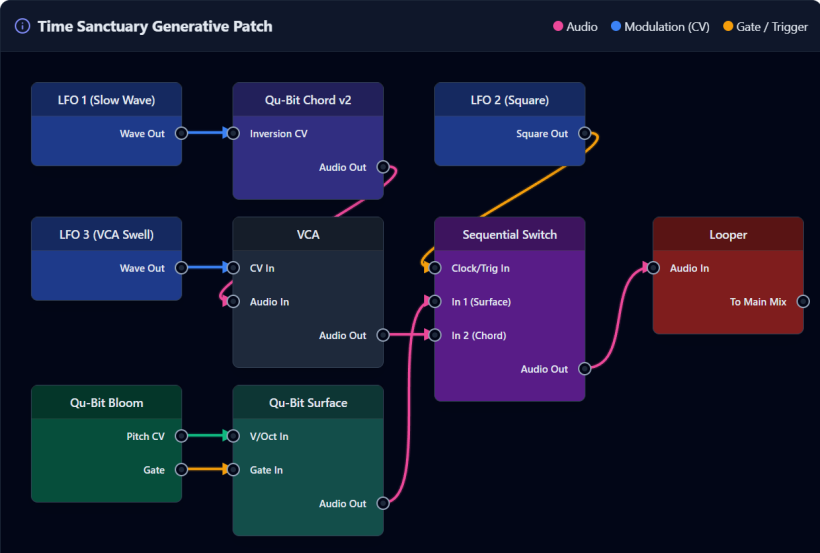
(Aug 29, 2026)
#Q: Back to FM synthesis, I remember decades ago computer sound cards were using FM to imitate General MIDI instruments. Does it mean with OpSix I can re-create (Or by importing DX-7 programs) the sounds of orchestral instruments and play them like an orchestra? Of course, the sound won't be as realistic as big sample libraries but an electronic orchestra might be able to borrow arrangement tricks from orchestral music.
#A: You are absolutely spot on. Those classic computer sound cards (like the Sound Blaster and AdLib) used Yamaha OPL2 and OPL3 chips, which were 2-operator and 4-operator FM synthesizers. Because the OpSix is a vastly more powerful 6-operator FM synthesizer, it can absolutely recreate those sounds and go much further.
Here is how you can achieve your "electronic orchestra" vision with the OpSix, along with a few technical considerations:
#1. Importing DX7 Orchestral Libraries
The OpSix can natively import Yamaha DX7 SysEx (.syx) files. The DX7 was famous for its acoustic emulations in the 1980s. You can easily find massive, free archives of DX7 patches online containing thousands of orchestral sounds: French horns, string sections, solo violins, flutes, oboes, timpani, and marimbas. You can load these directly into your OpSix using the Korg librarian software and instantly have a retro-electronic orchestra at your fingertips.
#2. The Hardware Catch: Multitimbrality
To play these sounds "like an orchestra," you need to keep one hardware limitation in mind: The OpSix is monotimbral. This means it can only play one patch (e.g., just the strings, or just the brass) at a time. To build a full orchestra, you cannot split the keyboard into 16 different MIDI channels with 16 different instruments simultaneously on the hardware.
How to work around this in your Ableton workflow:
- Multi-tracking: You will need to record your orchestra one section at a time into Ableton as audio.
- Sampling: You can design a beautiful FM cello on the OpSix, sample a few notes into Ableton's Sampler, and then move on to the next instrument, building a custom Ableton Drum Rack or Instrument Rack.
#3. Borrowing Orchestral Arrangement Tricks for FM
Treating an FM synthesizer like an acoustic orchestra is a brilliant approach because FM synthesis mimics acoustic physics better than standard analog subtractive synthesis. Here is how orchestral tricks apply beautifully to the OpSix:
- Velocity to Brightness (The Brass/String Trick): In a real orchestra, when a trumpet player blows harder, the sound doesn't just get louder; it gets brighter (more high-frequency harmonics). In FM synthesis, you can map MIDI Velocity to the level of your Modulator operators. When you play a key harder, the FM index increases, generating more harmonics. This makes FM brass and strings incredibly expressive and dynamic.
- Voice Leading and Counterpoint: Because FM sounds can be very complex and rich in harmonics, playing thick block chords can sound muddy. Using traditional orchestral voice leading (spreading out the notes, moving independent lines, and avoiding parallel fifths) will make your electronic orchestra sound huge and clear.
- Envelopes for Bowing vs. Plucking: The OpSix envelopes are incredibly snappy. You can use a slow attack on the carrier and modulators to simulate the slow drag of a violin bow, or an instant attack with a fast decay to simulate a pizzicato string or a struck marimba.
By layering these distinct, expressive FM patches in Ableton, you can create a highly dynamic, synthetic orchestra that responds to your playing just like acoustic instruments would!