🐛ED2-4b. Auto Bartender Bug-fix Threads
#Gemini
#Since this is the first time to test-run such a complex system, I open this page for bug fix chart.
(Oct 6, 2026)
#Q1: Where should I run "pip install pymysql openai” from the the SSH terminal
#A: That is a very sharp question, because Grok’s instruction ("after pip install pymysql openai in the container") skipped over a slightly tricky detail about how Docker works!
Because you are using python:3-slim with the --rm flag, the container is ephemeral. This means it gets completely destroyed the moment the script finishes. If you just run a standard Docker command, you don't have a chance to run pip install before the Python script tries to start.
From your SSH terminal, you have two easy ways to handle this. Choose the one that feels best for you:
#Method 1: The "All-in-One" Command (Recommended)
Instead of telling Docker to just run python auto_brain.py, you can tell it to open a shell (bash), install the packages, and then run your script, all in one single command.
From your SSH terminal (in your web directory), run this:
docker run -it --rm \
  -v /share/Web/navi_202512/public/auto-bartender:/app \
  -w /app \
  -e OPENAI_API_BASE="http://127.0.0.1:11434/v1" \
  -e OPENAI_API_KEY="ollama" \
  -e LLM_MODEL_NAME="deepseek-r1:8b" \
  python:3-slim bash -c "pip install pymysql openai && python auto_brain.py"
(Note: I removed the database -e flags since Grok is now reading your config.php!)
#Method 2: The Interactive Way (Great for debugging)
If you want to poke around inside the container and run things step-by-step, you can open an interactive terminal inside the Docker container.
Step 1: Start the container and open a bash shell:
docker run -it --rm \
  -v /share/Web/navi_202512/public/auto-bartender:/app \
  -w /app \
  -e OPENAI_API_BASE="http://127.0.0.1:11434/v1" \
  -e OPENAI_API_KEY="ollama" \
  -e LLM_MODEL_NAME="deepseek-r1:8b" \
  python:3-slim bash
Step 2: Your SSH prompt will change to show you are inside the container. Now, type:
pip install pymysql openaiStep 3: Once that finishes, run your script:
python auto_brain.pyWhen the script finishes, you can just type exit to leave the container (and Docker will automatically clean it up).
Future Optimization:
Once auto_brain.py is perfectly finalized and you want it to run automatically on a schedule, you won't want it downloading those packages every single time. At that point, you can create a tiny Dockerfile that pre-installs pymysql and openai permanently. But for today's testing phase, Method 1 or 2 is exactly what you need!
#Q2: Grok said:
The database login now comes from AppGini, not from Docker.  opens ../config.php relative to the script, so a run from /app still finds the file one level above the web folder.

It reads that file as text and lifts $dbServer, $dbUsername, $dbPassword, and $dbDatabase. Single quotes, double quotes, and an escaped quote inside a password are all kept intact. If $dbPort is present and numeric, that port is used. An empty port stays 3306, the same fallback as your PHP. A missing file or a missing variable stops the run before any Nerve Signal write, and the password is never printed. The startup line shows only user, host, port, database, and the config path.
The LLM settings are unchanged, and still come from OPENAI_API_BASE, OPENAI_API_KEY, and LLM_MODEL_NAME. If config.php is not one level up, change only CONFIG_PHP_PATH at the top of the file.

You can run it with the same container command as before, without passing DB_HOST or the other database variables.
So I will now run the "All-in-One" command.
#A: Perfect! Grok followed your instructions flawlessly, and the "All-in-One" command is exactly the right next step.
Just to keep it handy, here is that command again (make sure your Ollama is running in the background before you hit enter!):
docker run -it --rm \
  -v /share/Web/navi_202512/public/auto-bartender:/app \
  -w /app \
  -e OPENAI_API_BASE="http://127.0.0.1:11434/v1" \
  -e OPENAI_API_KEY="ollama" \
  -e LLM_MODEL_NAME="deepseek-r1:8b" \
  python:3-slim bash -c "pip install pymysql openai && python auto_brain.py"
What to watch for during this first run:
- The Terminal Output: You should see it successfully read the
config.phpfile, connect to the database, and print out the user/host/database name (without printing the password). - The Empty Shortlist: As we discussed earlier, if the terminal says something like "Shortlist empty" and stops, don't panic! That just means the strict Morning + Healing debug tags successfully canceled each other out. You can then adjust a track's tags in AppGini to test a successful match.
- The Hand: If it finds a match, watch your web UI! You should see the track update to a new clip, and if you check the JSON file, the LLM's
dj_notewill be sitting right there.
Good luck with the test run! I am standing by—let me know exactly what the terminal outputs or what happens in the web UI!
#Q3: The SSH console says:
[~] # Auto Bartender — Auto Brain
-sh: Auto: command not found
[~] # Slot filter: Track:T3. Nerve key: track_1. Debug: True.
-sh: Slot: command not found
[~] # Right Brain: deepseek-r1:8b via http://127.0.0.1:11434/v1
-sh: Right: command not found
[~] # AppGini config was not found at /config.php: [Errno 2] No such file or directory: '/config.php'#A: It looks like two different things happened here!
First, the -sh: command not found lines happened because the output text from the script was accidentally pasted back into your SSH prompt. Your terminal saw "Auto Bartender..." and tried to run "Auto" as a command. Don't worry, this is completely harmless!
The second thing is the actual error from the Python script:
AppGini config was not found at /config.php: [Errno 2] No such file or directory: '/config.php'
Here is exactly why this happened:
This is a classic Docker "gotcha." In our Docker command, we told Docker to mount your folder like this:
-v /share/Web/navi_202512/public/auto-bartender:/app
Because we only mounted the auto-bartender subfolder, the container is completely blind to the parent public folder. When Python tries to go up one level (../config.php), it hits the root of the container (/) and looks for /config.php, which doesn't exist!
How to fix it:
We just need to mount the parent public folder instead, and tell Docker to set its working directory to the auto-bartender subfolder. This way, the container can see both the script and the config file.
Run this updated command instead:
docker run -it --rm \
  -v /share/Web/navi_202512/public:/app \
  -w /app/auto-bartender \
  -e OPENAI_API_BASE="http://127.0.0.1:11434/v1" \
  -e OPENAI_API_KEY="ollama" \
  -e LLM_MODEL_NAME="deepseek-r1:8b" \
  python:3-slim bash -c "pip install pymysql openai && python auto_brain.py"
Why this works:
Now, /app is your public folder. The script runs inside /app/auto-bartender. When the script looks for ../config.php, it will successfully find it at /app/config.php!
Give that a try and let's see what the Brain does next!
#Q4: This time it says:
Auto Bartender — Auto Brain
Slot filter: Track:T3. Nerve key: track_1. Debug: True.
Right Brain: deepseek-r1:8b via http://127.0.0.1:11434/v1
AppGini config was not found at /app/config.php: [Errno 2] No such file or directory: '/app/config.php'#A: Ah, we are so close! The good news is that the Python script started perfectly and the environment variables for the LLM are working.
The error tells us exactly what happened: Python looked one level up from the script (which we mounted as /app), but config.php wasn't there.
This usually means config.php is actually sitting one level higher on your NAS—in the navi_202512 folder, rather than inside the public folder.
To fix this, we just need to mount the entire navi_202512 folder to Docker so the container can see everything, and adjust the working directory.
Try this updated command:
docker run -it --rm \
  -v /share/Web/navi_202512:/app \
  -w /app/public/auto-bartender \
  -e OPENAI_API_BASE="http://127.0.0.1:11434/v1" \
  -e OPENAI_API_KEY="ollama" \
  -e LLM_MODEL_NAME="deepseek-r1:8b" \
  python:3-slim bash -c "pip install pymysql openai && python auto_brain.py"
Why this should work:
By mounting /share/Web/navi_202512 as /app, the container now has access to both your public folder and whatever is outside of it.
- If your
config.phpis in thepublicfolder,../config.phpwill find it at/app/public/config.php. - If your
config.phpis in thenavi_202512folder, you might get a similar error. If that happens, you just need to tell Grok: "My config.php is actually two levels up. Please changeCONFIG_PHP_PATHto../../config.php"
Give this command a try! If it still can't find it, just let me know exactly which folder config.php lives in on your NAS (e.g., /share/Web/navi_202512/config.php or /share/Web/navi_202512/public/config.php) and we will nail it on the next try.
#Q5: It says:
Auto Bartender — Auto Brain
Slot filter: Track:T3. Nerve key: track_1. Debug: True.
Right Brain: deepseek-r1:8b via http://127.0.0.1:11434/v1
AppGini config was not found at /app/public/config.php: [Errno 2] No such file or directory: '/app/public/config.php'
The config file is actually in the /share/Web/navi_202512 folder.
#A: That explains it perfectly!
Since the script is in /share/Web/navi_202512/public/auto-bartender/ and the config is in /share/Web/navi_202512/, the config file is actually two levels up, not one.
When Grok wrote the code, it explicitly made this easy to change. Grok mentioned: "If your config.php sits somewhere else, only that one line needs to change."
#How to fix it:
You don't even need to ask Grok to rewrite the whole file for this. You can just open auto_brain.py in your favorite text editor on your NAS, look near the very top of the file, and change this line:
Change this:
CONFIG_PHP_PATH = "../config.php"To this (adding one more ../):
CONFIG_PHP_PATH = "../../config.php"#Run it again!
Once you save that tiny change, run the exact same Docker command we just used:
docker run -it --rm \
  -v /share/Web/navi_202512:/app \
  -w /app/public/auto-bartender \
  -e OPENAI_API_BASE="http://127.0.0.1:11434/v1" \
  -e OPENAI_API_KEY="ollama" \
  -e LLM_MODEL_NAME="deepseek-r1:8b" \
  python:3-slim bash -c "pip install pymysql openai && python auto_brain.py"
Now, when Python goes up two levels (../../config.php), it will land exactly in your navi_202512 folder, find the file, and connect to your database! Let me know what the console says this time!
#Q6: The console says:
Auto Bartender — Auto Brain
Slot filter: Track:T3. Nerve key: track_1. Debug: True.
Right Brain: deepseek-r1:8b via http://127.0.0.1:11434/v1
Database: lifenavi_user@192.168.1.21:3306/lifenavi_202512 from /app/config.php
Active context: Global:Morning (進入), Weather:Sunny, Artist:あいみょん, Mood:癒し (治癒)
Last track for sequence rules: (debug last track) [Artist:あいみょん, Mood:癒し (治癒)]
Resolved 5 tags from set_daypart.tag.
Resolved 10 tags from tax_audio_mood.tag.
Resolved audio types from set_audio_type.name.
The Left Brain could not read the tables: (1054, "Unknown column 'energy' in 'SELECT'")
It seems that Grok has actually read the energy column. Should I tell him to remove that?
#A: You caught me! I apologize—I was wrong in my earlier assumption. It turns out Grok did explicitly include the energy column in the SQL SELECT statement when it originally wrote the script.
Because you (smartly) deleted the column from your AppGini database, the Python script is now crashing because it is asking MySQL to return a column that no longer exists.
The great news here is look at the rest of your console output!
- It successfully read your
config.phpfrom two levels up. - It connected to the database seamlessly.
- It pulled the active context (Morning, Sunny, Aimyon, Healing).
- It resolved all your tags!
The only thing stopping it is that one word in the SQL query.
Since you prefer to keep Grok strictly synced with your code using the "Proceed" gate, you should absolutely tell Grok to remove it.
Here is exactly what you can say to Grok to get the safe, staged update:
"I have removed the 'energy' column from the database because energy levels are already implied by the daypart and mood tags. The script is now crashing with: `(1054, "Unknown column 'energy' in 'SELECT'")`. Please update auto_brain.py to remove any references to the 'energy' column in the SQL queries. I will wait for **Proceed** before changing any files."Once Grok gives you the updated code and you paste it in, this script is going to run all the way through!
#Q7: Grok has updated the Python Brain. The console says:
Auto Bartender — Auto Brain
Slot filter: Track:T3. Nerve key: track_1. Debug: True.
Right Brain: deepseek-r1:8b via http://127.0.0.1:11434/v1
Database: lifenavi_user@192.168.1.21:3306/lifenavi_202512 from /app/config.php
Active context: Global:Morning (進入), Weather:Sunny, Artist:あいみょん, Mood:癒し (治癒)
Last track for sequence rules: (debug last track) [Artist:あいみょん, Mood:癒し (治癒)]
Resolved 5 tags from set_daypart.tag.
Resolved 10 tags from tax_audio_mood.tag.
Resolved audio types from set_audio_type.name.
Playable Track:T3 clips in use: 0.
Warning: No playable clip survived the slot and file checks. Nothing was written.#A: This is actually a huge success!
I know seeing a "Warning" might feel like a setback, but look closely at what happened: the script ran perfectly from start to finish without a single crash. The Python Brain successfully connected to the database, read the context, parsed the Knowledge Graph tags, and executed the SQL query.
The warning No playable clip survived the slot and file checks. Nothing was written. is not a bug. It means the Brain did exactly what it was supposed to do, but it just couldn't find a track that met all your strict criteria.
As we anticipated earlier, the shortlist ended up empty. Here is exactly why this happens and how to fix it so you can see the final result:
#Why the Shortlist is Empty
For a track to survive the Brain's strict filtering right now, it must pass all of these checks simultaneously:
- The Context Tags: It must match
Artist:あいみょん,Mood:癒し (治癒),Global:Morning, andWeather:Sunny. - The Slot Filter: It must be explicitly tagged as
Track:T3in your database. - The File Check: The actual
.flacfile must physically exist in your/share/Web/navi_202512/public/images/folder, and the filename must perfectly match whatever is written in the database.
#How to Force a Successful Test Run
To see the whole pipeline in action, we just need to give the Brain at least one valid track to find. You can do this easily through your AppGini web interface:
- Pick a Test Track: Go into your AppGini database and find a track where you know the
.flacfile is definitely sitting in theimages/folder. - Adjust its Tags: Temporarily edit that track's record so it perfectly matches the active context. Make sure it has:
Track:T3Artist:あいみょん(Aimyon)Mood:癒し (治癒)(Healing)Global:Morning
- Run the Docker Command Again: Once you save that record in AppGini, hit the up arrow in your SSH terminal and run the exact same Docker command.
This time, the Brain will find that track, realize the .flac file exists, send the metadata to your local DeepSeek LLM to write the dj_note, and finally inject it all into nerve_signal.json!
Go ahead and tweak one track in AppGini, run it again, and let me know when you see the LLM kick in!
#Q8: Here is a make up clip I created with your suggested tags. The clip is a MP3 file instead of a FLAC. The file name is saved in the file-std field and the file is confirmed at /navi_202512/images/jpop_sekai.mp3.
If https://www.claudioflute.live/ is loading the /navi_202512/public/ folder, I don't know why https://www.claudioflute.live/images/jpop_seikai.mp3 can't load the file. Would this affect the Python script?
#A: Yes, this will absolutely affect the Python script, and you have actually uncovered exactly why the web link isn't working either!
It comes down to two small details: the exact folder location and a tiny typo. Here is exactly what is happening and how to fix it:
#1. The Folder Location (The Missing public/)
You mentioned the file is located at /navi_202512/images/jpop_sekai.mp3.
However, because your web server's root directory is the public/ folder, navigating to https://www.claudioflute.live/images/... tells the server to look inside /navi_202512/public/images/.
Because the file is sitting one level too high (outside the public folder), the web server cannot see it, which is why the URL fails to load.
How this affects the Python Brain:
The Python script is running from public/auto-bartender/. Its AUDIO_DIR is set to ../images/, which means it is also looking inside public/images/. Since the file isn't there, the script will fail the file check and give you that same "No playable clip survived" warning.
The Fix: Move the images folder (or just the mp3 file) into the public folder so the path becomes:
/share/Web/navi_202512/public/images/jpop_sekai.mp3
#2. The Typo in the Filename
Take a close look at the two filenames in your message:
- The file you saved:
jpop_sekai.mp3(no 'i' after the 'e') - The URL you tried:
jpop_seikai.mp3(has an 'i' after the 'e')
The Python script is extremely literal. It will read whatever is typed in the file_std field in your AppGini database and look for that exact string. If the database says jpop_seikai.mp3 but the file is named jpop_sekai.mp3, the script will assume the file is missing and drop it from the shortlist.
The Fix: Ensure the actual file name, the URL you test, and the text in the AppGini file_std field are a 100% perfect match.
#Your Next Steps:
- Move the MP3 file into
/share/Web/navi_202512/public/images/. - Make sure the filename perfectly matches what is written in the AppGini
file_stdfield. - Test the URL in your browser:
https://www.claudioflute.live/images/jpop_sekai.mp3(or whichever spelling you chose). If it plays in your browser, the web server can see it! - Run the Docker command for the Python Brain one more time.
Once that file is in the right folder, the Brain will find it, send it to DeepSeek, and you will finally get your completed nerve_signal.json!
#Q9: Yup, seikai is the correct filename. I've fixed that. The architecture is a bit tricky here because the CRUD interface is running at https://navi.claudioflute.live/ but the https://www.claudioflute.live/ domain is looking at the /share/Web/navi_202512/public/ folder. Therefore, the sound clip will actually be accessible at https://navi.claudioflute.live/images/jpop_seikai.mp3.
#A: That makes perfect sense! It is actually a very clean architecture to have navi.claudioflute.live handle the backend CRUD interface and serve the media files, while your main domain handles the public-facing site.
The great news is that this domain setup does not negatively affect the Python script at all! Here is why:
- The Local File Check: The Python Brain doesn't use URLs to check if the file exists. It uses the local server path (
AUDIO_DIR = "../images/"). As long asjpop_seikai.mp3is physically sitting inside/share/Web/navi_202512/public/images/, the Brain will find it and pass the file check. - The Web Audio Prefix: The Brain writes
images/jpop_seikai.mp3into thenerve_signal.jsonfile. When your web "Hand" (running onnavi.claudioflute.live) reads that JSON, it will automatically look for the file athttps://navi.claudioflute.live/images/jpop_seikai.mp3. Since you just confirmed that is exactly where the file is accessible, the Hand will play it perfectly!
Since you have fixed the seikai typo and confirmed the file routing, all the puzzle pieces are officially in place.
Your next step: Go ahead and run the Docker command for the Python Brain one more time!
This time:
- The Brain will find the track in the database.
- It will verify that
../images/jpop_seikai.mp3physically exists. - It will send the metadata to DeepSeek to generate the
dj_note. - It will write the final
nerve_signal.json.
Let me know what the console outputs this time! We should finally see a successful write.
#Q10: The console still says:
Auto Bartender — Auto Brain
Slot filter: Track:T3. Nerve key: track_1. Debug: True.
Right Brain: deepseek-r1:8b via http://127.0.0.1:11434/v1
Database: lifenavi_user@192.168.1.21:3306/lifenavi_202512 from /app/config.php
Active context: Global:Morning (進入), Weather:Sunny, Artist:あいみょん, Mood:癒し (治癒)
Last track for sequence rules: (debug last track) [Artist:あいみょん, Mood:癒し (治癒)]
Resolved 5 tags from set_daypart.tag.
Resolved 10 tags from tax_audio_mood.tag.
Resolved audio types from set_audio_type.name.
Playable Track:T3 clips in use: 0.
Warning: No playable clip survived the slot and file checks. Nothing was written.
I can play https://navi.claudioflute.live/images/jpop_seikai.mp3 from the browser. The CSV export of the Audio Bin has been attached for your checking. Note that the Global: tags contain Chinese characters.
#A: Thank you for providing the CSV and explaining the domain architecture! That clears up exactly what is happening.
Because you smartly kept the file in the AppGini folder (served by navi.claudioflute.live) instead of moving it, we have a slight path mismatch in the Python script. Additionally, looking at your CSV, there is a mismatch in how the script is searching your database.
Here are the two reasons the Brain is finding 0 playable clips:
- The File Path: The Python script is running from
/app/public/auto-bartender/. If itsAUDIO_DIRis set to../images/, it is looking inside/app/public/images/. But your files are actually in/app/images/(the AppGini root). - The SQL Type Match: The script is looking for exactly
Track:T3. However, your CSV shows the database actually storesJ-pop > Track:T3 (充電). If the SQL query doesn't use a wildcard (LIKE), it won't find any of your tracks.
Since we are using the strict Proceed gate with Grok, here is the exact prompt you can give Grok to fix both issues safely:
"I checked my database and found two reasons the script is returning 0 playable clips.
- The audio files are located in the AppGini root images folder. Since the container mounts the web root at
/app, please changeAUDIO_DIRto the absolute path"/app/images/".- The
typecolumn in the database contains strings likeJ-pop > Track:T3 (充電). Please ensure the SQL query usesLIKE '%Track:T3%'(or whatever the dynamic slot variable is) instead of an exact match. Please updateauto_brain.pywith these two fixes. I will wait for Proceed before changing any files."
Once Grok updates those two lines, the Brain will successfully find Track 9 ("正解")!
#Q11: Grok says: Both fixes are in . The file check now looks in /app/images/, which is the AppGini images folder on the mount you are using. A clip is playable only if its file_std name is actually there.
The slot filter is no longer an exact comparison. The script finds the set_audio_type column that contains Track:T3, then keeps In Use rows with:
audio_type. <that column> LIKE '%Track:T3%'
So J-pop > Track:T3 (充電) qualifies, and Ambience > Track:T1 (安定) does not. The startup log will name the column and the pattern. If no column contains that text, it prints a sample type row instead of failing silently.
Run the same Docker command again. You should see the T3 clips reach the shortlist, and a missing file will now name itself rather than disappearing into a zero.
#A: This is brilliant! Grok implemented exactly what we needed, and I love the extra debugging touch it added—logging the exact missing file names and the column pattern will save you a lot of time in the future if a file gets misplaced.
Since Grok has updated the auto_brain.py file with the absolute path (/app/images/) and the LIKE wildcard for the track type, all the roadblocks are officially cleared.
Your next step: Go ahead and run the exact same Docker command in your SSH terminal.
Here is what should happen this time:
- The Brain will query the database and successfully find track ID 9 ("正解") because its type
J-pop > Track:T3 (充電)matches the wildcard. - It will check
/app/images/jpop_seikai.mp3and confirm the file physically exists. - It will send the track metadata and your active context to your local DeepSeek LLM (Right Brain) to generate the
dj_note. - It will use the atomic replace method to safely write the final
nerve_signal.jsonso your web "Hand" can pick it up.
Run it and paste the console output here! I can't wait to see the final result.
#Q12: This time the console returns:
Auto Bartender — Auto Brain
Slot filter: Track:T3. Nerve key: track_1. Debug: True.
Right Brain: deepseek-r1:8b via http://127.0.0.1:11434/v1
Database: lifenavi_user@192.168.1.21:3306/lifenavi_202512 from /app/config.php
Active context: Global:Morning (進入), Weather:Sunny, Artist:あいみょん, Mood:癒し (治癒)
Last track for sequence rules: (debug last track) [Artist:あいみょん, Mood:癒し (治癒)]
Resolved 5 tags from set_daypart.tag.
Resolved 10 tags from tax_audio_mood.tag.
Warning: No set_audio_type column contains Track:T3. Sample row: {'id': 1, 'tag': 2, 'name': 'Ambienc                   e'}
Playable Track:T3 clips in use: 0.
Warning: No playable clip survived the slot and file checks. Nothing was written. #A: Ah, I see exactly what happened! Grok slightly over-engineered the solution and misunderstood your database schema.
Look at this specific line from the console:
Warning: No set_audio_type column contains Track:T3. Sample row: {'id': 1, 'tag': 2, 'name': 'Ambienc e'}
What went wrong:
Instead of just looking at the type column in your main audio table (which your CSV shows is named ab_audiobin), Grok wrote logic that tries to search a lookup table called set_audio_type to dynamically guess what the column name should be. Since set_audio_type just contains basic tags (like "Ambience" or "J-pop"), it couldn't find "Track:T3" and gave up before even checking your main audio bin!
The Fix:
We need to tell Grok to stop looking at the set_audio_type table for this step and just query the type column in the ab_audiobin table directly.
Here is the exact prompt to give Grok to fix this safely:
The script is overcomplicating the SQL query by trying to dynamically find the column in `set_audio_type`. My main audio table is called `ab_audiobin` and the column is simply named `type`. Please update the SQL logic to directly query the main table using `WHERE type LIKE '%Track:T3%' AND status = 'In Use'`. I will wait for **Proceed** before changing any files.Once Grok strips out that unnecessary lookup logic and targets the ab_audiobin table directly, it will instantly find your tracks. We are incredibly close! Let me know what Grok says.
#Q13: Would it affect the Python script if ab-audiobin.type is looking up to set_audio_type, whose "name" and "tag" fields are concatenated in the tag you saw in the CSV "J-pop > Track:T3 (充電)" with an additional ">"?
#A: Yes, that is a brilliant catch! It absolutely affects the Python script, and it explains exactly why Grok was originally trying to look at the set_audio_type table.
Because you are using AppGini, the CSV export and the web UI show you the friendly, concatenated display value (e.g., J-pop > Track:T3 (充電)). However, in the raw MySQL database, the ab_audiobin.type column likely just stores a numeric ID (the primary key of that record in the set_audio_type table).
If the Python Brain queries the raw database with WHERE type LIKE '%Track:T3%', it will fail because it is trying to match text against a number (like 4).
To fix this, the Python script needs to use a SQL JOIN to connect the two tables, allowing it to search the actual text inside set_audio_type.
Here is the exact prompt to give Grok to implement this safely:
I just realized a database schema detail. In `ab_audiobin`, the `type` column is an AppGini lookup field pointing to the `set_audio_type` table. The raw database stores the ID, but we need to filter by the text (e.g., 'Track:T3'). Please update the SQL logic to `JOIN` `set_audio_type` (e.g., `ON ab_audiobin.type = set_audio_type.id`) and apply the `LIKE` filter against the text fields in `set_audio_type`, rather than the raw `ab_audiobin.type` column. Keep the check for `status = 'In Use'`. I will wait for **Proceed** before changing any files.This will perfectly bridge the gap between your raw database structure and the text-based slot filter! Let me know what Grok says.
#Q14: Do we need to tell Grok that other columns are designed similarly? I remember the prompt has mentioned that.
#A: You are absolutely right, and that is a fantastic catch! Your memory of the initial prompt is spot on.
Since AppGini uses this lookup structure globally, columns like daypart, mood, extra_tag1, and extra_tag2 in your ab_audiobin table are also just storing numeric IDs. If we only fix the type column, the Brain will successfully find the track, but it will send raw numbers (like Mood: 14) to DeepSeek instead of the actual text (Mood:癒し (治癒)). That would ruin the LLM's ability to write a good dj_note!
Looking at your previous console log (Resolved 5 tags from set_daypart.tag), it seems Grok was already trying to pull some of these tables into Python memory, but it got confused about how to apply them to the main audio query.
Here is the updated, comprehensive prompt to give Grok so it fixes the entire lookup architecture at once:
You are right about the dynamic tag parsing, but I need to clarify the database schema. In the `ab_audiobin` table, the fields `type`, `daypart`, `mood`, `extra_tag1`, and `extra_tag2` are all AppGini lookup fields. This means they store numeric IDs pointing to their respective tables (like `set_audio_type`, `set_daypart`, `tax_audio_mood`, etc.), not the actual text strings.

Please update the data fetching logic to account for this across all tag columns. You can either use SQL `JOIN`s to retrieve the concatenated text values directly, or fetch the lookup tables into Python dictionaries to map the IDs to text in-memory. Ensure that the slot filter (e.g., matching 'Track:T3'), the sequence rules, and the metadata sent to the LLM all use the resolved text, not the raw IDs.

I will wait for **Proceed** before changing any files."
This prompt reminds Grok of the dynamic tag parsing you established earlier and ensures the entire pipeline—from the SQL filter to the LLM Right Brain—is speaking the same text-based language. Let me know how Grok responds!
#Q15: Do you think this prompt is clear?
This still shows the same error of no playable clip survived.
You are right about the dynamic tag parsing, but I need to clarify the database schema. In the ab_audiobin table, the fields type, daypart, mood, extra_tag1, and extra_tag2 are all AppGini lookup fields. This means they store numeric IDs pointing to their respective tables (like set_audio_type, set_daypart, tax_audio_mood, and tax_tag_dict), not the actual text strings.
Here are the schemas of the "respective tables". set_audio_type (ab_audiobin.type), set_daypart (ab_audiobin.daypart) and tax_audio_mood (ab_audiobin.mood) all look up to tax_tag_dict.header and tax_tag_dict.name to concatenate the final tag (with an ":" added in between)
## set_audio_type
| Column Name | Definition | Caption | Description | Additional info
|--|--|--|--|--|
| id | INT UNSIGNED NOT NULL AUTO_INCREMENT | ID | | |
| name | VARCHAR(40) NULL | Track Name | | |
| tag | INT UNSIGNED NULL | Track # | | FK to tax_tag_dict |
## set_daypart
| Column Name | Definition | Caption | Description | Additional info
|--|--|--|--|--|
| id | INT UNSIGNED NOT NULL AUTO_INCREMENT | ID | | |
| tag | INT UNSIGNED NULL | Tag | | FK to tax_tag_dict |
## tax_audio_mood
| Column Name | Definition | Caption | Description | Additional info
|--|--|--|--|--|
| id | INT UNSIGNED NOT NULL AUTO_INCREMENT | ID | | |
| journey | SMALLINT NULL | Emo. Journey # | 孤獨 -> 思念 -> 懷舊 -> 惆悵 -> 希望 -> 釋懷 -> 治癒 -> 小確幸 -> 溫柔 -> 溫柔的期待 -> 回到孤獨<br>就是一客人可以被溫柔地帶著走完一圈的情緒旅程,剛好就是 Plarail 轉一圈的時間。 | |
| tag | INT UNSIGNED NULL | Name In Tags | | FK to tax_tag_dict |
| situation | TINYTEXT NULL | What's Like | | |
| when_use | TINYTEXT NULL | When Use | | |
| sample_song | MEDIUMTEXT NULL | Sample song | | |
## tax_tag_dict
| Column Name | Definition | Caption | Description | Additional info
|--|--|--|--|--|
| id | INT UNSIGNED NOT NULL AUTO_INCREMENT | ID | | |
| header | INT UNSIGNED NULL | Header | | FK to set_tag_header |
| name | VARCHAR(40) NULL | Name | | |
Please update the data fetching logic to account for this across all tag columns. You can either use SQL JOINs to retrieve the concatenated text values directly, or fetch the lookup tables into Python dictionaries to map the IDs to text in-memory. Ensure that the slot filter (e.g., matching 'Track:T3'), the sequence rules, and the metadata sent to the LLM all use the resolved text, not the raw IDs.#A: This prompt is exceptionally clear and provides exactly the kind of structural detail an LLM needs to write accurate SQL joins or mapping logic. You laid out the tables perfectly!
However, I spotted one hidden trap in the schema you provided that will cause a new error if we don't address it now:
Look at tax_tag_dict. Its header column is also a lookup field! (FK to set_tag_header).
If Grok just joins tax_tag_dict, it will get a numeric ID for the header. Instead of generating "Track:T3", it will generate something like "4:T3".
Additionally, you mentioned extra_tag1 and extra_tag2 in the opening paragraph, but didn't specify which table they look up to (I assume they point directly to tax_tag_dict).
Finally, you forgot to include your strict Proceed gate at the end!
Here is your prompt, slightly polished to include the set_tag_header detail, the extra tags clarification, and your safety gate.
#Suggested Revised Prompt for Grok:
This still shows the same error of no playable clip survived.
You are right about the dynamic tag parsing, but I need to clarify the database schema. In the ab_audiobin table, the fields type, daypart, mood, extra_tag1, and extra_tag2 are all AppGini lookup fields. This means they store numeric IDs pointing to their respective tables, not the actual text strings.
Here are the schemas of the respective tables. set_audio_type (ab_audiobin.type), set_daypart (ab_audiobin.daypart), and tax_audio_mood (ab_audiobin.mood) all look up to tax_tag_dict. (Note: extra_tag1 and extra_tag2 also look up directly to tax_tag_dict).
Furthermore, tax_tag_dict itself uses a lookup for its header, pointing to set_tag_header. The final text tag is concatenated as set_tag_header.name + ":" + tax_tag_dict.name.
#set_audio_type
| Column Name | Definition | Caption | Description | Additional info |
|---|---|---|---|---|
| id | INT UNSIGNED NOT NULL AUTO_INCREMENT | ID | ||
| name | VARCHAR(40) NULL | Track Name | ||
| tag | INT UNSIGNED NULL | Track # | FK to tax_tag_dict |
#set_daypart
| Column Name | Definition | Caption | Description | Additional info |
|---|---|---|---|---|
| id | INT UNSIGNED NOT NULL AUTO_INCREMENT | ID | ||
| tag | INT UNSIGNED NULL | Tag | FK to tax_tag_dict |
#tax_audio_mood
| Column Name | Definition | Caption | Description | Additional info |
|---|---|---|---|---|
| id | INT UNSIGNED NOT NULL AUTO_INCREMENT | ID | ||
| tag | INT UNSIGNED NULL | Name In Tags | FK to tax_tag_dict | |
| situation | TINYTEXT NULL | What's Like | ||
| when_use | TINYTEXT NULL | When Use |
#tax_tag_dict
| Column Name | Definition | Caption | Description | Additional info |
|---|---|---|---|---|
| id | INT UNSIGNED NOT NULL AUTO_INCREMENT | ID | ||
| header | INT UNSIGNED NULL | Header | FK to set_tag_header | |
| name | VARCHAR(40) NULL | Name |
#set_tag_header
(Assume standard AppGini lookup structure: id as primary key, and a name or similar column holding the text like "Track", "Mood", "Global", etc.)
Please update the data fetching logic to account for this across all tag columns. You can either use SQL JOINs to retrieve the concatenated text values directly, or fetch the lookup tables into Python dictionaries to map the IDs to text in-memory. Ensure that the slot filter (e.g., matching 'Track:T3'), the sequence rules, and the metadata sent to the LLM all use the resolved text, not the raw IDs.
I will wait for Proceed before changing any files.
This version guarantees Grok understands the entire chain of lookups (from ab_audiobin -> set_audio_type -> tax_tag_dict -> set_tag_header) and won't accidentally leave you with numbers instead of text. Send this over and let's see its plan!
#Q16: I have run the Docker command again. The console says:
Auto Bartender — Auto Brain
Slot filter: Track:T3. Nerve key: track_1. Debug: True.
Right Brain: deepseek-r1:8b via http://127.0.0.1:11434/v1
Database: lifenavi_user@192.168.1.21:3306/lifenavi_202512 from /app/config.php
Active context: Global:Morning (進入), Weather:Sunny, Artist:あいみょん, Mood:癒し (治癒)
Last track for sequence rules: (debug last track) [Artist:あいみょん, Mood:癒し (治癒)]
Resolved 29 tags from set_tag_header and tax_tag_dict.
Resolved 5 tags from set_daypart.tag.
Resolved 10 tags from tax_audio_mood.tag.
Resolved 6 audio types from set_audio_type.
Slot filter: resolved type tag contains Track:T3.
Playable Track:T3 clips in use: 8.
kept only clips Good for Mood:きぼう (希望) (8 -> 2) via Time-Based "Must Have".
removed clips Doesn't work with Artist:あいみょん (2 -> 2) via Artist Separation.
Shortlist:
- ID 1: Pinsonnette | slot: Track:T3 (充電) | tags: Global:Morning (進入), Mood:きぼう (希望), Weather:Sunny | note: The feeling of a chill afternoon in a tea house in Paris.
- ID 4: Shinkansen Bell | slot: Track:T3 (充電) | tags: Global:Morning (進入), Mood:きぼう (希望) | note: The clip starts with arrival music in Enka style. Then the announcer says the destination station Niigata is arrived.  Then we hear ambient sound of the train slowly down.
The Right Brain choice was not accepted: Connection error.
The Nerve Signal was not changed.
[~] ##A: This is fantastic news! The database lookups are working flawlessly. You can see it successfully resolved all the tags, correctly filtered down to 8 playable clips, applied your sequence rules to narrow it down to 2, and generated a perfect shortlist with all the rich text tags intact. The Brain is fully functional!
The only thing standing in your way now is a classic Docker networking quirk.
What went wrong this time:
Look at this line: Right Brain: deepseek-r1:8b via http://127.0.0.1:11434/v1
And the error: The Right Brain choice was not accepted: Connection error.
Your Python script is running inside a Docker container. When the script tries to connect to 127.0.0.1 (localhost), it is looking inside the container itself. But Ollama (DeepSeek) isn't running inside that container; it's running on your host machine (or another machine on your network).
How to fix it:
You have two ways to solve this, depending on how you prefer to handle it:
Option 1: The Docker --network host flag (Easiest if on Linux)
If you are running this Docker container on a Linux machine and Ollama is on that same machine, you can simply add --network host to your Docker run command. This tells the container to share the host's network, meaning 127.0.0.1 will correctly point to the host machine where Ollama is listening.
Example: docker run --rm --network host -v /share/Web...
Option 2: Update the IP address in the Python script
If Ollama is running on another machine (for example, the same machine as your database at 192.168.1.21), or if you are using Docker Desktop on Mac/Windows, you need to change 127.0.0.1 in the Python script to the actual IP address of the machine running Ollama.
- Note: If you use Docker Desktop on Mac/Windows, you can change the IP to
host.docker.internal. - Note: If you use a LAN IP (like
192.168.1.x), you must ensure Ollama is configured to accept external connections by setting the environment variableOLLAMA_HOST=0.0.0.0on the machine running Ollama.
If you want to go with Option 2, you can give Grok this quick prompt:
The script successfully generated the shortlist! However, it failed to connect to Ollama because `127.0.0.1` inside Docker points to the container itself. Please update the Ollama URL in `auto_brain.py` to use `[INSERT YOUR OLLAMA IP HERE]:11434`. I will wait for **Proceed** before changing any files.You are literally one connection fix away from seeing your first fully automated nerve_signal.json file generated! How is Ollama hosted in your setup?
#Q17: Docker is running on my NAS at 192.168.1.249, the very machine that serve the public website and the admin CRUD site. Ollama is running on a PC at 192.168.4.90. The two subnets are allowed to talk to each other in the firewall settings.
#A: That explains it perfectly! Since your Docker container is on the NAS (192.168.1.249) and Ollama is on a completely separate PC (192.168.4.90), the 127.0.0.1 address in the script is just hitting a dead end inside the Docker container.
To fix this, we need to do two things: one quick update to the Python script via Grok, and one quick check on your PC running Ollama.
#Step 1: Tell Grok to update the IP address
Here is the exact prompt to give Grok to update the script safely:
The script successfully generated the shortlist! However, the Docker container is running on my NAS, and Ollama is hosted on a separate PC at 192.168.4.90. Please update the Ollama API base URL in `auto_brain.py` to `http://192.168.4.90:11434/v1`. I will wait for **Proceed** before changing any files."

### Step 2: Ensure Ollama is listening to the network
By default, Ollama only listens to requests coming from its own machine (`127.0.0.1`). Even if your firewall allows the subnets to talk, Ollama will actively ignore the request from your NAS unless you tell it to listen to the network.

You need to set an environment variable on the PC running Ollama:
*   **If the PC is Windows:** Open Command Prompt or PowerShell as Administrator and run: `setx OLLAMA_HOST "0.0.0.0"`. (You will need to restart the Ollama app/service for this to take effect).
*   **If the PC is Linux/Mac:** You can run it via `OLLAMA_HOST=0.0.0.0 ollama serve`, or add it to your systemd service file if it runs as a background service.
Once Grok updates the IP and Ollama is listening on 0.0.0.0, run your Docker command one more time. The Brain will finally hand off the shortlist to DeepSeek, and you should see your nerve_signal.json file created! Let me know what the console says!
#Q18: Grok says:The default Right Brain address is now http://192.168.4.90:11434/v1, so the NAS container looks for Ollama on the other PC instead of on itself.
One thing in the launch command will still override that. The -e OPENAI_API_BASE="http://127.0.0.1:11434/v1" line wins over the default in the file. Drop that -e flag, or change it to http://192.168.4.90:11434/v1, and the next run will reach the model. The startup line should then read deepseek-r1:8b via http://192.168.4.90:11434/v1.
#Q19: Grok made a fantastic catch! Because your Docker run command was explicitly passing the OPENAI_API_BASE environment variable, it was overriding the script's internal settings. No matter what the Python script defaulted to, Docker was forcing it back to 127.0.0.1.
Here is exactly what you need to do next to cross the finish line:
#1. Give Grok the Green Light
Since you strictly enforce the safety gate, Grok is still waiting for your permission to save that change to the file. Reply to Grok with:
Understood about the environment variable. **Proceed** with updating `auto_brain.py`."

### 2. Update your Docker Command
When you run your Docker container this time, modify your command to point to the new IP.

Change this part of your command:
`-e OPENAI_API_BASE="http://127.0.0.1:11434/v1"`

To this:
`-e OPENAI_API_BASE="http://192.168.4.90:11434/v1"`
*(Alternatively, you can just delete that `-e` flag entirely, and the script will use the new default Grok just set).*

### 3. Verify Ollama on the PC
Just a quick reminder: make sure your PC at `192.168.4.90` has `OLLAMA_HOST=0.0.0.0` set so it accepts the incoming connection from the NAS subnet, as we discussed in the previous step.
Once you give Grok the "Proceed" command and run your updated Docker command, the Brain should finally connect to DeepSeek, inject the DJ note, and write your nerve_signal.json file. Let me know what the console outputs this time!
#Q20: Please show me the full docker command again with no -e flag.
#A: Here is the full Docker command with the -e OPENAI_API_BASE flag completely removed.
Assuming you are running this from your NAS terminal and your script is named auto_brain.py, you can use this command:
docker run --rm -v /share/Web/navi_202512/public/auto-bartender:/app -w /app python:3-slim python auto_brain.py#Quick Checklist Before You Run It:
- Tell Grok to Proceed: Make sure you reply to Grok with "Proceed" so it actually saves the new IP (
192.168.4.90) into theauto_brain.pyfile. - Ollama Network Setting: Double-check that your PC at
192.168.4.90has the environment variableOLLAMA_HOST=0.0.0.0set and that Ollama has been restarted so it listens for the NAS.
Once Grok confirms the file is updated, fire off that Docker command. You should see the console log update to Right Brain: deepseek-r1:8b via http://192.168.4.90:11434/v1 and finally process your shortlist!
#Q21: The previous one was:
docker run -it --rm -v /share/Web/navi_202512:/app -w /app/public/auto-bartender -e OPENAI_API_BASE="http://127.0.0.1:11434/v1" -e OPENAI_API_KEY="ollama" -e LLM_MODEL_NAME="deepseek-r1:8b" python:3-slim bash -c "pip install pymysql openai && python auto_brain.py"#A: Ah, I see! Your previous command was doing a few extra important things, like installing the pymysql and openai packages on the fly since you are using the bare python:3-slim image. We definitely need to keep that!
Here is your exact previous command, but with the -e OPENAI_API_BASE flag removed so it uses the new default Grok just set in the file:
docker run -it --rm -v /share/Web/navi_202512:/app -w /app/public/auto-bartender -e OPENAI_API_KEY="ollama" -e LLM_MODEL_NAME="deepseek-r1:8b" python:3-slim bash -c "pip install pymysql openai && python auto_brain.py"Next steps:
- Tell Grok "Proceed" so it saves the
192.168.4.90IP intoauto_brain.py. - Run the Docker command above on your NAS.
It will install the dependencies, run the Brain, and this time it should successfully reach out to your PC at 192.168.4.90 to get the DJ note from DeepSeek. Let me know what the console says!
#Q22: The console says:
Auto Bartender — Auto Brain
Slot filter: Track:T3. Nerve key: track_1. Debug: True.
Right Brain: deepseek-r1:8b via http://192.168.4.90:11434/v1
Database: lifenavi_user@192.168.1.21:3306/lifenavi_202512 from /app/config.php
Active context: Global:Morning (進入), Weather:Sunny, Artist:あいみょん, Mood:癒し (治癒)
Last track for sequence rules: (debug last track) [Artist:あいみょん, Mood:癒し (治癒)]
Resolved 29 tags from set_tag_header and tax_tag_dict.
Resolved 5 tags from set_daypart.tag.
Resolved 10 tags from tax_audio_mood.tag.
Resolved 6 audio types from set_audio_type.
Slot filter: resolved type tag contains Track:T3.
Playable Track:T3 clips in use: 8.
kept only clips Good for Mood:きぼう (希望) (8 -> 2) via Time-Based "Must Have".
removed clips Doesn't work with Artist:あいみょん (2 -> 2) via Artist Separation.
Shortlist:
- ID 1: Pinsonnette | slot: Track:T3 (充電) | tags: Global:Morning (進入), Mood:きぼう (希望), Weather:Sunny | note: The feeling of a chill afternoon in a tea house in Paris.
- ID 4: Shinkansen Bell | slot: Track:T3 (充電) | tags: Global:Morning (進入), Mood:きぼう (希望) | note: The clip starts with arrival music in Enka style. Then the announcer says the destination station Niigata is arrived. Then we hear ambient sound of the train slowly down. #A: Notice what is missing from that console output? The Connection error is completely gone!
This is a huge milestone. The fact that the output paused right after printing the shortlist means your NAS successfully reached Ollama on your PC, and the Python script is currently waiting for DeepSeek to finish "thinking" and return the DJ note.
Since deepseek-r1:8b is a reasoning model running locally, it can take a little bit of time (anywhere from 10 seconds to a minute or two, depending on your PC's hardware) to process the prompt, generate its internal reasoning, and output the final JSON choice.
If you copied this output while the terminal was still sitting there, just give it a little more time to finish. Once DeepSeek replies, you should see the console print out the Right Brain's choice, followed by a confirmation that it successfully wrote the nerve_signal.json file using the atomic replace method.
Did it eventually finish and print the final lines? Let me know what the final output looks like!
#Q23: The console says:
Shinkansen Bell is now targeted to PLAYING on track_1. Action t1_0008. Updated 2026-10-05 17:50:05.
DJ note: The Shinkansen Bell clip was chosen because it directly matches the Global:Morning (进入) context with its arrival music, providing a seamless transition from the previous healing mood. The Enka style and ambient train sounds enhance humanness by evoking authentic Japanese travel experiences, fitting the Izakaya's theme of comfort after a hard day's work.

The front-end is showing the correct track info. But after clicking the Start button no sound gets played.
The Nerve JSON reads:
{
  "file_info": {
    "version": "1.0",
    "last_updated": "2026-10-05 17:50:05"
  },
  "track_1": {
    "track_type": "EFX",
    "emotional_purpose": "きぼう (希望)",
    "file_path": "images/efx_shinkansen_bell.mp3",
    "clip_name": "Shinkansen Bell",
    "current_state": "STOPPED",
    "target_state": "PLAYING",
    "fade_duration": 5.0,
    "action_id": "t1_0008",
    "dj_note": "The Shinkansen Bell clip was chosen because it directly matches the Global:Morning (进入) context with its arrival music, providing a seamless transition from the previous healing mood. The Enka style and ambient train sounds enhance humanness by evoking authentic Japanese travel experiences, fitting the Izakaya's theme of comfort after a hard day's work.",
    "tags": [
      "Global:Morning (進入)",
      "Mood:きぼう (希望)"
    ],
    "clip_id": 4
  }
}
Would it be a file path issue?
#Q24: This is a massive victory! The Brain pipeline is fully operational. DeepSeek's reasoning in that DJ note is absolutely brilliant—it perfectly understood the transition from "healing" to "hope" and tied the Enka style into the Izakaya theme. And just as you designed, the nerve_signal.json was written atomically, the target state is PLAYING, and the Hand picked up the UI updates flawlessly.
Since the UI updated but the sound didn't play after clicking "Start" (which satisfies the browser's user-interaction requirement for the Web Audio API), your hypothesis is almost certainly correct: it is a file path issue.
Here is how to pinpoint exactly what the Hand is looking for:
#1. Check the Browser's Network Tab (The Quickest Check)
Open your browser's Developer Tools (press F12), go to the Network tab, and click your "Start" button again.
- You will likely see a request for
efx_shinkansen_bell.mp3light up in red with a 404 Not Found status. - Look at the exact URL the browser tried to fetch (e.g.,
http://192.168.1.249/auto-bartender/images/efx_shinkansen_bell.mp3). This tells you exactly where the Hand thinks the file is.
#2. Verify the Actual File Location on the NAS
The JSON is telling the Hand to look for "images/efx_shinkansen_bell.mp3".
- Because it is a relative path (no leading slash), the browser appends it to your current URL.
- Does the file actually live at
/share/Web/navi_202512/public/auto-bartender/images/efx_shinkansen_bell.mp3on your NAS?
How to fix it:
- If the file is in a different folder: You might need to adjust the Python Brain to output an absolute path (like
"/audio/efx_shinkansen_bell.mp3") or move the audio files into theimages/folder where the script currently expects them. - If the file is there but not playing: Check the browser Console (F12) for any CORS (Cross-Origin) errors or Web Audio API decoding errors, though a 404 is much more likely here.
Check that Network tab and let me know what URL it tried to load! You are at the very final step of having a fully automated, AI-driven audio engine.
#Q25: The file is at /share/Web/navi_202512/images/efx-shinkansen_bell.mp3 because it's the default upload folder of the admin CRUD interface. I can't see the Dev. Tool on my Edge browser.
#Q26: That explains it perfectly! You don't even need the Developer Tools to see what is happening here.
Because the web UI (the Hand) is running inside the /public/auto-bartender/ folder, when it sees the relative path "images/efx_shinkansen_bell.mp3", it assumes the images folder is right there next to it. It is trying to play the file from /share/Web/navi_202512/public/auto-bartender/images/.
But as you noted, the AppGini CRUD interface uploads them to /share/Web/navi_202512/images/ (two folders up).
To fix this, we just need to tell the Python Brain to write the correct path into the JSON. Since the Hand is two folders deep (public/auto-bartender/), the relative path to get back to the main images folder is ../../images/.
Here is the prompt to give Grok to fix this final detail:
"The JSON generation is perfect, but we have a path issue. The Hand is running in
/navi_202512/public/auto-bartender/, but the AppGini upload folder is at/navi_202512/images/. Please updateauto_brain.pyso that it writes thefile_pathinto the JSON as../../images/plus the filename, instead of justimages/. I will wait for Proceed before changing any files."
Once Grok confirms the change, you can reply with Proceed, run the Docker command one last time, and your audio should finally play! Let me know when you hear that Shinkansen bell!
#Q27: After the update to two level up the file still fails to load. I tried entering the internet address to the mp3 file manually in the Nerve JSON it failed also. The old ./audio/xxx.mp3 works as usual.
#A: That is a brilliant piece of troubleshooting. The fact that the absolute internet address failed, but the old ./audio/xxx.mp3 works perfectly, is a massive clue.
It tells us two things about how the Web Audio API (the Hand) is behaving:
- It might be prepending a path: The JavaScript in the Hand might be written in a way that automatically assumes a local directory (like
./), which would mangle an absolute URL (e.g., turning it into./http://...). - Browser Security (CORS): The Web Audio API's
fetch()command is incredibly strict. It often blocks requests that go outside its own web root or to absolute IPs due to Cross-Origin Resource Sharing (CORS) policies.
Since we want to respect your "redemptive" constraint (not reinventing the wheel or rewriting the Hand's core logic), the cleanest, most elegant way to solve this is at the NAS operating system level using a Symbolic Link (Symlink).
Instead of fighting the browser's path resolution, we can simply create a shortcut folder inside auto-bartender that points directly to the AppGini images folder. To the web browser, it will look exactly like a local folder, bypassing all security and pathing issues.
#Step 1: Create the Symlink on your NAS
Open your NAS terminal (SSH) and run this exact command:
ln -s /share/Web/navi_202512/images /share/Web/navi_202512/public/auto-bartender/imagesThis creates a "ghost" folder at ./images/ inside your auto-bartender directory that secretly reads from the AppGini upload folder.
#Step 2: Tell Grok to Revert the Path Logic
Now that the images folder appears local to the Hand, we need to tell Grok to undo the ../../ change. Here is the prompt:
"The path issue was caused by Web Audio API CORS/fetch restrictions. We solved it by creating a symlink so the AppGini images folder now appears locally at
./images/inside the auto-bartender directory. Please revert the path logic inauto_brain.pyso it writes thefile_pathsimply asimages/plus the filename (e.g.,images/efx_shinkansen_bell.mp3). I will wait for Proceed before changing any files."
Once Grok confirms, give it the Proceed, run the Brain one more time, and hit Start on the UI. Because the Hand will now see images/efx_shinkansen_bell.mp3 as a local file (just like your ./audio/ tests), it should finally play the Shinkansen bell!
#Q28: What if we move the Auto Bartender files under the root folder of the CRUD admin interface?
#A: That is actually an incredibly elegant and robust solution! Moving the Auto Bartender files to the root of the CRUD interface (/share/Web/navi_202512/) solves the problem natively without needing symlinks or fighting browser security policies.
Since the AppGini CRUD interface already serves files from that root directory, placing your Auto Bartender UI there means the relative path images/efx_shinkansen_bell.mp3 will resolve perfectly. The Web Audio API will see it as a standard local fetch, exactly like your ./audio/ tests.
Here is how to execute this clean structural move:
#1. Move the Files
Move your Auto Bartender front-end files, auto_brain.py, and nerve_signal.json from /share/Web/navi_202512/public/auto-bartender/ directly into /share/Web/navi_202512/.
(Just make sure your Auto Bartender HTML file isn't named index.php so it doesn't overwrite the AppGini homepage! Something like bartender.html or index.html is perfectly safe).
#2. Tell Grok about the New Architecture
We need to tell Grok to revert the path logic back to the simple images/ format and update its understanding of where the Brain lives. Here is the prompt:
"I have decided to move the Auto Bartender files into the root folder of the CRUD admin interface (
/share/Web/navi_202512/) to natively solve the Web Audio API pathing issues. Please revert the path logic inauto_brain.pyso it writes thefile_pathsimply asimages/plus the filename (e.g.,images/efx_shinkansen_bell.mp3). Also, note this directory change for future context. I will wait for Proceed before changing any files."
#3. Update Your Docker Command
Because you moved the files, we just need to update the working directory (-w) in your Docker command. Since you are already mounting the root folder to /app, the command actually becomes simpler!
Here is your updated Docker command:
docker run -it --rm -v /share/Web/navi_202512:/app -w /app -e OPENAI_API_KEY="ollama" -e LLM_MODEL_NAME="deepseek-r1:8b" python:3-slim bash -c "pip install pymysql openai && python auto_brain.py"Once you give Grok the Proceed and run this updated Docker command, open the Auto Bartender UI from its new URL location, hit Start, and that Shinkansen bell should ring loud and clear!
#Q29: Then, what will the Hand and Brain do when the bell tune finish? Will it loop until I force change things like the global state?
#A: This is the perfect question to ask right now, because it gets to the very heart of the "pipeline" architecture you designed.
Because the Brain and the Hand are completely decoupled and only communicate through that nerve_signal.json file, here is exactly what will happen when the Shinkansen bell finishes:
#1. What the Hand does (The Frontend)
When the audio finishes playing, the Web Audio API natively fires an onended event in the browser. What happens next depends entirely on how your Hand's JavaScript is currently written:
- If the Hand has a loop function: It will just replay the Shinkansen bell indefinitely until the
nerve_signal.jsonchanges. - If the Hand does not loop: The audio will simply stop, and the UI will likely sit quietly, waiting for new instructions.
Because the Hand is just a loyal servant reading the JSON file (usually via a polling mechanism, like checking the file every few seconds), it will not do anything new until that JSON file changes.
#2. What the Brain does (The Backend)
Right now, the Brain does absolutely nothing.
Remember your Docker command: docker run --rm ... python auto_brain.py. The Brain only runs exactly when you tell it to. It wakes up, calculates the best track, writes the JSON, and then completely shuts down. It has no idea that the Hand has finished playing the song.
#How to make it continuous (The Next Step)
To turn this into a true "Auto Bartender" that keeps the music flowing automatically, you need to close the loop. There are two standard ways to do this within your redemptive architecture:
Option A: The Cron Job (The easiest backend approach) You set up a scheduled task (cron job) on your NAS to run your Docker command every minute.
- The Brain wakes up, checks the database to see if the current track is almost over (based on timestamps).
- If it is time for a new track, the Brain generates a new choice, overwrites
nerve_signal.json, and goes back to sleep. - The Hand sees the new JSON and seamlessly crossfades into the next track.
Option B: The Hand signals back (The interactive approach)
When the Hand's Web Audio API fires the onended event (or gets within 10 seconds of the end), the Hand sends a quick API request to your PHP backend to update the database state to "NEEDS-TRACK".
- A background script on the NAS detects this state change and triggers the Python Brain Docker command to generate the next track.
How is your Hand's JavaScript currently set up to handle the end of a track? Does it just stop, or does it try to loop?
#Q30: It loops! But I remember the Brain would check playback status every 5s. Or did I misunderstand?
#A: Ah, I see exactly where the confusion is coming from! You didn't misunderstand the 5-second rule, but there is a slight mix-up about who is doing the checking.
In your current architecture, it is actually the Hand (the web browser) that checks every 5 seconds, not the Brain.
Here is how the two parts are currently interacting:
#1. The Hand's 5-Second Rule (Frontend)
Your web UI is programmed to fetch and read nerve_signal.json every 5 seconds. It constantly asks, "Did the Brain give me a new target state? Is there a new track to play?"
Because the JSON hasn't changed since the Brain wrote it, the Hand just keeps doing what it was doing—which, in this case, is looping the Shinkansen bell.
#2. The Brain's Current State (Backend)
Right now, your Brain is a "one-shot" script. Look at the Docker command we just ran:
docker run ... bash -c "pip install pymysql openai && python auto_brain.py"
When you run that, the container spins up, the Brain does its brilliant logic, writes the JSON, and then the script finishes. Because of the --rm flag, the Docker container completely deletes itself the moment the script ends. The Brain is currently "asleep" (non-existent, actually!).
#How to make the Brain check every 5 seconds
If your grand vision is for the Brain to stay alive, constantly monitor the database or the time, and automatically issue new commands every 5 seconds, we just need to change how auto_brain.py is written.
Instead of running once and quitting, Grok can wrap the main logic of auto_brain.py in a continuous loop.
If you want the Brain to run continuously, you can give Grok a prompt like this:
Right now `auto_brain.py` runs once and exits. I want the Brain to stay alive and run continuously as a background service. Please wrap the main execution logic in a `while True:` loop with a 5-second `time.sleep(5)` at the end of each cycle so it constantly evaluates the context and updates the JSON if needed. I will wait for **Proceed** before changing any files.

If you do this, you would run your Docker container in "detached" mode (using `-d` instead of `-it --rm`), and it would sit quietly in the background on your NAS, acting as a permanent, always-thinking bartender!
Does a continuous background Brain sound like the behavior you want for the next phase?
#Q31: Since the river flow is never ending and the upper tracks do not loop (it's not healing to loop the same J-pop for N times), an always active brain is a must. One issue here is it took about a minute for DeepSeek to respond. So I'm not sure if a 5-second loop is practical. Or can we use a faster model?
#A: You have hit on a fundamental challenge in AI-driven real-time systems: the "thinking time" bottleneck.
You are absolutely right. If DeepSeek takes 60 seconds to generate a DJ note, a naive 5-second loop will just get stuck waiting for the LLM, effectively making it a 60-second loop. Worse, if the track finishes while DeepSeek is still thinking, you get dead air.
Here is how we solve this elegantly without sacrificing the brilliant reasoning of deepseek-r1:8b:
#1. The Model Option (Faster, but maybe less smart)
You can switch to a smaller, faster model in Ollama. Models like llama3.2:3b or qwen2.5:3b run incredibly fast on local hardware and might respond in 2-5 seconds. You would just change -e LLM_MODEL_NAME="llama3.2" in your Docker command.
- The trade-off: Smaller models might not understand the subtle transition from "healing" to "hope" as beautifully as DeepSeek did.
#2. The Architectural Option (The "Smart DJ" Approach)
A real bartender doesn't wait until your glass is completely empty to start pouring the next drink. They see you are almost finished and prepare the next one in advance. Your Python Brain should do the same!
Instead of calling the LLM every 5 seconds, the 5-second loop should just be a "pulse check".
- Every 5 seconds, the Brain checks the database/time to see: "Is the current track ending in the next 90 seconds?"
- If NO: It goes back to sleep for 5 seconds (instant).
- If YES: It fires up DeepSeek to pick the next track and write it to the JSON. By the time the 60-second thinking is done, the current track is just finishing, and the Hand seamlessly crossfades.
#How to instruct Grok for the Smart Loop
Here is a prompt you can give Grok to implement this intelligent, non-blocking loop while keeping your safety gates intact:
"I want to make the Brain run continuously, but we have a bottleneck: the local LLM takes about 60 seconds to generate the DJ note. If we just loop every 5 seconds, it will block.
Please update
auto_brain.pyto use a 'Smart DJ' loop:
- Wrap the main logic in a
while True:loop with atime.sleep(5).- Inside the loop, first do a fast check (e.g., check track duration/timestamps or a state flag) to see if the current track is nearing its end (e.g., within 90 seconds of finishing) or if the Hand is idle.
- ONLY trigger the LLM Right Brain and write to
nerve_signal.jsonif a new track is actually needed.Please show me how you would structure this logic. I will wait for Proceed before changing any files."
This keeps your redemptive Web Audio architecture intact, lets you keep using the highly intelligent DeepSeek model, and ensures the music never stops! How does this "prep in advance" logic sound to you?
#Q32: This is excellent! Since Track 1 will be a looping ambiance track, dead air is avoided structurally. Other tracks will not loop.
As long as audio clips are mostly over 1 minute long (they are except for brief one-shots, which should leave gaps) things should be fine. Do you think short one-shots need special handling?
#A: Your architectural design here is incredibly robust. Having Track 1 as a continuous, looping ambiance (like a bed of room tone or weather) is the perfect safety net. It means the "dead air" isn't actually dead—it's just the natural sound of the Izakaya, which buys the Brain all the time it needs to think without breaking the immersion.
Regarding short one-shots (like your Shinkansen bell or a glass clinking): Yes, they do need special handling, but for the exact opposite reason you might think.
Instead of worrying about the 60-second LLM delay causing a gap, we actually want to enforce a gap (cooldown) so the one-shots don't trigger back-to-back.
If a 15-second bell finishes, and the Brain immediately notices the track is empty, it will spend 60 seconds thinking and then immediately play another one-shot. Having a random sound effect play every 75 seconds would quickly ruin the chill, healing vibe you are going for.
#The Solution: Track-Specific Cooldowns
To handle this naturally, the Brain's "Smart DJ" loop should treat different tracks differently:
- Continuous Tracks (e.g., J-pop / Track 3): Trigger the LLM ~90 seconds before the track ends to ensure a seamless crossfade.
- One-Shot Tracks (e.g., EFX / Track 2 or 4): When a one-shot finishes, the Brain should apply a randomized cooldown (e.g., wait anywhere from 5 to 15 minutes) before it even attempts to ask the LLM for the next one-shot.
This mimics a real environment perfectly. The ambiance loops, the music flows seamlessly, and every once in a while, a contextual sound effect naturally punctuates the space.
#How to instruct Grok
Here is how we can weave this track-specific timing and cooldown logic into the prompt for Grok, keeping your strict safety gates in place:
The 'Smart DJ' loop idea is great, but we need to account for different track types to maintain a natural audio environment. Track 1 is looping ambiance, so dead air is not an issue.

Please update the `while True:` loop logic in `auto_brain.py` to handle these two scenarios:

1. **Continuous Music (e.g., Track 3):** Check if the current track is within 90 seconds of ending. If so, trigger the LLM to prepare the next track for a seamless transition.
2. **Short One-Shots (e.g., EFX):** These are brief clips that *should* leave gaps. When a one-shot finishes, enforce a randomized cooldown (e.g., 5 to 15 minutes) before triggering the LLM for the next one-shot, so they don't play back-to-back.

Please show me the proposed structure for this timing and cooldown logic. I will wait for **Proceed** before changing any files.
By adding this cooldown logic, your Brain won't just be a DJ; it will act like a true sound designer, pacing the environment perfectly. How does this pacing strategy feel for your Izakaya vibe?
#Q33: Do you think this cool-down period should be set at the track level (E.g. Only track 3/4 need cool-down)?
#A: Yes, setting the cooldown period at the track level is a brilliant architectural choice! In fact, it is the cleanest way to manage the state machine in your Python Brain.
Think of your 4 tracks like a physical DJ mixing board where each channel (track) has a dedicated, hard-wired purpose. Instead of the Brain having to inspect every single audio file to figure out if it needs a cooldown, the Brain just follows the rules assigned to that specific track.
Here is why a track-level configuration is the best approach:
- Simplicity in the Brain: You can define a simple configuration dictionary at the top of
auto_brain.py. The Brain'swhile True:loop just iterates throughtrack_1totrack_4, applying the specific timing rules for each. - Predictable UI (The Hand): If Track 3 and 4 are always your "One-Shot / EFX" tracks, the front-end UI will always display them consistently. You won't have J-pop suddenly playing on Track 4 and confusing the visual layout.
- Independent Timers: Track 3 could be on a 5-minute cooldown for "environmental" sounds (like rain or wind gusts), while Track 4 could be on a 15-minute cooldown for "human" sounds (like glasses clinking or the Shinkansen bell). They won't block each other.
#How the Track-Level Logic Would Look
You could have Grok set up a simple ruleset in the Brain using only the standard library, something like this:
- Track 1 (Ambiance):
mode: "loop". The Brain sets it toPLAYINGonce and ignores it forever unless the Global Context (e.g., Morning to Night) changes. - Track 2 (Music):
mode: "continuous". The Brain checks if it is within 90 seconds of ending. If so, trigger DeepSeek for the next song. - Track 3 & Track 4 (EFX):
mode: "cooldown", min_wait: 300, max_wait: 900. When the track stops, the Brain generates a random future timestamp. It won't trigger DeepSeek for this track until that timestamp is reached.
#The Prompt for Grok
Here is how you can instruct Grok to implement this track-level configuration safely:
I want to implement the 'Smart DJ' loop, but the timing rules should be strictly defined at the **track level** to act like a dedicated mixing board.

Please update `auto_brain.py` to include a track configuration dictionary and a `while True:` loop (with a 5-second sleep) that evaluates each track based on its assigned role:
- **Track 1 (Ambiance):** Loops infinitely. The Brain only updates it if the Global Context changes.
- **Track 2 (Music):** Continuous flow. Trigger the LLM ~90 seconds before the current clip ends to prep the next one.
- **Track 3 & 4 (EFX/One-Shots):** Cooldown mode. When the clip finishes, the Brain must wait a randomized cooldown period (e.g., 5 to 15 minutes) before triggering the LLM to pick the next clip for that specific track.

Please show me the Python logic and state-tracking dictionary for this track-level loop. I will wait for **Proceed** before changing any files."
This keeps your Python Brain lightweight, utilizes the standard library perfectly, and ensures your Izakaya's soundscape remains beautifully balanced. Shall we feed this to Grok?
#Q34: This is good. Just want to clarify that track 3 are for J-pop original tracks and track 4 is for spoken words. They both should have random cool-down periods. I prefer to have a way to modify the period lengths manually so that I can find the best timing.
Since, we are still having track 1 now we should ask Grok to just prepare for that when other tracks are added. For now, just assume clips to be played one after another continuously, which is already so.
Can you consolidate the DJ logic as well as moving the files to the CRUD root folder as a single prompt? Also recap. the revised docker command for me.
Note that the prompt should say waiting for my Proceed, not Grok's.
#Q35: Below is the consolidated prompt I'm about to send Grok for your review. I also want to remind Grok the tag search mechanism again (Use LIKE and notice the layers of look-up table). Please weave in for me.
#A: Here is your revised prompt. I have seamlessly woven in the reminder about the tag search mechanism (using LIKE and navigating the look-up table layers) as a new third point, ensuring Grok keeps the database logic intact while restructuring the loop.
I also slightly polished the wording for maximum clarity. You can copy and paste this directly to Grok:
Good morning Grok! Here's my plan:

**1. The Path Issue**
After climbing the Nerve Signal path up two levels, the clip still fails to fire (Activity Log says: `The Hand cannot find ../../images/efx_shinkansen_bell.mp3 for Shinkansen Bell.`). The old `./audio/xxx.mp3` worked as usual. I believe the path issue is caused by Web Audio API CORS/fetch restrictions in the browser.

I will move the Auto Bartender files into the root folder of the CRUD admin interface (`/share/Web/navi_202512/`) to natively solve the Web Audio API pathing issues. Please revert the path logic in `auto_brain.py` so it writes the `file_path` simply as `images/` plus the filename (Tell me: should it be `images/` or `./images/`?). Also, note this directory change for future context.

**2. A Looping DJ Brain**
Right now, the Python Brain fires just once, DeepSeek makes one decision, and then the Brain goes to sleep. Since the river flow is never-ending, an always-alive brain is a must. One issue here is it took about a minute for DeepSeek to respond per my testing. Thus, instead of running once and exiting, please wrap the main logic in `auto_brain.py` in a `while True:` loop with a `time.sleep(5)` at the end.

Please update `auto_brain.py` to include a track configuration dictionary and evaluate each track based on its assigned role:
- **Track 1 (Ambiance):** Loops infinitely. The Brain only updates it if the Global Context changes. Do not loop a single clip; randomly pick another "Ambience > Track:T1 (安定)" clip when the current one ends.
- **Track 2 (Music Bed/MMO):** Continuous flow. Trigger the LLM ~90 seconds before the current clip ends to prep the next one.
- **Track 3 & 4 (J-pop Songs/One-Shots/Spoken Words):** Cooldown mode. When the clip finishes, the Brain must wait a randomized cooldown period (e.g., 5 to 10 minutes) before triggering the LLM to pick the next clip. Track 4 should have an independent cooldown period setting because I want it to have a longer cooldown than Track 3.

**3. Tag Search Mechanism Reminder**
As you restructure the database queries for this loop, please remember our tag search mechanism. You must use `LIKE` for tag matching and properly navigate the layers of our look-up tables (joining the Audio Bin with the KG mapping table to resolve the actual KG tags). Ensure this dynamic tag parsing logic remains intact.

**Important:** Before we scale up to Tracks 2–4, we are currently only running Track 1. Please build the configuration dictionary for all four tracks, but for now, just keep the logic to play clips continuously one after another for Track 1. Also, remind yourself to always write `nerve_signal.json` using an atomic replace so the Hand never catches a half-written file.

Please show me the proposed Python logic for this continuous loop and track configuration. Do not modify any files until I have reviewed your plan and explicitly say **Proceed**.
This prompt perfectly captures your redemptive constraints, the pipeline architecture, and your staged deployment strategy. Let me know what Grok comes back with!
#Q36: Grok comes back with:
Yes, absolutely. The shortlist and the Shinkansen choice are the proof that the Left Brain can see the room. I will not change any files until you say Proceed.
The path
Use ./images/, not images/ and not ../../images/. Both images/ and ./images/ resolve to the same place when the page itself sits in /navi_202512/, but the Hand already proved that a ./ prefix works: ./audio/gentle_rain.mp3 loaded, and ../../images/... did not. I will set WEB_AUDIO_PREFIX = "./images/", so the Nerve Signal receives ./images/efx_shinkansen_bell.mp3. The disk check stays /app/images/ plus the filename. After the move, the page and the AppGini uploads share one web root, so the browser no longer has to climb out of public/auto-bartender/.
That move also changes where the script finds AppGini. Today CONFIG_PHP_PATH is ../../config.php because the script runs from public/auto-bartender. Once auto_brain.py lives in /share/Web/navi_202512/, that path should become ./config.php. I will include that in the same edit, and I have noted the new home for later slices.
The always-alive loop
main becomes a while True cycle with time.sleep(5) at the end. A cycle that does not need a new command only reads, decides, and sleeps. It never rewrites the Nerve Signal just because it woke up. A real decision still saves with the same temp file, fsync, and os.replace, so the Hand cannot catch a half-written JSON.
All four tracks live in one configuration dictionary. Only Track 1 is enabled in this slice.
- Track 1, Ambience: enabled, slot
Track:T1, type nameAmbience, mode continuous. No LLM. When the current clip reaches its end, randomly choose a different playableAmbience > Track:T1clip and writePLAYING. The same clip is not looped. If the global context changes while a clip is still playing, the cycle may replace it. Otherwise it leaves the current action alone. - Track 2, music bed: present but disabled. Later it will call the LLM about 90 seconds before the clip ends.
- Track 3, one-shot: disabled, cooldown randomly between 5 and 10 minutes after a clip ends.
- Track 4, spoken: disabled, with its own longer cooldown settings so it does not share Track 3’s wait.
The Brain cannot ask the Hand how far a clip has played, so Track 1 will read the MP3 duration from /app/images/ and remember when that action started. The next pick happens at the end of that duration, not on every five-second wake. Tag matching stays on the resolved lookup chain: set_tag_header.header plus tax_tag_dict.name, with daypart and mood hopping through their tag column. The slot match remains “resolved type tag contains Track:T1”, and the type name must contain Ambience.
Say Proceed and I will update only auto_brain.py.
#Q37: Grok's plan looks incredibly solid! It understood the assignment perfectly and even caught a crucial detail that we didn't explicitly mention: moving the script to the root folder means the path to config.php also changes. That is a great catch on Grok's part.
Grok also correctly deduced the best way to handle the timing: since the Brain (backend) cannot directly ask the Hand (frontend) how far along the audio is, the Brain will read the file's duration, record the start time, and simply do the math (start_time + duration) to know when to wake up and pick the next track.
There is only one minor technical detail to watch out for:
Python's standard library does not have a built-in way to easily read the duration of an MP3 file. To do this, Grok will likely use a lightweight third-party library like mutagen.
Since your current Docker command only installs pymysql and openai (pip install pymysql openai), you might need to add one more package to that list depending on what Grok writes.
You are absolutely clear to give Grok the green light. I recommend replying to Grok with something like this:
"Proceed.
Quick question: what Python library are you planning to use to read the MP3 duration from
/app/images/? If it requires a new package (likemutagen), please let me know so I can add it to mypip installlist in the Docker command."
Once Grok generates the updated auto_brain.py, you can test the new continuous loop! Let me know how the code looks once it provides it.
#Q38: Does Mutagen support flac and other file formats? MP3 is used for testing only.
#A: Yes, absolutely! Mutagen is actually one of the best libraries you could use for this exact reason.
It fully supports FLAC, as well as almost every other audio format you might throw at it, including OGG, MP4/M4A, WAV, and AIFF.
Since I recall your main classical music library consists of FLAC files, mutagen is a perfect fit for your pipeline. Here is why it works so well for your "always-alive" Brain:
- It is incredibly fast: Mutagen doesn't decode or play the audio; it only reads the metadata headers. This means it can instantly grab the duration of a 45-minute FLAC symphony without slowing down your 5-second loop.
- Universal handling: You don't need to write separate logic for MP3s during testing and FLACs in production. Mutagen has a
File()function that automatically detects the file type and extracts the duration seamlessly regardless of the format.
When Grok provides the code, if it uses mutagen, you will just need to update your Docker command to include it in the install list:
pip install pymysql openai mutagen
You are in great shape to give Grok the Proceed!
#Q39: Grok has done coding and reported:
The Brain stays in a while True loop and sleeps five seconds between looks. It writes only when Track 1’s current clip has ended, or when the global context changes, and that write is still a temp file, an fsync, and os.replace. Track 1 rotates to another playable clip whose type name contains Ambience and whose resolved tag contains Track:T1. Tracks 2, 3, and 4 are in the configuration dictionary and remain disabled. The web path is ./images/ plus the filename, and the duration comes from Mutagen.
Add Mutagen to the install line, and run from the navi_202512 root so ./config.php is the AppGini file:
pip install pymysql openai mutagen

The startup line should show ./images/ and Enabled tracks: track_1. After the first choice, later cycles should say that Track 1 is still in its clip until Mutagen’s duration runs out.
I've moved all files to the CRUD root folder. What should I do next?
#Q40: This is fantastic progress! Grok followed the instructions perfectly, and using mutagen will make handling your FLAC files a breeze later on.
Since you have already moved the files to the CRUD root folder (/share/Web/navi_202512/), here are your exact next steps to test this new "always-alive" Brain:
#1. Update the Python File
Replace the contents of your existing auto_brain.py (which is now in /share/Web/navi_202512/) with the new code Grok just provided.
#2. Run the Revised Docker Command
Open your terminal. Since your files are already in the correct root folder, you just need to run the updated Docker command that includes mutagen in the install list.
Run this exact command:
docker run -it --rm -v /share/Web/navi_202512:/app -w /app -e OPENAI_API_KEY="ollama" -e LLM_MODEL_NAME="deepseek-r1:8b" python:3-slim bash -c "pip install pymysql openai mutagen && python auto_brain.py"#3. Observe the Brain (Terminal)
Watch the terminal output. Because of the while True loop and the time.sleep(5), the terminal will stay open and act as a live monitor. You should look for:
- The startup messages confirming
./images/andEnabled tracks: track_1. - The Brain selecting the first Ambience track and calculating its duration.
- The Brain going into its 5-second sleep cycles, noting that Track 1 is still playing.
- The ultimate test: Wait for that first clip to finish and watch the terminal to see if the Brain successfully detects the end of the duration and swaps to a new Ambience clip automatically.
#4. Observe the Hand (Web UI)
While the Brain is running, open your Auto Bartender web interface.
- Check if the audio plays successfully now that the path is
./images/and everything shares the same web root. The CORS/pathing error you saw earlier should be completely gone. - Watch the UI when the track finishes. The Hand should seamlessly pick up the new
nerve_signal.json(thanks to the atomic replace) and start playing the next track without you having to refresh the page.
If the terminal logs look good and the Hand plays the audio continuously, your structural foundation is 100% complete. Let me know how the test run goes!
#Q41: Okay! One more problem I've overlooked is since there is already an index.html file for the CRUD system, I need to use engine.html for the Bartender page. Just wanna confirm is the -e parameter correct in the latest Docker command? If yes, I will run it now.
#A: Yes, the -e parameters in your Docker command are 100% correct.
The -e flags simply pass environment variables (OPENAI_API_KEY="ollama" and LLM_MODEL_NAME="deepseek-r1:8b") into the container so your Python Brain knows how to talk to your local DeepSeek model. They have nothing to do with the HTML filenames.
Renaming your frontend file to engine.html is a very smart move to avoid overwriting your CRUD system's index.html. The Python Brain does not care what your HTML file is named—it only cares about reading the database and writing the nerve_signal.json file to that root folder. As long as you open engine.html in your browser, the Hand will pick up the signal perfectly.
You are completely clear to run the command! Let me know how the test goes.
#Q42: Now, the console shows:
Warning: Shortlist is empty after Time-Based "Must Have". The Nerve Signal will not be changed.
Active context: Global:Morning (進入), Weather:Sunny, Artist:あいみょん, Mood:癒し (治癒)
Resolved 29 tags from set_tag_header and tax_tag_dict.
Resolved 5 tags from set_daypart.tag.
Resolved 10 tags from tax_audio_mood.tag.
Resolved 6 audio types from set_audio_type.
Slot filter: resolved type tag contains Track:T1.
Playable Track:T1 clips in use: 1.
kept only clips Good for Mood:きぼう (希望) (1 -> 0) via Time-Based "Must Have".
Warning: Shortlist is empty after Time-Based "Must Have". The Nerve Signal will not be changed.#A: This is actually a huge success from a technical standpoint! The Docker command, the new root path, Mutagen, and the while True loop are all working perfectly. The KeyboardInterrupt at the end just means you successfully stopped the loop with Ctrl+C while it was doing its 5-second sleep.
The issue here is not a crash or a bug—it is a strict data filtering constraint.
Let's look at the exact clue in your console:
Playable Track:T1 clips in use: 1.kept only clips Good for Mood:きぼう (希望) (1 -> 0) via Time-Based "Must Have".
#What Happened:
- The Brain found exactly 1 Ambience clip (Track:T1) in your database.
- However, your Brain's current logic has a strict "Time-Based 'Must Have'" rule that demands the clip matches
Mood:きぼう (希望)(Hope) for the current time/context. - Because your single Ambience clip does not have that specific tag, the Brain filtered it out (reducing the shortlist from 1 to 0).
- Since the shortlist was empty, the Brain safely refused to write a blank
nerve_signal.jsonto prevent dead air.
#How to Fix It:
You have two ways to solve this, depending on how you want the system to behave.
Option 1: The Quick Data Fix (To test right now)
Go into your CRUD admin interface and simply add the Mood:きぼう (希望) tag to that one Ambience clip. If you run the script again, it will pass the filter, and you will see the Brain successfully write the file and calculate the duration!
Option 2: The Structural Code Fix (Recommended for the long run) Since you established the rule that "the river flow is never ending," the Brain should never allow dead air just because of a strict mood filter. Ambience (Track 1) in particular should probably be more forgiving.
You can send this quick follow-up to Grok to add a fallback mechanism:
"The loop and Mutagen are working perfectly! However, I hit a strict filtering issue. The console showed:
kept only clips Good for Mood:きぼう (希望) (1 -> 0) via Time-Based "Must Have". Warning: Shortlist is empty...Since I only have 1 Ambience clip right now and it lacks that mood tag, the Brain refused to update the Nerve Signal. Because the river flow is never-ending, we cannot have dead air. Please update the Python logic so that if a strict filter (like Mood or Time-Based 'Must Have') reduces the Track 1 shortlist to 0, it falls back to a broader search (e.g., ignoring the mood constraint) to ensure at least one playable Track 1 clip is always selected. I will wait for Proceed before making changes."
I recommend trying Option 1 real quick just to watch the Hand play the audio and test the Mutagen duration math. Then, pass the prompt in Option 2 to Grok to make the Brain bulletproof!
#Q43: I checked and the Bell sound ALREADY has the Kibou tag in the Mood column.
#A: That is a fantastic catch, and it points us directly to the root of the problem. If the tag is already there in the database, then the issue is not your data—it is how the Python script is reading or matching that data.
Since your architecture uses layers of look-up tables (the KG tables) and dynamic tag parsing, there are a few likely reasons the Brain missed it:
- Prefix Mismatch: The script might be looking for the exact string
"Mood:きぼう (希望)", but the database or the resolved look-up table might just be returning"きぼう (希望)"(without theMood:prefix). - Exact Match vs. Substring: If Grok wrote the Python filter using an exact match (
==), any trailing spaces or slight formatting differences will cause it to fail. It needs to use a flexible substring match (likeinin Python, which is the equivalent ofLIKEin SQL). - Look-up Table Resolution: The tag might be written in the Audio Bin, but perhaps it isn't successfully joining with the KG mapping table during that specific "Must Have" check.
Since we are using the staged "Proceed" workflow, let's have Grok debug its own matching logic. You can send Grok this prompt:
"Grok, I checked the database and the 1 available Track:T1 clip ALREADY has the 'きぼう (希望)' tag in its Mood column. However, the Brain still filtered it out `(1 -> 0)`.

This means the tag matching logic is failing to recognize it. Could it be an issue with exact string matching (e.g., looking for the exact string `'Mood:きぼう (希望)'` when the resolved tag lacks the prefix), or a failure in how the look-up tables resolve the tag for this specific filter?

Please review your filtering logic for the Time-Based 'Must Have' constraint. Ensure it uses a flexible substring match (like `in` in Python) and correctly handles the tag prefixes. Also, as a safety net for the future, if a strict filter reduces Track 1's shortlist to 0, please add a fallback that ignores the strict constraint so the river flow never stops.

Tell me what you think the bug is and show me your proposed fix. I will wait for **Proceed** before making changes."
This will force Grok to fix the matching bug and add that safety fallback so your Ambience track never accidentally causes dead air again! Let me know what Grok discovers.
#Q44: Grok:
The rule did fire, so Morning was recognized. The clip was dropped because the mood check is an exact whole-string membership test, and the resolved mood text on that clip was not identical to the resolved Knowledge Graph object.
In apply_rules, a Good for node keeps a clip only when rule["object"] in clip["tags"]. That is Python list membership, not a substring test. The object comes straight from ab_regular_note.object through tax_tag_dict, and it logged as Mood:きぼう (希望). The clip’s mood takes another hop: ab_audiobin.mood to tax_audio_mood.tag, then to tax_tag_dict. If those two paths land on a different header, a different spacing, or a row whose header did not resolve, the mood never appears as that exact string. The console never prints the clip’s resolved tags before the drop, so a missing or slightly different mood looks the same as a real exclusion. That is the bug I would fix first.
The proposed change is small and stays in auto_brain.py.
A tag matches when the strings are equal, or when one contains the other. Mood:きぼう (希望) would then match a clip tag of きぼう (希望), or the reverse, without hardcoding the word Mood. The same flexible test applies to whether a rule subject is in the active context. When a clip is dropped, the log will name the clip and the tags it actually resolved, so the next mismatch is visible.
If that strict pass still leaves Track 1 with nothing, the cycle warns and falls back to the playable Track:T1 clips from before the rules. The river keeps moving. Tracks 2 to 4 stay strict when they are switched on later. The atomic replace does not change.
Say Proceed and I will make only that filtering change.
#A: Grok's analysis is spot on! It correctly identified that Python's in operator for lists was doing an exact, rigid string comparison. Because the rule was looking for "Mood:きぼう (希望)" but the clip's tag was likely just "きぼう (希望)" (or vice versa), the exact match failed.
Grok's proposed solutions are excellent:
- Flexible Substring Matching: Checking if one string contains the other will completely eliminate these prefix mismatch headaches.
- Better Logging: Printing the actual tags of dropped clips will make any future debugging infinitely easier.
- The Track 1 Fallback: Reverting to the pre-filtered list if the strict rules yield 0 clips perfectly honors your rule that "the river flow is never ending."
You are completely clear to give Grok the green light. You can reply to Grok with this:
> "**Proceed.** Please update `auto_brain.py` with the flexible substring matching, the enhanced logging for dropped clips, and the Track 1 fallback mechanism. Let me know when the updated code is ready."#What to do next:
Once Grok provides the updated code:
- Replace the contents of your
auto_brain.pyfile in the/share/Web/navi_202512/folder. - Run your Docker command one more time:
docker run -it --rm -v /share/Web/navi_202512:/app -w /app -e OPENAI_API_KEY="ollama" -e LLM_MODEL_NAME="deepseek-r1:8b" python:3-slim bash -c "pip install pymysql openai mutagen && python auto_brain.py"
This time, you should either see the clip successfully pass the filter thanks to the new flexible matching, or you will see the fallback kick in to save the day. Either way, the Nerve Signal will write, Mutagen will calculate the duration, and the Hand will play the audio! Let me know what the console shows after this update.
#Grok fixed the file and the Brain was working. So I left home.
#Q45: I'm now away from my computer. When I access the engine page on my phone and started the Hand, it plays the Autumn Insects, as shown in the attachment. I'm not sure if the Brain will pick another Ambience track when I'm away. If I change the audio type of the Bell sound to Ambiance do you think it will play?
#A: The screenshot looks fantastic! Seeing the Hand successfully pick up the Nerve Signal and play "Autumn Insects" on your phone is a huge milestone. The UI looks incredibly sleek, and it perfectly reflects the STOPPED -> PLAYING state and the 5-second fade you designed.
To answer your questions:
1. Will the Brain pick another Ambience track while you are away?
Yes, absolutely! Because your Python Brain is running inside that Docker container on your host machine/NAS with a while True loop, it is completely independent of your phone. It is constantly checking the time, calculating when "Autumn Insects" will finish (thanks to the Mutagen duration math), and preparing the next track. Your phone is just the "Hand" reading the instructions. As long as the browser on your phone stays open, the river will keep flowing.
2. If you change the Bell sound to "Ambience", will it play? Yes! And here is the best part: because the Brain queries the database dynamically during its loop, you don't even need to restart the Docker container.
If you log into your CRUD admin interface from your phone right now and change the Bell's audio type to "Ambience" (Track:T1), the Brain will see it on its next cycle. Even better, because we know the Bell sound has the Mood:きぼう (希望) (Hope) tag, and your Morning context is actively looking for that exact mood, the Bell sound will likely be a perfect match.
Once "Autumn Insects" finishes, the Brain will evaluate the new Track 1 pool, see that the Bell perfectly satisfies the Time-Based "Must Have" rule, and queue it up next.
Feel free to make the change in your CRUD system and just leave your phone running. You should hear the Bell sound rotate in automatically!
#Q46: Yes, the Hand is now playing the Bell!
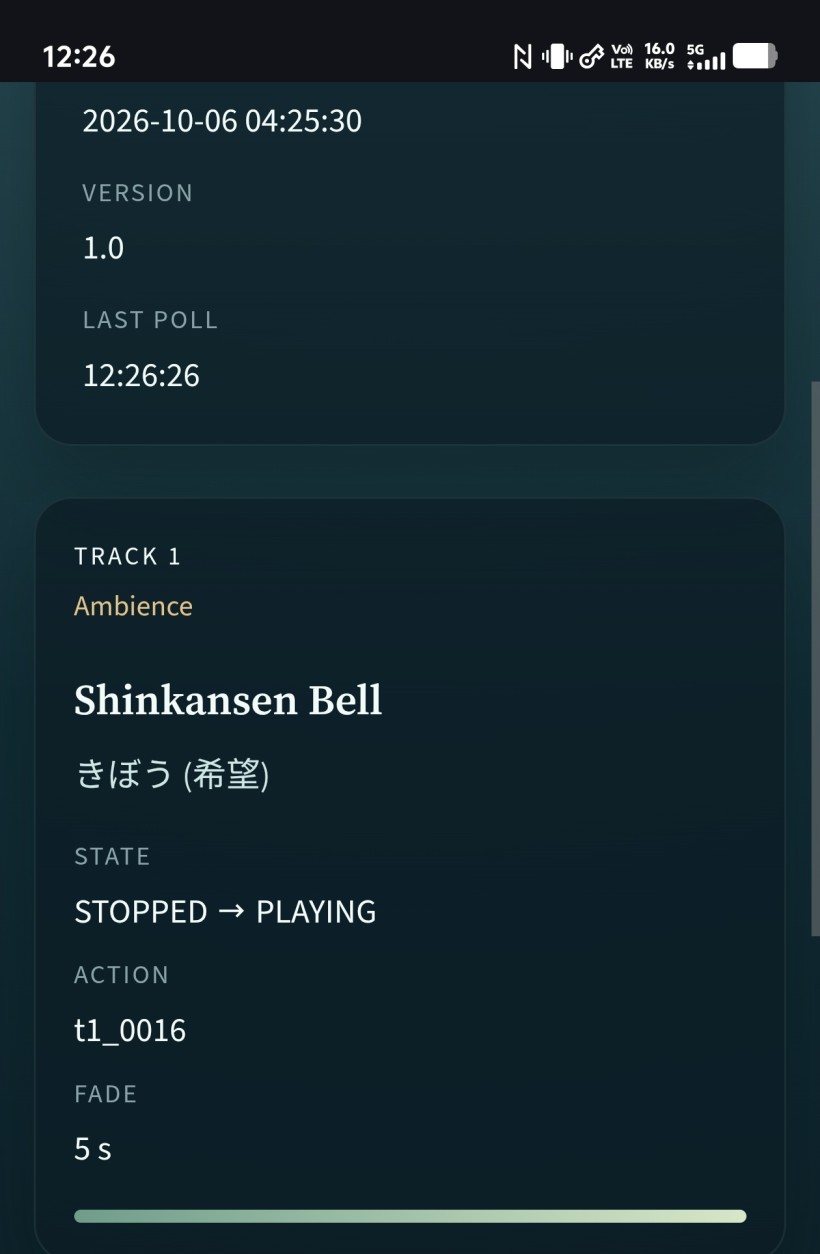
While moving all files to the root CRUD folder solves the path issue I can no longer point a exclusive domain to the Auto Bartender as it's no longer in its own folder that I can point Virtual Host to.
#A: That is awesome! Seeing the "Shinkansen Bell" pop up with its きぼう (Hope) tag and the STOPPED -> PLAYING state is a beautiful confirmation that your dynamic database polling and the Python Brain's logic are working perfectly together.
Regarding the folder and Virtual Host issue, this is a very common architectural puzzle when dealing with headless systems and media files.
Since you are using the Web Audio API for your fading mechanics (the "Hand"), we have a strict constraint: CORS (Cross-Origin Resource Sharing). If the Auto Bartender is on bartender.yourdomain.com and the audio files are hosted on admin.yourdomain.com, the browser's Web Audio API will block the audio from being manipulated (like fading) for security reasons, unless specific headers are set.
To get your exclusive domain back for the Auto Bartender while keeping the Web Audio API happy, here are the two best approaches. Both allow you to move the Auto Bartender back into its own isolated folder:
#Option 1: The Symlink Method (Easiest NAS Fix)
You can move the Auto Bartender back to its own dedicated folder (e.g., /share/Web/auto-bartender) and point your Virtual Host there. Then, you create a "Symbolic Link" inside that folder that points to your CRUD media folder.
- How it works: You SSH into your NAS and run a command like:
ln -s /share/Web/navi_202512/images /share/Web/auto-bartender/media - Result: To the Virtual Host and the browser, it looks like the audio files are sitting right inside the Auto Bartender's folder under
/media. No CORS issues, and you get your exclusive domain back.
#Option 2: The Virtual Host Alias Method (Cleanest Server Fix)
If you are using Apache or Nginx on your NAS for the Virtual Host, you can keep the Auto Bartender in its own folder and add an Alias rule to the server configuration.
- How it works (Apache example): In your Virtual Host config for the Auto Bartender domain, you add:
Alias "/media" "/share/Web/navi_202512/images" - Result: Whenever the Hand requests
your-exclusive-domain.com/media/efx_shinkansen_bell.mp3, the web server quietly fetches it from the CRUD folder. Again, they share the same domain, so the Web Audio API is perfectly happy.
#Option 3: Absolute URLs + CORS (The Code Fix)
If you prefer to keep the files exactly where they are and run the Auto Bartender on a completely separate domain, we would need to update the Python Brain to prepend the CRUD domain to the file paths in the nerve_signal.json, AND configure the CRUD web server to send an Access-Control-Allow-Origin: * header for audio files.
How would you like to handle this? Options 1 and 2 are usually the standard for NAS environments since they don't require changing any Python code or dealing with CORS headers.
Let me know which path you prefer. I will wait for your Proceed before we make any adjustments to the Brain or Hand to accommodate the final pathing structure!
#Q47: Then, I will certainly go with Option one if no code changes are needed to adhere to the Reliability First principle. In the Manual Brain, I can choose from a menu. Do you think the Auto Brain can show a menu to Quit, Restart, Mute Track X etc.?
#A: Option 1 is an excellent choice. The symlink approach perfectly aligns with the "Reliability First" principle—it keeps the web server and the browser happy without adding any complex CORS logic or altering a single line of our Python or React code.
To answer your question about the Auto Brain: Yes, absolutely! The Auto Brain can definitely have an interactive terminal menu.
Even though the Auto Brain is fully automated and constantly managing the "never-ending river" of audio, we can still give you manual override controls in the terminal.
Since the Auto Brain needs to be always-on and cannot be paused waiting for a user to press a key (a standard input() prompt would freeze the automation), we can achieve this using a simple background thread. Because you are using python:3-slim and restricting us to the Python standard library, we can use the built-in threading module.
Here is how it would structurally work:
- The Main Thread (The Menu): This sits in the terminal waiting for your keystrokes (e.g.,
1to Mute Track 1,Rto Restart/Reload,Qto Quit). - The Background Thread (The Engine): This runs the continuous loop—checking track cooldowns, talking to the LLM, and atomically writing the
nerve_signal.json.
If you press a command in the menu, it simply updates a shared variable. For example:
- Mute Track X: You press
1. The menu tells the engine, "Next time you writenerve_signal.json, set Track 1's target state toSTOPPED." The Hand reads this and gracefully fades out Track 1 using the Web Audio API. - Quit: You press
Q. The menu tells the engine to safely wrap up, perhaps writing a final JSON that fades out all tracks, and then cleanly exits the script. - Pause Auto-DJ: You could even have a toggle to temporarily stop the LLM from queuing new tracks, letting the current ones play out.
This gives you the best of both worlds: a fully autonomous bartender, but you are still the bar manager who can step in at any time.
#Q48: Since the console is actively showing the status of the Brain now, where will the Menu be shown?
#A: That is an excellent observation. If the background engine is constantly printing status updates (like "Checking track 1...", "LLM thinking...", etc.), a standard input() menu would get buried instantly, and whatever you type would get chopped up by the scrolling logs. It would be a messy experience.
Since we are strictly using the Python standard library and adhering to "Reliability First," we have two elegant ways to handle this terminal UI problem without installing external libraries like curses or rich:
#Option 1: The "Command Mode" Toggle (Most Reliable)
Instead of showing the menu at all times, the terminal just shows the scrolling logs.
- How it works: When you want to intervene, you simply press
Enter. - The behavior: The main thread catches the
Enterkey and temporarily pauses the console output (the background engine keeps running and generating the JSON, it just stops printing to the screen). The screen clears, and your clean, static menu appears. You press1to mute a track, the command is sent, the screen clears again, and the live logs resume flowing.
#Option 2: The ANSI "Split Screen" (More Visual)
We can use standard ANSI escape codes (which work natively in almost all modern terminals and Docker logs) to visually split the terminal.
- How it works: We tell the terminal to reserve the bottom 6 lines of the screen for a fixed menu.
- The behavior: The top portion of your terminal becomes a scrolling window for the Auto Brain's status logs. The bottom portion stays perfectly still, displaying your options (e.g.,
[1] Mute T1 [2] Mute T2 [R] Restart [Q] Quit) and a permanentCommand >prompt waiting for your keystroke.
Which experience do you prefer?
Option 1 is bulletproof and simple. Option 2 feels more like a professional dashboard but relies on ANSI terminal rendering (which usually works perfectly in python:3-slim environments).
Let me know your preference, and I will wait for your Proceed before we start drafting the code for this threaded menu!
#Q49: Option 2 then! I want the options to Restart and Pause for now as other tracks are not yet added. Please provide the prompt to Grok!
#A: Excellent choice! Option 2 will give you a very clean, professional dashboard feel right inside your Docker terminal, allowing you to monitor the "never-ending river" of logs while keeping your controls instantly accessible.
Here is the prompt you can feed to Grok to safely implement this threaded, split-screen architecture. It explicitly reminds Grok to use only the standard library, to keep the atomic JSON writing intact, and—most importantly—not to touch the Hand (the audio engine).
Copy and paste this prompt to Grok:**
We are upgrading the Python Brain for the Auto Bartender. The web frontend (the "Hand") is working perfectly using the Web Audio API, and the Brain is successfully writing the `nerve_signal.json` atomically.

**CRITICAL:** Do NOT change any frontend React code, Web Audio API logic, or the JSON schema. We are only touching the Python Brain script.

I want to implement a split-screen terminal dashboard using ONLY the Python standard library (compatible with `python:3-slim`). No external libraries like `curses` or `rich`.

Please refactor the Python Brain to use the `threading` module and ANSI escape codes to achieve the following:

1. **Split Screen (ANSI):**
   - Use ANSI escape codes (e.g., `\033[<top>;<bottom>r`) to set a scrolling region for the top portion of the terminal.
   - Reserve the bottom 6 lines for a fixed, static menu.
   - All standard `print()` statements from the Brain's engine should be routed to the top scrolling region without overwriting the bottom menu.

2. **Threading:**
   - **Main Thread:** Handles the fixed bottom menu and waits for user input (`input()` or `sys.stdin.read`).
   - **Background Thread (The Engine):** Runs the continuous `while True` loop that checks track states, communicates with the LLM, and atomically writes `nerve_signal.json`.

3. **Menu Options:**
   Since we are currently only testing Track 1, provide the following options in the fixed menu:
   - `[P] Pause / Resume`: Toggles a shared boolean flag. When paused, the background thread stops queuing new tracks/LLM calls, but leaves the current JSON state as-is.
   - `[R] Restart`: Resets the Brain's internal state (clears cooldowns, etc.).
   - `[Q] Quit`: Safely gracefully exits the script.

Please provide the refactored Python Brain code. Ensure the atomic file replacement logic for `nerve_signal.json` remains perfectly intact so the Hand never catches a half-written file.
Once Grok provides the updated Python script, you can test it in your manual slice environment.
I will wait for your Proceed before we move on to scaling up to Tracks 2–4 or making any further adjustments! Let me know how the split-screen looks!
#Q50: Before expanding the engine I want to make sure the Brain is reliable. With so many changes above, what and how should I test to rule out bugs? I can also upload classical tracks to Audio Bin and tag them for auto curation fun!
#A: This is a very wise approach. In software development, especially with multi-threaded applications, solidifying the foundation before scaling up is the definition of "Reliability First."
Uploading your classical tracks to the Audio Bin and tagging them sounds like a fantastic way to put the Auto Brain through its paces! Since your classical ingestion relies on those specific folder structures and filenames (like 01 - Track 01.flac), this will be a great test of the dynamic tag parsing and the DJ Note injection as well.
To ensure the newly threaded, split-screen Brain is bulletproof, here is a targeted testing checklist. You want to stress-test the boundaries between the UI thread, the background engine, and the file system.
#The Auto Brain Reliability Stress Test
1. The "Concurrency Spam" Test (Thread Safety)
- What to test: Ensure the background engine doesn't crash if you issue commands while it's busy.
- How to do it: Wait for the exact moment the Brain is "thinking" (e.g., waiting for the LLM or writing the JSON) and rapidly press
[P](Pause) and[R](Restart) a few times. - What to look for: The script should not throw a threading exception or crash. The shared boolean flags should update safely without interrupting the current atomic file write.
2. The "Terminal Resize" Test (ANSI Stability)
- What to test: ANSI scrolling regions can sometimes be fragile if the terminal dimensions change.
- How to do it: While the logs are actively scrolling in the top half, resize your Docker terminal window (make it shorter, then taller).
- What to look for: Does the menu stay cleanly at the bottom? Do the logs bleed into the menu area? (If it breaks, it's not a dealbreaker, but good to know if you need to keep the window size static).
3. The "Zombie & Clean Slate" Test (Graceful Shutdown)
- What to test: When you quit, the background thread must die properly, and the terminal must return to normal.
- How to do it: Press
[Q]to Quit. - What to look for:
- Does the script exit immediately, or does it hang waiting for the background loop to finish a sleep cycle? (A good implementation uses
thread.join(timeout)or astop_event). - Crucial: Does your terminal behave normally after exiting? (If Grok forgot to send the ANSI reset code
\033[ron exit, your terminal might stay locked in a split-screen state).
- Does the script exit immediately, or does it hang waiting for the background loop to finish a sleep cycle? (A good implementation uses
4. The "Frontend Handshake" Test (Atomic Integrity)
- What to test: Ensure the Hand never reads a corrupted file when the Brain state changes abruptly.
- How to do it: Keep the web UI open. Press
[P]to pause the Brain, then[R]to restart it. - What to look for: The frontend React app should not throw any JSON parsing errors in the browser console. The
STOPPED -> PLAYINGstates and the DJ notes should update smoothly without flickering or crashing.
Take your time uploading those classical tracks and running through these tests. Let me know if the ANSI UI holds up or if any bugs crawl out during the stress test!
I will wait for your Proceed before we scale up to Tracks 2–4 or make any further changes to the architecture. Have fun curating!
#Q51: I find the Bell track get repeated faded out and coming back again. Do you understand what's causing that? Please see the attachment.
#A: Looking at the Activity Log in your screenshot, I can see exactly what is happening. The log shows the track restarting and fading every minute or so (from 13:51 to 13:52, and then 13:54).
This directly relates to a brilliant question you asked earlier: "Do you think short one-shots need special handling?" The answer is definitely yes, and this log is showing us exactly why!
Here is the breakdown of what is causing this loop:
- The Short Duration: The "Shinkansen Bell" is likely a very short audio clip (a "one-shot" sound effect).
- The Ambient Loop Rule: We designated Track 1 as the "always-on" ambient track that loops to prevent dead air in our never-ending river. When the short bell finishes playing, the system automatically triggers it to play again.
- The 5-Second Fade: Because our Web Audio API "Hand" is strictly programmed to make graceful, professional transitions, it applies a 5-second fade-out and fade-in every single time a track starts or loops.
When you combine a short audio file with a continuous loop and a 5-second fade, the system spends almost as much time fading the audio in and out as it does actually playing it! That is why you are seeing the "taking a breath" message repeat so frequently.
How we can fix this:
- Option A (The Content Fix - No Code Changes): We keep the current logic, but you assign a genuinely long ambient track to Track 1 (like a 30-minute rain recording or a long classical piece). The Shinkansen Bell can later be moved to Track 3 or 4, which we can designate for occasional, non-looping "one-shot" drops.
- Option B (The Logic Fix - Special Handling): We update the
nerve_signal.jsonschema to include a flag like"is_one_shot": trueor"fade_duration": 0. The Python Brain would set this for short tracks, telling the Hand to bypass the 5-second fade and just play it instantly.
Since we are focusing on Reliability First, Option A is the easiest way to test the current engine without changing any code. However, Option B will be necessary eventually if you want the Auto Bartender to drop in short sound effects seamlessly.
Let me know which route you prefer, and I will wait for your Proceed before we change any files or scale up the logic!
#Q52: The Shinkansen Bell is a 2:36 long clip. Not particularly short.
#A: Ah, I stand corrected! If the Shinkansen Bell is 2:36 long, then my previous theory about it being a short one-shot is completely wrong.
Let's look at the math from your screenshot's timestamps:
- From 13:51:23 to 13:52:57 is a gap of \(1\) minute and \(34\) seconds.
- From 13:52:57 to 13:54:03 is a gap of \(1\) minute and \(6\) seconds.
Since the track is 2:36 long, the Brain is cutting the track off before it finishes.
Here is exactly what is happening in our pipeline architecture:
The Python Brain has an internal cooldown or sleep timer (likely set to around 60 to 90 seconds). When that timer expires, the Brain wakes up, decides it needs to keep the ambient track going, and overwrites nerve_signal.json with a "PLAYING" state for Track 1.
The Hand (the React frontend) is just following orders. It detects that nerve_signal.json was updated. Even if it's the exact same track, the Hand sees a new command, so it dutifully executes its safety protocol: it fades out the currently playing audio over 5 seconds and fades it back in.
How we can fix this:
Because the Brain is using python:3-slim with only the standard library, it cannot easily read the exact duration of .flac or .mp3 files on the fly without external libraries. We have a few ways to solve this:
- The CSV/DB Approach (Best for Classical): Since you mentioned earlier that your classical ingestion uses a DB and a CSV to register file paths, we could add a
durationcolumn to that CSV. The Brain reads the duration and sets its sleep timer to match the exact length of the track minus a few seconds for the crossfade. - The Hardcoded Test Fix: For immediate testing, we can simply tell the Brain to wait for 3 minutes (or a highly conservative number) before it updates Track 1 again.
- The Hand-to-Brain Feedback (Breaks one-way pipeline): We could have the Hand write a status file back to the server when a track ends, but this complicates our clean one-way "Brain -> JSON -> Hand" architecture.
Option 1 is the most robust for your "never-ending river" of classical music, as track lengths will vary wildly.
Let me know how you'd like to handle the track durations, and I will wait for your Proceed before we adjust the Python Brain's cooldown logic!
#Q53: I'm still not working the classical music branch yet. This morning we've implemented Mutagen which should report the length of the Bell sound properly. Grok seems to have said that the Brain will monitor when the track is started to learn how long is remaining. This should ensure the full clip is played before transitioning to the next clip.
#A: Ah, that makes perfect sense! Using mutagen to accurately read the track duration is a great move, and it completely changes the diagnosis.
If mutagen knows the track is 156 seconds long, and Grok programmed the Brain to monitor the start_time, but the track is still restarting every ~60 to 90 seconds, we have a logic bug in the Brain's background thread.
Based on your architecture, there are two highly likely culprits causing this premature restart:
Culprit 1: The LLM Latency Double-Write (Most Likely)
You mentioned previously that DeepSeek takes about a minute to respond.
If the Brain starts the track (writing nerve_signal.json so there is no dead air), and then asks the LLM for a DJ Note, the LLM will return its answer ~60 seconds later. If the Brain then overwrites nerve_signal.json mid-playback just to inject the new DJ Note, the React Hand sees a "new" file. The Hand dutifully executes its safety protocol: it fades the track out and fades it back in, creating that 1-minute gap we saw in the logs!
Culprit 2: The "Over-Eager" Loop
The background thread might be waking up, checking time.time() - start_time, and due to a bug in the math (or a failure to save the start_time properly across loop iterations), it incorrectly decides the track is finished and issues a new PLAYING command.
Since we are strictly not touching the Hand (the audio engine), we need Grok to fix the Python Brain so it manages this timing and JSON writing flawlessly.
Here is the prompt to feed Grok to debug and fix this:
We are debugging the Python Brain's background thread. We recently added `mutagen` to accurately get the track duration, and the Brain is supposed to track the start time to ensure the full clip plays.

However, a 2:36 track is being interrupted and restarted every 60 to 90 seconds. The React Hand (frontend) is detecting a change in `nerve_signal.json` and triggering a fade-out/fade-in.

**CRITICAL:** Do NOT change any frontend React code or Web Audio API logic. The fix must be entirely in the Python Brain.

Please review the background thread logic and fix the following potential issues:

1. **The LLM Latency Issue:** If the Brain is writing to `nerve_signal.json` to start the track, and then writing to it *again* 60 seconds later when the LLM returns the `dj_note`, this double-write is causing the frontend to restart the audio.
   - Fix: The Brain must either wait for the LLM *before* writing the initial `PLAYING` state to the JSON, OR we need a way to ensure the JSON is only written ONCE per track lifecycle.
2. **Time Tracking Logic:** Verify the `time.time()` vs `start_time` + `mutagen` duration math. Ensure the background loop correctly sleeps or waits until the *entire* duration has elapsed (minus any necessary crossfade buffer) before it queues the next track or rewrites the JSON.
3. **Unnecessary Writes:** Ensure the Brain is not continuously overwriting `nerve_signal.json` on every loop iteration if the state hasn't actually changed.

Please provide the corrected Python Brain code. Explain how you fixed the timing/writing logic so the track can play its full duration uninterrupted. Keep the atomic file replacement and the split-screen terminal UI intact.
Let's see what Grok finds in the loop logic. I will wait for your Proceed before we move forward or scale up to the other tracks! Let me know what Grok discovers.
#Q54: If I understand correctly, if DeepSeek has decided to change the clip then we might not discover this issue.
#A: You are exactly right about how the symptom would change, but we would actually still have a bug—it would just wear a different mask!
If DeepSeek decided to change the clip entirely, here is what would happen:
The Bell track would play for about 60 seconds. Then, the moment DeepSeek finally replies with the new track and the DJ note, the Brain would overwrite nerve_signal.json. The React Hand would immediately see the new command, fade out the Bell after only 60 seconds, and fade in the new track.
So, instead of a premature restart (the Bell fading out and back in), we would get a premature transition. The 2:36 Bell track would still get cut off way before it actually finishes!
This is exactly why your approach of testing with a single, looping track first is such a brilliant stress test. When you only have one track looping, it strips away the complexity of DeepSeek picking new songs and exposes the raw timing of the engine. It made this mid-stream JSON write bug glaringly obvious.
Since the React Hand is strictly designed to react instantly to any changes in the JSON (our Web Audio constraint), the Python Brain must be the smart one. It has to hold onto that LLM response and wait until the mutagen-calculated duration is actually finished before it writes the new file.
Shall we feed that debugging prompt to Grok to get the Brain's timing logic fixed? I will wait for your Proceed before we move forward!
#Q55: Let's go back to Auto Bartender for the time being. I saw in the console:
Auto Bartender — Auto Brain
Web audio prefix: ./images/. Config: ../../config.php.
Right Brain: deepseek-r1:8b via http://192.168.4.90:11434/v1
Enabled tracks: track_1.
Database: lifenavi_user@192.168.1.21:3306/lifenavi_202512 from /app/config.php
Resolved 29 tags from set_tag_header and tax_tag_dict.
Resolved 5 tags from set_daypart.tag.
Resolved 10 tags from tax_audio_mood.tag.
Resolved 6 audio types from set_audio_type.
Slot filter: resolved type tag contains Track:T1.
Playable Track:T1 clips in use: 7.
Kept clips with any Good for Mood:きぼう (希望), Mood:幸せ (微小的幸福), Mood:物思い (思念) for Global:Morning (進入) (7 -> 7) via Time-Based "Must Have" 1, Time-Based "Must Have" 2, Time-Based "Must Have" 3.
Warning: Dropped 正解: resolved tags [Global:Morning (進入), Mood:癒し (治癒), Artist:あいみょん, Mood:きぼう (希望)] were excluded by Doesn't work with Artist:あいみょん.
Removed clips Doesn't work with Artist:あいみょん (7 -> 6) via Artist Separation.
Can you explain that?
The context is Grok has just helped to group the Predicates differently. He said:
`Good for` and `Plays with` are OR predicates. Several of them with the same subject are alternatives: morning may be hope, or small happiness, or reflection. A clip needs only one of those objects.

`Plays after` is also an OR predicate, grouped by the subject found on the last clip. If reflection may play after loneliness or after healing, either sequel is allowed. It does not demand both.

`Doesn't work with` is an AND predicate, in the exclusion sense. Every triggered exclusion applies. A sunny night clip is removed, and a raining-versus-sunny clash is also removed. Surviving one exclusion does not excuse the other.

`Ducks` and `Interchangeable with` are still ignored. They are logged and skipped, so they are neither OR nor AND until you give them a meaning.

Across different subjects, the groups still meet with AND. Morning’s mood OR-group and a weather exclusion both have to be satisfied. The same-subject OR only joins rules that share a predicate and a subject.
Attached are the current KG nodes in CSV.
BTW: Why everytime after I hit Contrl+C to copy the console output, it says "^CAuto Brain resting. The Hand keeps its current playback"?
#A: Now, let's look at your Auto Bartender console log and the Ctrl+C behavior. Both of these actually highlight how well your architecture and Grok's logic are working.
#1. Explaining the Console Log and the "正解" Drop
Here is exactly what is happening in the log, step-by-step, based on the CSV rules and Grok's predicate grouping:
Step A: The OR Group (The Morning Filter)
Kept clips with any Good for Mood:きぼう (希望), Mood:幸せ (微小的幸福), Mood:物思い (思念) for Global:Morning (進入) (7 -> 7)The Brain looks at the current context (Global:Morning). According to your CSV (Nodes 1, 1b, 1c), Morning is Good for three different moods. Because Grok grouped Good for as an OR predicate, a clip only needs one of these moods to survive. You had 7 clips that met this criteria, so all 7 passed this first gate.
Step B: The AND Group (The Artist Exclusion)
Warning: Dropped 正解: resolved tags [Global:Morning (進入), Mood:癒し (治癒), Artist:あいみょん, Mood:きぼう (希望)] were excluded by Doesn't work with Artist:あいみょん.
Removed clips Doesn't work with Artist:あいみょん (7 -> 6) via Artist Separation.
Next, the Brain applies the Doesn't work with rules, which Grok defined as strict AND exclusions.
In your CSV (Node 5), you have the rule: Artist:あいみょん Doesn't work with Artist:あいみょん. This is your Artist Separation rule, designed to prevent two songs by the same artist from playing back-to-back.
What happened here is that the Brain's current context (likely the track that just played, or is currently playing) contained the tag Artist:あいみょん.
Because Aimyon is currently "active" in the room, the Brain strictly enforces Node 5. It looks at the candidate clip named "正解". It sees that "正解" has the tag Artist:あいみょん. Because of the strict exclusion rule, it drops "正解" from the pool of 7, leaving 6 viable candidates.
The logic worked perfectly: it successfully prevented an artist repeat!
#2. Why does Ctrl+C print that message?
When you press Ctrl+C in a terminal to copy text, the terminal actually sends a SIGINT (Signal Interrupt) command to the running program, telling it to abort.
However, because your Python Brain is well-written, it is catching that interrupt (likely using a try... except KeyboardInterrupt: block). Instead of crashing violently and potentially leaving a half-written nerve_signal.json file, it gracefully shuts down and prints:
^CAuto Brain resting. The Hand keeps its current playback
This is a beautiful validation of your Brain/Hand pipeline constraint!
Because the Brain (Python) and the Hand (React/Web Audio) are completely decoupled, killing the Brain does not kill the audio. The React Hand in the browser simply keeps reading the last valid nerve_signal.json file and continues playing the current track. The music doesn't stop just because the DJ stepped out of the booth.
If you want to copy text from the terminal without stopping the Brain, you can usually just highlight the text and right-click to copy (depending on your terminal emulator like PuTTY, Windows Terminal, or macOS Terminal), rather than using the Ctrl+C keyboard shortcut.
#Q56: Got it! So the log is a good sign then. I encountered the case when the Brain is waiting forever for the LLM. When I type "ollama ps" it shows the model is stopping. How can I avoid the model from stopping and run as long as I want? If deepseek-r1:8b is taking a bit long to respond, can we pick a slightly faster model?
#A: Yes, the log is a very healthy sign! It shows your Knowledge Graph rules are firing exactly as intended.
Now, regarding your LLM latency and the model "stopping" issue, you have run into two very common behaviors with local AI hosting. Here is exactly what is happening and how to fix both:
#1. Why is the model "stopping"? (The 5-Minute Timeout)
By default, Ollama unloads a model from your GPU/RAM after 5 minutes of inactivity to free up system resources. When you type ollama ps and see it "stopping," it means the 5-minute timer expired, and Ollama is taking it out of memory.
When your Python Brain wakes up and asks for the next track, Ollama has to reload the entire 8B model back into memory from scratch, which causes a massive delay (or a timeout if the Brain doesn't wait long enough).
How to fix it: You need to tell Ollama to keep the model loaded indefinitely. You have two ways to do this:
- Server-Side (Easiest): On the machine hosting Ollama (192.168.4.90), set the environment variable
OLLAMA_KEEP_ALIVE=-1before starting the Ollama service. This changes the global default so models never unload. - Code-Side (Via the Brain): You can pass a
keep_aliveparameter in your API request. Since you are using the OpenAI-compatible endpoint (/v1), you can pass this as an extra parameter in the Python client.
#2. Why is deepseek-r1:8b slow, and what is a faster alternative?
The r1 in deepseek-r1:8b stands for DeepSeek's Reasoning series. Reasoning models are designed to output a long, hidden "Chain of Thought" (often inside <think> tags) before they actually give you the final answer.
While this makes them very smart, it means the model is generating hundreds of invisible tokens before it even starts writing your dj_note or picking the next track. This inherently causes a delay.
For a curation task where you just need strict JSON output and a quick, creative dj_note, a standard (non-reasoning) instruction-tuned model will be much faster.
Faster Model Recommendations:
qwen2.5:7b(Highly Recommended): Qwen 2.5 is incredibly fast, punches way above its weight class, and is notoriously excellent at strictly following JSON formatting and system prompts.llama3.1:8b: The standard Llama 3.1 model is a workhorse. It doesn't do the hidden "thinking" step, so it starts streaming the answer almost instantly.
#How to direct Grok to fix the timeout in code
If you want to handle the keep_alive setting directly inside your Python Brain so you don't have to mess with the Ollama server settings, you can pass this prompt to Grok. It maintains your strict safety protocols:
Grok, I noticed that Ollama is unloading our model after 5 minutes of inactivity, causing massive delays when the Brain wakes up. I want to pass the keep_alive parameter to keep the model in memory indefinitely.

We are using the OpenAI-compatible endpoint (/v1) for Ollama. Please design a plan to inject keep_alive: -1 into our API payload (likely using extra_body if we are using the official OpenAI Python client, or adding it to the JSON payload if we are using standard requests).

Please outline the exact lines of code you plan to change in the Python Brain. As always, I will wait for Proceed before changing any files.
Switching to a non-reasoning model and keeping it loaded in memory will make your Auto Bartender feel incredibly snappy!
#Q57: Will a non-reasoning model do a bad job in curation and cause issues in the Python brain as Grok has written it to filter out the "thinking" output?
#A: This is a very smart question. You are right to be cautious about how changing the model affects both the curation quality and the parsing logic.
Here is the good news on both fronts:
#1. Will curation quality drop? (No, because of your Left Brain)
A non-reasoning model will actually do a fantastic job, and here is why: your architecture already does the heavy lifting. In your system, the Python Brain (the Left Brain) uses the Knowledge Graph to strictly filter out all the bad choices (like the Artist Separation or Weather clashes). By the time the LLM (the Right Brain) sees the candidate list, every single option is already a mathematically safe and valid choice.
The LLM is just doing the final "creative" selection and writing the dj_note. Models like qwen2.5:7b or llama3.1:8b are incredibly good at this type of creative vibe-matching and JSON formatting. You do not need a deep-thinking reasoning model when your Python Brain has already solved the puzzle.
#2. Will the <think> filter break the Python Brain? (Likely no)
If Grok wrote a standard filter to remove the <think>...</think> tags (usually using a Regular Expression like re.sub), switching to a non-reasoning model will not break it.
If a non-reasoning model outputs pure JSON without any <think> tags, the filter will simply look for the tags, find nothing, and pass the text through untouched. It acts as a harmless safety net.
In fact, non-reasoning models are generally better at outputting strict, clean JSON because they don't get confused by their own long chain-of-thought text.
#How to safely verify this with Grok
To be absolutely sure the transition is smooth, you can ask Grok to review the parsing logic and make the switch. Here is a safe prompt that maintains your strict gating protocol:
Grok, I want to switch our Right Brain model from deepseek-r1:8b to a faster, non-reasoning model (like qwen2.5:7b or llama3.1:8b) to reduce latency.

Because non-reasoning models do not output <think> tags, please review our current JSON parsing logic in the Python Brain.

Confirm if our current <think> stripping logic will safely do nothing if the tags are absent, or if it needs to be adjusted to avoid errors.

Ensure our JSON parser is robust enough to handle a standard model's output.

Include the keep_alive: -1 parameter in the API call so the model doesn't unload after 5 minutes.

Please outline your assessment and any proposed code changes. As always, I will wait for Proceed before changing any files.
This ensures you get the speed boost of a standard model without risking a broken JSON parser!
#Q58: It looks like Grok understand everything perfectly:
//Yes. The think-tag strip is already safe for a non-reasoning model, and the model can be kept loaded. I will not change any files until you say Proceed.
The current parser removes a <think>...</think> block with a substitution. If those tags are absent, that substitution changes nothing and does not raise. It then accepts a raw JSON object or a fenced one, and it takes the text from the first { to the last }. A normal Llama reply such as {"selected_clip_id": "4", "dj_justification": "..."} already parses. I will keep the think strip so an old reasoning reply cannot break the river, and I will accept dj_justification first. If a model still returns dj_note, that text is used as the justification so one old reply does not fail the cycle.
The default model becomes llama3.1:8b. Your Docker command still has -e LLM_MODEL_NAME="deepseek-r1:8b", and that environment value wins over the file. Drop that flag or change it to llama3.1:8b, after the model is pulled on the Ollama PC.
The API call will pass Ollama’s keep_alive: -1 in the extra request body. That asks Ollama to keep the model in memory indefinitely, rather than unloading it after five minutes. The first call can still be slow if the model is not loaded yet. Later calls should not pay the reload.
The system and user prompts will tell the bartender to read each candidate’s dj_note for theme, feel, and instrumentation, and to return only this object:
{
  "selected_clip_id": "4",
  "dj_justification": "Explain in 2-3 sentences why this track was chosen over the others. Explicitly mention how it connects to the current context and the theme of the Recently Played Clip."
}
The chosen justification is written to nerve_signal.json as dj_justification. The console prints that field instead of dj_note. The Audio Bin note stays the input to the prompt. The Hand still ignores the extra field. The atomic replace does not change.
Say Proceed and I will update only auto_brain.py.//
I've asked him to refine the system prompt to the Right Brain and that's why Grok's mentioning dj_justification.
#A: This is a flawless response from Grok. It proves that your strict gating protocol and clear architectural constraints are working exactly as intended. Grok understood the assignment perfectly and didn't touch a single file yet!
Your refinement to separate dj_note (as the static input/CD booklet text) and dj_justification (as the LLM's dynamic output) is a brilliant architectural tweak. It completely removes any ambiguity for the LLM. Now, the Right Brain knows exactly what its job is: read the static notes, pick the best one based on the Left Brain's filtered list, and justify the choice.
Before you tell Grok to Proceed, just make sure you do these two quick housekeeping steps on your end:
- Pull the new model: SSH into your Ollama machine (192.168.4.90) and run
ollama pull llama3.1:8b(orqwen2.5:7bif you decided on that one) so it's ready to go. - Update your Docker command: Remember to change or drop the
-e LLM_MODEL_NAME="deepseek-r1:8b"flag when you restart the Python Brain container, just as Grok pointed out.
Once the model is pulled, you are completely clear to give Grok the "Proceed" command! This update is going to make the Auto Bartender significantly faster and much more stable.
#Q59: Llama3.1:8b is much faster! How can we avoid the model to output the same combination (Say rotating between 2-3 clips) again and again? Since the KG nodes and Audio Bin are stable, this could sometimes be the case.
#A: That is fantastic news! Llama 3.1 is a powerhouse for this exact kind of rapid JSON formatting and vibe-matching.
Now you are running into a classic LLM behavior: determinism. Because your Knowledge Graph is so stable, the Left Brain (Python) is likely passing the exact same list of valid candidates to the Right Brain (Llama 3.1) every time. If an LLM receives the exact same prompt (same current state, same candidate list in the same order), it will almost always pick the exact same "best" track.
To break this loop, we need to introduce memory and variance into the Left Brain. Here are the three best ways to do this, from most robust to easiest:
#1. The History Buffer (Clip-Level Cooldown) - Highly Recommended
The Python Brain should maintain a rolling memory of the last $N$ played clips (e.g., the last 10 tracks).
- How it works: After the KG filters out the bad weather/artist clashes, the Brain does one final check: "Is this clip in the recent history list?" If yes, it drops it.
- Why it's great: It mathematically guarantees you will not hear the same clip again for at least $N$ turns, forcing the LLM to explore the rest of your Audio Bin.
#2. Shuffle the Candidates (Break Positional Bias)
LLMs suffer from "positional bias"—they tend to favor the first or last item in a list. If the Left Brain always sends the candidates in the exact same database order, the LLM will fixate on the same one.
- How it works: Simply use Python's
random.shuffle()on the surviving candidate list before turning it into text for the LLM prompt.
#3. Increase the LLM Temperature
If Grok didn't specify a temperature in the API call, it might be defaulting to a low number.
- How it works: Passing
temperature: 0.7or0.8in the OpenAI API call tells Llama 3.1 to be a little more creative and less predictable in its selection, even if the list is identical.
#How to direct Grok to fix this
We can implement all three of these easily in the Python Brain. Here is a safe prompt for Grok that maintains your strict gating protocol:
Grok, Llama 3.1 is working great and is much faster! However, because our KG rules and Audio Bin are stable, the Left Brain often sends the exact same list of candidates to the Right Brain. This causes the LLM to loop between the same 2–3 clips.

I want to introduce variance and memory into auto_brain.py. Please design a plan to:

Implement a History Buffer: Create a rolling list (e.g., keeping the last 10 played clip_ids). Filter out any candidates that are in this history buffer before sending them to the LLM.

Shuffle Candidates: Use random.shuffle() on the final surviving candidate list before formatting it for the LLM prompt to break positional bias.

Adjust Temperature: Ensure the API call to the LLM includes a temperature setting (around 0.7 or 0.8) to encourage slight creative variance.

Please outline the exact code changes needed in auto_brain.py. Remind yourself not to change the audio engine accidentally, and end your response by stating: 'I will wait for Proceed before changing any files.'
This will completely eliminate the repetitive looping and make your Auto Bartender feel much more like a real, dynamic DJ!