🪚ED2-4a. Recursive Review of Meta AI's Designs (First Time)
#Gemini
(Sep 15, 2026)
Today, I tried bringing design issues I encountered during the review of the earlier part of this chat contributed by Meta AI to Gemini for logic-by-logic review (Previously I was just requested an overall evaluation). This is the first time I do things this way. So this page is created.
#Q: This is what Meta AI suggested for Regular's Notebook. Do we still follow this design now?
#A: Based on the image you provided and what we know about your AppGini setup, the short answer is: We should keep Meta AI's content taxonomy (the categories and choices), but we CANNOT follow its UI interaction design.
Here is why, tying back to the exact technical limitation we discussed earlier:
#The AppGini "Conditional Dropdown" Limitation
Look at the very last sentence in the image:
"This way, when you fill out the notebook, if you select J-Drama on the left, you can only select 'First Love' on the right, you won't make a mistake."
Meta AI is suggesting a cascading (or conditional) dropdown. It assumes that if you pick "J-Drama" in Field A, the database will dynamically update Field B to only show J-Drama options.
As you correctly noted in our previous discussions, AppGini's straightforward CRUD interface does not support this natively. If you try to build exactly what Meta AI suggested, you will end up with a broken interface where selecting "J-Drama" does not filter the second list, leaving you staring at a massive, confusing list of every single tag mixed together.
#How we adapt Meta AI's idea to our "Flat" AppGini Design
Meta AI did a fantastic job defining your Taxonomy (the actual lists of moods, singers, energies, etc.). We absolutely want to use those exact categories! We just need to map them into the "flat" table structure we designed to bypass AppGini's limitations.
Instead of having a Tag_Key field and a Tag_Value field, you will create a separate field for each of Meta AI's categories.
Your AppGini regular_notebook table's Trigger section will look like this:
| Field Name (AppGini) | Type in AppGini | Options (From Meta AI's List) |
|---|---|---|
Trigger_JDrama |
Dropdown Choice | First Love, 海街日記, 倒閉小姐, 寂寞的松子 |
Trigger_Singer |
Dropdown Choice | 宇多田光, 米津玄師, 藤井風, Vaundy, あいみょん |
Trigger_Mood |
Dropdown Choice | Happy, Reflective, Lonely, Healing, Nostalgic |
Trigger_Energy |
Dropdown Choice | 1, 2, 3, 4, 5 |
Trigger_TimeFeel |
Dropdown Choice | Midnight, Rain, Morning, Sunset |
Trigger_Weather |
Dropdown Choice | 雨, 晴, 雪 |
(You would duplicate this exact same list of fields for the Target section as well, e.g., Target_JDrama, Target_Singer, etc.)
#How you will use this in AppGini:
When you are adding a new rule in AppGini, you will see all of these dropdowns on the screen at once.
- If you want a rule for "First Love", you simply select "First Love" from the
Trigger_JDramadropdown and leave all the other trigger dropdowns blank. - Because they are separate fields, you don't have to worry about AppGini failing to filter the options. The options are hard-coded into their specific dropdowns.
Summary: Tell Meta AI "Thank you for the excellent list of tags!" and use its exact lists (A and B in the image) to populate the dropdown choices in AppGini. But stick to our "Flat Table" blueprint for the actual database schema so you don't break AppGini's UI!
#Q: Since the number of values for song titles are unlimited, how do I add new song titles to that super long trigger/target tag lists?
#A: This is a fantastic question, and it highlights a common trap in database design: hard-coded dropdowns are terrible for lists that constantly grow.
If you use a standard AppGini "Options list" for song titles, you would have to open the AppGini project file, type the new song into the field settings, regenerate the code, and re-upload the app every single time you discover a new track. That completely breaks your workflow!
To solve this, we will use one of AppGini's most powerful native features: Lookup Fields.
Here is how you handle unlimited, growing values like Song Titles without ever touching the code again:
#The Solution: Use a Lookup Table
Instead of typing the song titles into a static dropdown list, you tell AppGini to look up the choices from another table.
Step 1: Create a new table just for Song Titles (or use your Audio Bin) You have two choices here:
- Option A (Dedicated Table): Create a simple new table called
Tags_Songs. It only needs one main field:Song_Title. Whenever you find a new song, you just add a new record to this table using the standard AppGini web interface. - Option B (Direct to Audio Bin): Since your
Audio_Bintable already contains your tracks, you can point directly to it!
Step 2: Change the Field Type in AppGini
In your Regulars_Notebook table, go to your Trigger_Song and Target_Song fields.
Instead of setting their Data Type to "Options list", change it to "Lookup field".
Step 3: Link them together AppGini will ask you which table and field to look at.
- Point it to your
Tags_Songstable (orAudio_Bintable). - Select the
Song_Titlefield.
#Why this is the perfect setup for your RP System:
- Zero Maintenance: When you want to add a new song title, you just click "Add New" in your web app's
Tags_Songstable. The dropdowns in yourRegulars_Notebookwill instantly and automatically include the new song. - No Typos: Because you are selecting from a dynamically generated list of existing records, you will never accidentally type "First Love" in one place and "FirstLove" in another, ensuring your Knowledge Graph logic works perfectly.
- AppGini Friendly: Lookup fields are a core, highly optimized feature in AppGini. It handles the UI for this beautifully, even giving you a searchable dropdown if the list of songs gets really long (e.g., hundreds of songs).
Summary for your blueprint: For closed, static lists (like Moods, Energy 1-5, Weather), use AppGini's Options list. For open, growing lists (like Song Titles, Artists, or specific Anime Quotes), use AppGini's Lookup fields pointing to a reference table.
#Q: But besides song titles, song artists are also unlimite. If I create a table also for song artists, then I can't look-up to both song title and song artist tables from the same tag list. Then, we will be going back to the Meta AI suggested UI.
#A: You have hit on a brilliant architectural realization. You are absolutely right: if you create separate tables for Songs, Artists, and J-Dramas, you cannot point a single lookup field to all of them. You would be forced to create TriggerSong, TriggerArtist, TriggerJDrama as separate columns, making your table ridiculously wide and clunky.
To solve this without reverting to Meta AI's broken two-step conditional dropdown, we use a standard database design pattern that perfectly matches your Knowledge Graph (KG) goals: The Unified Tag Dictionary.
Here is how you build it so it works flawlessly within AppGini's constraints.
#The Solution: One Master "Tag Dictionary" Table
Instead of making separate tables for Songs and Artists, you create ONE single table in AppGini called Tag_Dictionary. This table will act as the master list for every single node in your Knowledge Graph.
Fields in your Tag_Dictionary table:
Tag_ID(Primary Key, Auto-increment)Category(Options list: Song, Artist, J-Drama, Mood, Energy, Time, Weather)Tag_Name(Text field: e.g., "First Love", "Utada Hikaru", "Happy")Display_Label(Calculated field or just a combined view: e.g., "[Artist] Utada Hikaru")
Whenever you discover a new song or a new artist, you just add a new record to this one table. You select the category, type the name, and save.
#How to link this in your Regular's Notebook
Now, in your Regulars_Notebook table, you don't need separate fields for every category. You just need a few generic trigger/target slots:
Trigger_1(Lookup field pointing toTag_Dictionary)Trigger_2(Lookup field pointing toTag_Dictionary)Target_1(Lookup field pointing toTag_Dictionary)
When you set up the Lookup field in AppGini, AppGini allows you to choose which field from the parent table is displayed. You can tell it to display the Category AND the TagName together.
#Why this is NOT the Meta AI UI (and why it works better)
The Meta AI UI failed because it required Conditional Logic:
- Step 1: Pick "Artist" in Field A.
- Step 2: Field B magically updates to only show Artists. (AppGini cannot do this).
The Unified Tag Dictionary uses Searchable Lookups: AppGini automatically uses a searchable dropdown box (a library called Select2) for all lookup fields.
- Step 1: You click the
Trigger_1dropdown. It shows everything (Songs, Artists, Moods) in one massive list. - Step 2: You don't scroll. You just type "Uta..." on your keyboard. AppGini instantly filters the list to show "[Artist] Utada Hikaru". You click it, and you are done.
#The Knowledge Graph Bonus
By putting all your tags into one Tag_Dictionary table, you have actually just built the foundation of your Knowledge Graph. In a KG, everything (a song, a mood, a person) is just a "Node." Your Tag_Dictionary is literally a table of Nodes.
Later on, if you want to write a rule like "If Trigger is [Time] Morning, Target is [Artist] Vaundy", your notebook easily handles it because both Morning and Vaundy are just pulled from the exact same master dictionary!
#Q: So in other words, each KG entry is always a trio of trigger-relationship-target. Both the Trigger and Target pull-downs are looking up at the same Tag Dictionary.
#A: Exactly! You have hit the nail on the head. You have just perfectly described the fundamental building block of a Knowledge Graph: the Semantic Triple (Node → Edge → Node).
By structuring it this way, your Regulars_Notebook table in AppGini becomes incredibly clean and powerful. Every rule you create is just a simple trio:
- Trigger (Node A): A lookup field pointing to the
Tag_Dictionary. - Relationship (The Edge): A standard dropdown field defining the rule (e.g., "Plays simultaneously with", "Has 80% chance to transition to", "Requires").
- Target (Node B): Another lookup field pointing to the exact same
Tag_Dictionary.
Why this is perfect for your Auto Bartender: When your Auto Bartender engine (using Howler.js or Tone.js) reads your database, it doesn't need to check 20 different columns to figure out what to do. It just reads these simple trios.
If it sees: [Time] Morning → [Plays with] → [Artist] Vaundy, the engine knows exactly how to layer the tracks.
You have successfully bypassed AppGini's UI limitations while building a highly scalable, true Knowledge Graph architecture for your RP system!
#Q: In this excerpt from Meta AI, why it can use only one relationship type called "Then"? The 關係說明 field is just for my understanding.
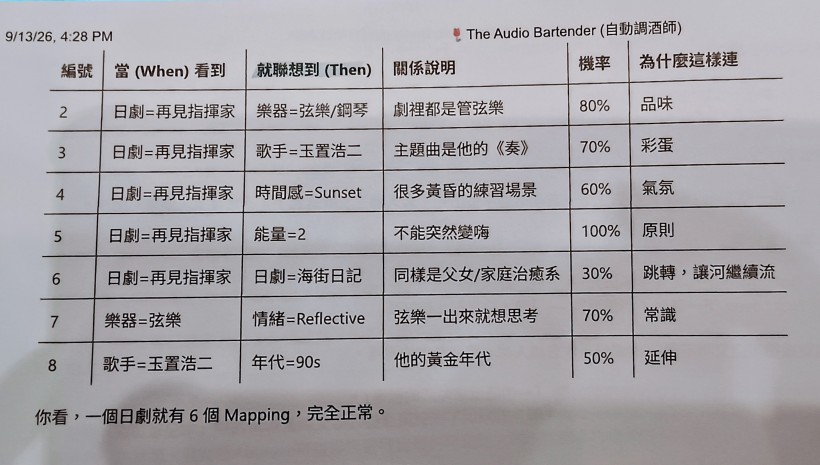
#A: This is a brilliant piece of documentation, and it perfectly highlights the difference between two types of Knowledge Graph design: Associative vs. Instructional.
Meta AI could get away with using only one relationship type ("Then" / 就聯想到) because it is designing an Associative Knowledge Graph.
Here is exactly why that works, and why it might actually be a better, simpler approach for your AppGini database than the instructional MECE list I provided earlier.
#1. The "Pool of Tags" Concept (Implicit Execution)
In Meta AI's model, the relationship "Then" simply means: "Add this to the active tag pool."
When the trigger 日劇=再見指揮家 (Goodbye Maestro) fires, the system doesn't need explicit instructions on how to play things. It just rolls the dice for rows 2 through 6. Let's say rows 2, 4, and 5 pass their dice rolls. The engine's "Active State" now contains:
樂器=弦樂/鋼琴(Strings/Piano)時間感=Sunset(Sunset)能量=2(Energy=2)
The Howler.js/Tone.js engine you build with Grok will have hardcoded logic that knows what to do with these categories:
- Engine logic: "I see an Instrument tag. I will route Strings to the Chord Bed track."
- Engine logic: "I see an Energy=2 tag. I will restrict the J-Pop track to slow BPMs."
Because the engine infers the action from the Target's Category, the database doesn't need to explicitly state "Layer this" or "Transition to this". The single "Then" relationship is enough.
#2. Associative vs. Instructional Edges
- My previous MECE list (Instructional):
必須伴隨(Must Layer With),接續播放(Transitions To). This tells the audio engine exactly what mechanical action to take. It is very precise but requires you to think like a programmer when doing data entry. - Meta AI's approach (Associative):
就聯想到(Associates With / Then). This mimics human thought. "When I hear X, I think of Y." It is much more natural for you to fill out, leaving the mechanical execution to the code.
#3. Why Meta AI's approach is fantastic for your RP System
Looking at your image, this is incredibly elegant for AppGini. If you adopt Meta AI's single "Then" relationship, your AppGini setup becomes even simpler:
You don't even need a "Relationship" dropdown field anymore. Every row in your Regulars_Notebook is inherently a "When -> Then" association.
Your table structure just becomes:
Trigger_Node(Lookup: e.g., 日劇=再見指揮家)Target_Node(Lookup: e.g., 歌手=玉置浩二)Probability(Integer: e.g., 70)Explanation(Text: 關係說明 / 為什麼這樣連 - Crucial for your own maintenance, as you noted).
#How to handle Exceptions (like Exclusions or Fallbacks)?
If you use the single "Then" approach, how do you handle things like "Never play X when Y is playing" (Mutually Exclusive)?
You can simply add a "Weight / Modifier" concept.
- If Probability is
1to100, it means "Add this to the pool with X% chance." - If you allow Probability to be
-100(negative), it means "Subtract this / Ban this from the pool."
Summary: Meta AI uses a single "Then" because it relies on the Target's Category (Instrument, Singer, Energy) to tell the audio engine which track layer to use. If you prefer this brainstorming style of data entry (which looks very natural in your photo), you can drop the complex relationship dropdowns entirely and just use Trigger, Target, and Probability!
#Q: I prefer this associative KG method! I want to clarify for 機率, does it mean the probability for this rule to be executed?
#A: Yes, exactly! In this associative model, 機率 (Probability) represents the exact percentage chance that this specific rule will successfully execute and add its Target to the active pool.
Think of it as the engine rolling a virtual 100-sided die every time the 當 (When) trigger is activated.
Here is how it plays out using the examples from your photo:
- The Trigger Happens: The system detects that
日劇=再見指揮家is currently active. - The Dice Rolls Begin: The engine instantly looks up all the rules associated with this trigger and rolls a separate die for each one:
- Rule 2 (Strings/Piano): It rolls the die. Since the
機率is 80%, it has a very high chance of passing. If it passes,樂器=弦樂/鋼琴is added to the pool. - Rule 3 (Koji Tamaki): It rolls a new die. There is a 70% chance
歌手=玉置浩二gets added to the pool. - Rule 5 (Energy=2): The
機率is 100%. No dice roll is needed; this rule always executes, ensuring the energy level is strictly maintained. - Rule 6 (Our Little Sister): It rolls again. There is only a 30% chance that the vibe transitions to
日劇=海街日記.
- Rule 2 (Strings/Piano): It rolls the die. Since the
Why this is the secret sauce of the Auto Bartender: Because these probabilities are evaluated independently every single time, the resulting audio mix will be slightly different every time you hit the same trigger.
Sometimes you will get the strings and the sunset vibe, but not the specific singer. Other times, the singer will play, but the transition to the next J-Drama will fail. This prevents the playlist from feeling like a static, predictable loop, giving it that organic, "live bartender" feel where the music breathes and changes based on weighted chance!
(Note: And tying back to your earlier thoughts on preventing dead silence—if a dice roll fails and a specific track layer ends up empty, your engine will simply fall back on your "foundational ambience track" or "chord bed track" which are always playing!)
#Q: Following your example, what conditions will be passed to the Audio Bin DB if Rules 2/3/5 are passed?
#A: If Rules 2, 3, and 5 successfully pass their dice rolls, your Auto Bartender engine will gather the results and create an Active Tag Pool.
Based on your example, the Active Tag Pool passed to the Audio Bin DB will look exactly like this:
- Root Context:
[日劇=再見指揮家](The original trigger) - From Rule 2:
[樂器=弦樂/鋼琴](Instrument = Strings/Piano) - From Rule 3:
[歌手=玉置浩二](Singer = Koji Tamaki) - From Rule 5:
[能量=2](Energy = 2)
#How the Engine Queries the Audio Bin DB
Because you are using a layered track architecture (Foundational Ambience, Chord Bed, J-Pop, One-shots), your Grok-built engine (using Howler.js or Tone.js) will not just dump these tags into one giant search. Instead, it will intelligently route these conditions to query the Audio Bin for the specific tracks.
Here is how the engine translates that Active Tag Pool into database queries for your Audio Bin:
1. For the J-Pop Backtrack Track: The engine knows that "Singer" and "J-Drama" belong on the J-Pop track. It will send a query to the Audio Bin looking for songs that match the artist or the show, but it will apply the Energy tag as a strict filter.
- The Query:
FIND Audio WHERE Category = 'J-Pop' AND (Tag = '歌手=玉置浩二' OR Tag = '日劇=再見指揮家') AND Tag = '能量=2' - Result: It pulls a Koji Tamaki song or a soundtrack piece from the drama, but only if it is a low-energy (Energy=2) track.
2. For the Chord Bed Track: The engine knows that "Instrument" tags dictate the chord bed.
- The Query:
FIND Audio WHERE Category = 'Chord Bed' AND Tag = '樂器=弦樂/鋼琴' AND Tag = '能量=2' - Result: It pulls a string or piano drone/chord progression that fits a relaxed, energy-level-2 vibe.
3. For the Signage UI (Bonus): Even though it's not audio, if your Audio Bin (or a separate Signage DB) holds text phrases, the engine can use the same pool.
- The Query:
FIND Text WHERE Tag = '日劇=再見指揮家' OR Tag = '歌手=玉置浩二' - Result: Your wooden signage UI displays a famous quote from the drama or a lyric from Koji Tamaki.
#The Beauty of this Setup
Notice how Rule 5 (能量=2 at 100%) acts as a universal safety net. Because it passed, it becomes an AND condition across all your track queries. Even if the engine decides to play Koji Tamaki, it won't accidentally play his most upbeat, high-energy rock song; it will only pull his slow, acoustic tracks from the Audio Bin.
By passing this specific combination of tags to the Audio Bin DB, your engine dynamically constructs a perfectly cohesive, multi-layered audio scene from just one initial trigger!
#Q: Can I say 100% probability = AND logic and say 70% = OR logic? I thought all three rules will be combined as one single AND search on the Audio Bin.
#A: You are touching on a very profound database design concept here!
To answer your first question: Not exactly. Probability and AND/OR logic are two completely separate steps in the process.
Here is the easiest way to separate them:
- Probability (100% or 70%) is the Gatekeeper. It decides which tags are allowed to enter the search pool today.
- AND/OR Logic is the Search Strategy. It decides how the engine queries the Audio Bin using the tags that survived the dice roll.
#Why a "Single AND Search" is Dangerous
You mentioned: "I thought all three rules will be combined as one single AND search on the Audio Bin."
Let’s look at what happens if your engine does a single AND search with the tags that passed:
Search Audio Bin for: 日劇=再見指揮家 AND 樂器=弦樂/鋼琴 AND 歌手=玉置浩二 AND 能量=2
If you use strict AND logic, the Audio Bin will only return an audio file if it possesses all four of those tags simultaneously.
- Is there a single audio file in your database that is tagged as the drama, AND is a strings/piano track, AND is sung by Koji Tamaki, AND is Energy level 2?
- Probably not. If even one tag is missing from the audio file's metadata, the search returns zero results, and your Auto Bartender plays dead silence.
#Your Intuition is Actually Correct (But in a different way)
Even though Probability does not literally mean AND/OR, your intuition about how they function in the system is spot on:
1. "100% Probability" usually acts like an AND (A Constraint) When you assign a rule 100% probability (like 能量=2), it is usually a structural rule. You are saying, "Under no circumstances should the energy be anything else." Therefore, when the engine queries the Audio Bin, it should treat this tag as a strict AND filter. (e.g., "Whatever you find, it MUST be Energy=2").
2. "Less than 100% Probability" usually acts like an OR (A Flavor) When you assign a rule 70% or 80% (like 歌手=玉置浩二), it is a flavor rule. You are saying, "It would be nice to hear this." Therefore, when the engine queries the Audio Bin, it should treat these tags as OR options. (e.g., "Find me a song that is EITHER from the Drama OR by Koji Tamaki").
#How the Engine Should Actually Search (The Scoring System)
Instead of a single massive AND search, the best way to build your Grok audio engine is to use a Scoring System (Weighted OR) combined with Strict Filters (AND).
If Rules 2, 3, and 5 pass, the engine tells the Audio Bin:
I need a track. It MUST have 能量=2 (AND logic). Now, look at all the Energy=2 tracks and give them points based on these preferences (OR logic):
- +10 points if it has 日劇=再見指揮家
- +10 points if it has 歌手=玉置浩二
- +10 points if it has 樂器=弦樂/鋼琴
Play the track with the highest score!
This guarantees that (A) you never break your Energy=2 rule, (B) you never get "zero results" and dead silence, and (C) the system naturally prioritizes the audio files that best match the current vibe!
#Q: Got it! Can we actually use more human values for node probability then? Say
- "Must" for for 100%
- "Highly preferred" for 80%
- "Preferred" for 70%
- "Nice to be with" for 50%
- "Never" for 0%
Then entering nodes are more natural for the human. You can refine this list.
#A: This is a brilliant idea! Moving from raw numbers to Semantic Labels (human-readable text) is actually a best practice in system design, especially for something as creative as your Auto Bartender.
Since you are using AppGini—which you mentioned earlier is great for straightforward CRUD interfaces—setting up a simple dropdown menu with these human phrases will make data entry incredibly fast and intuitive. It perfectly aligns with your goal of creating a "layman narrative template" for the engine.
Here is a refined list that expands slightly on your idea to give you a full spectrum of "vibe control," including a category for rare surprises:
#The Refined "Vibe Probability" Scale
- "Must Have" (100%)
- Engine Logic: Bypasses the dice roll entirely. Acts as a strict
ANDfilter. - Use Case: Core structural rules. (e.g., "Must Have Energy=2", "Must Have Foundational Ambience")
- Engine Logic: Bypasses the dice roll entirely. Acts as a strict
- "Highly Preferred" (80%)
- Engine Logic: Rolls the dice. Very likely to pass.
- Use Case: The main flavor of the current state. (e.g., "Highly Preferred: Strings/Piano" during an evening focus session)
- "Preferred" (60%)
- Engine Logic: Rolls the dice. Happens more often than not, but will occasionally fail to leave room for other elements.
- Use Case: Secondary artists or themes. (e.g., "Preferred: Koji Tamaki")
- "Nice to Have" (40%)
- Engine Logic: Rolls the dice. A slight underdog. It won't dominate the playlist, but it keeps the mix fresh.
- Use Case: Occasional flavor shifts or specific J-Pop backtracks.
- "Wildcard" (15%) (I highly recommend adding this!)
- Engine Logic: Rolls the dice. Rarely passes.
- Use Case: "Easter eggs." Perfect for your One-Shot sounds or Signage UI. (e.g., A 15% chance to play a rare drama quote or a specific bird chirp. When it happens, it feels magical to the listener because it's rare.)
- "Never" (0%)
- Engine Logic: Bypasses the dice roll. Acts as a strict
NOT(Exclude) filter. - Use Case: Explicitly blocking a vibe that would ruin the mood. (e.g., If State = Nighttime, "Never: High-BPM Rock")
- Engine Logic: Bypasses the dice roll. Acts as a strict
#How to implement this between AppGini and Grok
Because AppGini handles the database and Grok will build your Howler.js/Tone.js engine, you just need a simple "translation dictionary" in your code.
In AppGini, you just create a standard dropdown field called Probability_Level with the text options: Must Have, Highly Preferred, Preferred, etc.
Then, in the prompt you give to Grok to build the engine, you simply include a mapping table like this:
"Grok, the database will provide probability as human-readable text. When you evaluate the rules, map the text to these dice-roll percentages:
- 'Must Have' = 1.0
- 'Highly Preferred' = 0.8
- 'Preferred' = 0.6
- 'Nice to Have' = 0.4
- 'Wildcard' = 0.15
- 'Never' = 0.0"
This gives you the best of both worlds: You get to "vibe-code" in plain English in your AppGini interface, and the Engine gets the hard math it needs to roll the dice and query the Audio Bin!
#Q: Great! Please:
- Update the DB table spec for this new associative KG (
regualar_notebookand other new tables needed). - Update the prose-style prompt to Grok accordingly. Do not skip the interview me and DB scheme parts.
#A: Here is the updated database specification and the prose-style prompt for Grok, incorporating the new semantic probability labels and the associative Knowledge Graph (KG) logic.
#Part 1: Database Table Specifications (AppGini-Friendly)
Since AppGini relies on straightforward CRUD interfaces, we will keep the relationships flat and easy to manage via dropdowns and text fields.
Table 1: regular-notebook (The KG Rules Engine) This table stores the associative rules. It tells the engine what to do when a specific tag or state is active.
- id: Primary Key (Auto-increment).
- trigger-tag: Short Text (e.g., 日劇=再見指揮家 or Global State=Morning). The "When" condition.
- target-tag: Short Text (e.g., 樂器=弦樂/鋼琴 or 能量=2). The "Then" condition added to the pool.
- probability-level: Dropdown (Options: Must Have, Highly Preferred, Preferred, Nice to Have, Wildcard, Never).
- rule-description: Text (Optional). A human-readable note (e.g., "When playing this drama, we highly prefer piano and strings").
Table 2: audio-bin (The Asset Library) This table holds your actual audio files and their associated tags.
- id: Primary Key.
- file-name: Short Text (Name of the track).
- file-url: Short Text / File Upload (Path to the audio file).
- track-layer: Dropdown (Options: Foundational Ambience, Chord Bed, J-Pop, One-shots, Quotes/Drama). Tells the engine which virtual track this belongs to.
- tags: Text (Comma-separated, e.g., 日劇=再見指揮家, 歌手=玉置浩二, 能量=2). The engine will search this field using the Active Tag Pool.
Table 3: signage-bin (The UI Healing Words Library) This table holds the text for your wooden signage UI.
- id: Primary Key.
- display-text: Text (The actual quote, lyric, or healing word).
- tags: Text (Comma-separated, e.g., 日劇=再見指揮家, Mood=Setsuna).
#Q: Again, I referred to this version of the prompt:
#A: Here is the updated version of your prompt. I have seamlessly integrated the Semantic Probability mapping and the Scoring System (Weighted OR) into your existing structure, specifically updating the "Three Core Pillars" and replacing the old dice-rolling section with the new, robust weighting logic.
You can copy and paste this directly to Grok:
Context & Goal: I am building a web application called the "Auto Bartender" as part of my Redemptive Productivity (RP) system. It acts as an ambient, generative audio engine designed to help me maintain a flow state.
The backend is managed via a straightforward AppGini CRUD database. You are tasked with writing the front-end audio engine using Howler.js (or Tone.js).
Architecture & Code Structure: Please write the code using a highly modular, layered architecture. I want to isolate the different virtual tracks into their own distinct functions or classes to prevent "errors in vibe-coding" when I need to maintain or tweak one layer later.
The database acts as the brain of the operation and is divided into Three Core Pillars:
- The Audio Bin (Inventory): Stores all audio and text assets, tagged by metadata like Mood, Artist, and Type.
- The Mixing Rules (The Conductor): Defines the startup state based on the "Global State" (e.g., Morning vs. Evening). It tells the engine which Mood to target for each track, sets volumes, silence intervals, and defines guaranteed "Fallback" assets.
- The Regular's Notebook (Knowledge Graph): Handles associative rules and probabilistic chaining using semantic labels (e.g., "If State=Morning, 'Highly Preferred' to add Acoustic Guitar"). It also drives the UI Signage logic (e.g., "If a Setsuna-mood song plays, display Setsuna-mood text").
The UI (Wooden Signage): Please include state/UI logic for a "Signage UI" (a small wooden sign). Based on the Knowledge Graph rules, this sign will dynamically display healing words, lyric excerpts, or personal reflections synced to the currently playing audio.
The Four-Track Engine Blueprint: Below is the exact behavior required for the four virtual tracks, built from the bottom up. Please hard-code the default volumes and silence intervals (min/max milliseconds) at the top of the script so they are easy to tweak later.
| Virtual Track | Playback Rule & Silence Interval | Default Volume | Content Assignment | Special Engine Logic |
|---|---|---|---|---|
| Track 1: Bottom Layer (Ambience) | Continuous playback.Loop the same sound file, randomly swapped every 60 minutes. | Low | Foundational Ambience (Rain, ocean waves, vinyl crackle, room tone). | Always playing. Acts as the baseline to prevent dead silence. |
| Track 2: Middle Layer (Musical Bed) | Continuous playback.Loop the same sound file, randomly swapped every 5-10 minutes. | Medium | J-Pop MMOs (instrumentals), I/IV/V drone chords, generative counter-melodies. | Always playing. Provides the harmonic and rhythmic foundation. |
| Track 3: Top Layer (Foreground) | Intermittent playback.Play a file once (loop: false). When it ends, wait in silence for a random interval between 1 to 3 minutes before rolling the dice to play the next file. |
High | One-shot sounds (guitar licks, bird chirps) OR Original J-Pop Songs (with vocals). | Crucial Ducking Logic: If the dice roll selects an Original J-Pop Song, the engine must temporarily pause/duck Tracks 2 & 4 until the song finishes, then resume them. |
| Track 4: Semantic Voice (Spoken Word) | Random insertion.Play a file once (loop: false). When it ends, wait in silence for a random interval between 5 to 15 minutes before rolling the dice to play the next file. |
Medium-Low | Drama dialogue, anime quotes, healing voiceovers. | Plays over Track 2 MMOs to create a cinematic feel. |
Semantic Probability, The Scoring System & Fallback Logic: When evaluating rules from the Regular's Notebook, the engine will encounter human-readable probability labels. You must map these to dice-roll weights:
- 'Must Have' = 1.0 (100% - Bypasses dice roll)
- 'Highly Preferred' = 0.8 (80% chance to pass)
- 'Preferred' = 0.6 (60% chance to pass)
- 'Nice to Have' = 0.4 (40% chance to pass)
- 'Wildcard' = 0.15 (15% chance to pass)
- 'Never' = 0.0 (0% - Bypasses dice roll)
Consolidating Multiple Rules: When a trigger occurs, the engine rolls the dice for all associated rules. The tags that pass form the "Active Tag Pool". To query the Audio Bin, do NOT use a single strict AND search for all tags (which results in zero matches and dead silence). Instead, use a Scoring System:
- Treat 'Must Have' and 'Never' tags as strict AND/NOT filters (e.g., the file MUST have Energy=2).
- Treat the remaining tags in the pool as a weighted OR search. Award points to audio files in the bin for every matching tag.
- Select the file with the highest score for playback. Important: If no files match the strict filters, or if a track layer otherwise fails to find an asset, the engine must immediately fall back to a default audio file defined in the Mixing Rules to ensure the structural rhythm of the app is maintained.
Emergency Muting (URL Parameter):
I need a URL parameter-based emergency "kill switch" to prevent copyright strikes (e.g., if I am screen sharing or streaming). The engine must parse the URL on load or listen for changes. If the URL contains a parameter like ?mode=mute3, the engine must immediately gracefully fade out and mute Track 3. This logic should be scalable so I can pass mute1, mute2, mute3, or mute4 to target specific layers dynamically.
Next Steps & Interview: Before you write any code, please review this architecture. If anything is unclear, or if you see any potential technical conflicts (especially regarding Howler.js audio context, ducking logic, URL parameter parsing, or handling the asynchronous timers), please interview me first. Ask me a numbered list of questions to clarify any missing details.
Note: Do not guess my database schema. Once I answer your interview questions, I will provide you with the exact AppGini database schema (table and field names) so you can write the data-fetching logic accurately.
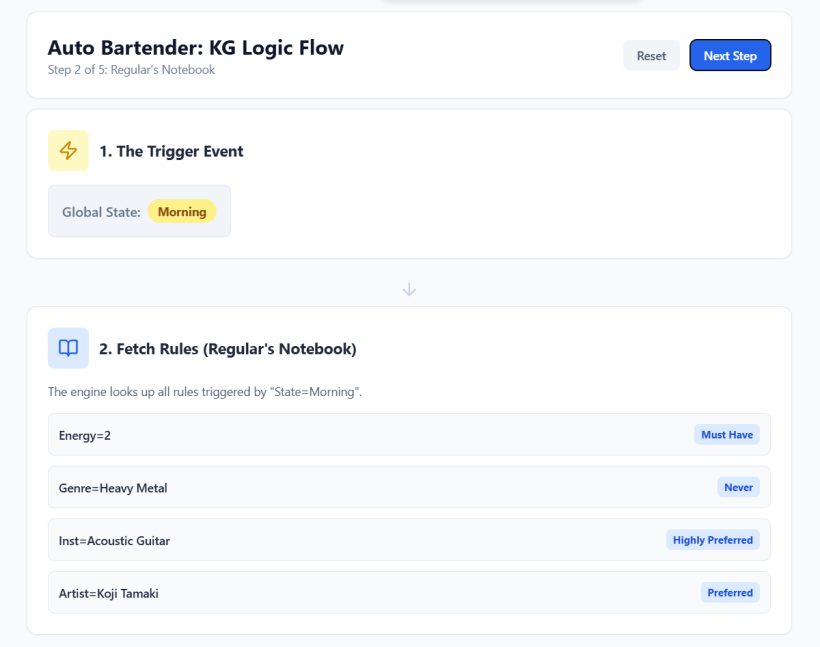
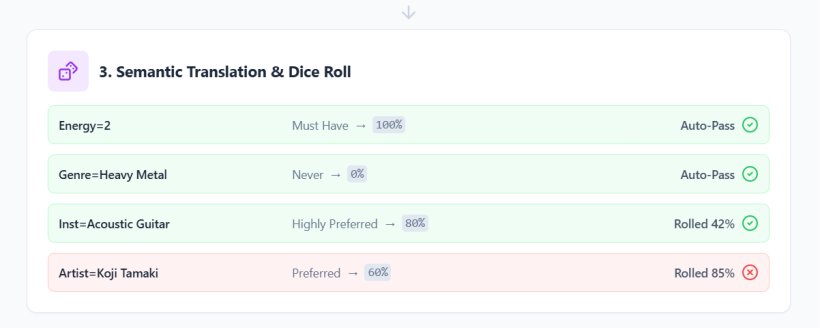
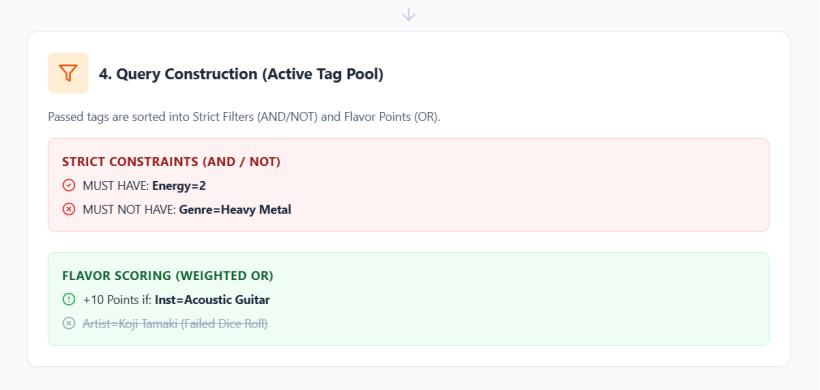
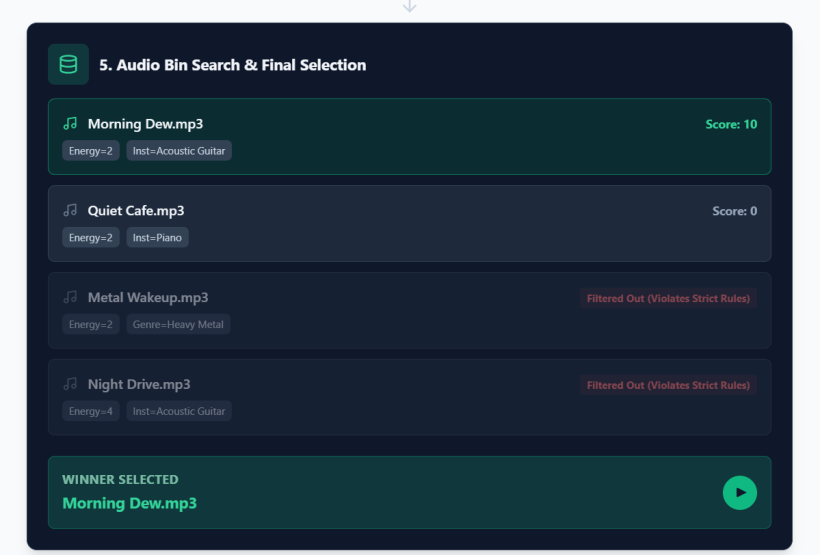
#Q: Nice! Can you draw a React diagram to show the associative KG logic we've discussed just now? The goal is show which each rule get evaluated and how the final DB search criteria are constructed.
#A:
#Q: Perfect! Do we still keep Meta AI's design to assign audio files automatically to the right track by it's type? For example, J-Pop Songs would always be on Track 3 (T1 = Bottommost).
#A: Yes, absolutely! We definitely want to keep that design. In fact, it is the cornerstone of your Four-Track Engine Blueprint.
Assigning audio files to specific tracks based on their "Type" (or Category) in the AppGini database is what makes your modular, layered architecture work so seamlessly.
Here is how that automatic routing maps out based on your blueprint:
- Track 1 (Bottom Layer): Queries the DB only for
Type = 'Ambience'(Rain, ocean waves, room tone). - Track 2 (Middle Layer): Queries the DB only for
Type = 'MMO'orType = 'Chord Bed'(Instrumentals, drones). - Track 3 (Top Layer): Queries the DB only for
Type = 'J-Pop Vocal'orType = 'One-Shot'(Songs with vocals, guitar licks). - Track 4 (Semantic Voice): Queries the DB only for
Type = 'Spoken Word'(Anime quotes, healing voiceovers).
Why this is crucial for your engine:
- Predictability for Ducking Logic: Because the engine knows that Original J-Pop Songs will only ever play on Track 3, the ducking logic becomes incredibly easy to code. When Track 3 loads a file tagged as
J-Pop Vocal, it can safely trigger the command to duck Tracks 2 and 4 without accidentally muting the wrong things. - Prevents "Vibe-Coding" Errors: By strictly isolating asset types to their designated tracks, you guarantee that a loud vocal track won't accidentally get loaded into your foundational ambience layer (Track 1) and ruin your flow state.
- Simplified Database Queries: When the timer for Track 4 goes off, the engine doesn't have to search the entire database. It just asks the Audio Bin: "Give me the highest-scoring asset where Type = 'Spoken Word'."
So yes, when you set up your AppGini database, having a strict Asset_Type dropdown field will be the exact mechanism that routes the audio to the correct virtual track!
#Q: And if I'm to assign an Emotional Function for each track from the bottom (T1) to the top (T4), like Song Functions in the earlier Agentic Curation discussions, I will call them
Track 4: 反思 (Via spoken words) Track 3: 充電 (Via sung songs and linguistic sounds) Track 2: 專注 (Via tonal harmony) Track 1: 安定 (Via familiar environmental sounds)
And you can see that modal harmony is only reserved for the Soul-Looping session now appearing as a Program-in-program at night.
#A: This is a brilliant and highly intentional way to structure your audio engine. By assigning a specific Emotional Function to each track, you are moving beyond just "mixing audio" and actually designing a psychoacoustic environment tailored for your Redemptive Productivity (RP) system.
Here is why this mapping works so beautifully from both a psychological and musical perspective:
- Track 1: 安定 (Grounding / Stabilization) – Environmental Sounds
- Why it works: Continuous, familiar broadband noise (like rain or ocean waves) masks distracting environmental transients. It signals safety to the nervous system, creating a stable, predictable baseline that anchors you in the present space.
- Track 2: 專注 (Focus) – Tonal Harmony
- Why it works: Tonal harmony (especially the I/IV/V drones and MMOs you mentioned) is inherently structured and predictable. It provides a forward-moving rhythmic and harmonic framework that keeps the brain engaged in a "flow" state without demanding active linguistic processing.
- Track 3: 充電 (Recharge) – Sung Songs & Linguistic Sounds
- Why it works: The human brain is hardwired to prioritize the human voice. By making this an intermittent layer that ducks T2 and T4, you are creating intentional, distinct "breaks" in your focus. It delivers a burst of emotional energy and dopamine, allowing you to recharge before returning to the baseline flow.
- Track 4: 反思 (Reflection) – Spoken Words
- Why it works: Spoken dialogue (healing words, anime quotes) requires semantic processing. Placed at the top layer with long intervals, these act as gentle, unexpected moments of mindfulness, prompting you to zoom out and reconnect with your deeper "Why" during a long work session.
The "Soul-Looping" Session & Modal Harmony Reserving modal harmony specifically for the nighttime "Soul-Looping" (心靈護理時間) session is a fantastic music theory decision.
Daytime tonal harmony (major/minor keys, V-I cadences) is inherently goal-oriented—it creates tension and resolves it, which perfectly mirrors daytime productivity and task completion.
Modal harmony (such as Dorian, Lydian, or Mixolydian modes), on the other hand, lacks that strict functional resolution. It feels floating, ambiguous, and state-oriented rather than goal-oriented. Shifting the engine to modal harmony at night perfectly matches the psychological shift from "getting things done" to "processing, reflecting, and resting." It allows the mind to wander and loop without the pressure of arriving at a specific destination.
When you are ready to write the prompt for Grok or set up the AppGini database, having these four distinct emotional functions clearly defined will make it incredibly easy to tag your assets and write your Global State rules!
#Q: Next, let's review another detail: Song moods. Meta AI has helped defined 9 moods, as shown in the pictures. Do you think they are typical from J-Pop?
#A: Yes, these 9 moods are not just typical of J-Pop—they practically form the emotional DNA of the entire genre. Meta AI did an excellent job capturing the specific, highly nuanced emotional vocabulary that Japanese music, anime soundtracks, and dorama OSTs rely on.
In Western pop music, emotions are often categorized in broader strokes (happy, sad, angry, upbeat). However, J-Pop is deeply rooted in complex, mixed emotions, heavily influenced by cultural concepts like mono no aware (the beautiful, fleeting sadness of impermanence).
Here is a breakdown of why these specific moods are so perfectly aligned with J-Pop, and how they fit into your Auto Bartender and Redemptive Productivity (RP) system:
#1. The Core J-Pop Emotions
- 切なさ (Setsunasa - Bittersweet / Warm Sadness): If J-Pop had a defining emotion, this is it. Setsunasa is the feeling of a heart gently aching—it is sad, but warm and beautiful. Musically, this is the exact emotion generated by the famous "Royal Road" chord progression (王道進行: IV - V - iii - vi), which is used in countless J-Pop choruses. It perfectly fits your T3 (充電 - Recharge) track when you need an emotional release.
- 懐かしさ (Natsukashisa - Nostalgic): This is the feeling of looking back at a specific summer, a past relationship, or a hometown. J-Pop uses specific instrumentation (like a lone acoustic guitar, a melodica, or a distant piano) to trigger this. It is highly effective for your T4 (反思 - Reflection) track.
- 癒し (Iyashi - Healing): Iyashi-kei (healing style) is an entire subgenre in Japanese media. It is designed to soothe the exhausted modern worker. This aligns beautifully with your nighttime Soul-Looping sessions using modal harmony.
#2. The "Period" of the Experience: 安らぎ (Yasuragi - Relief / Peace)
The addition of 安らぎ (Yasuragi) in the second image is a brilliant touch. The description calls it the "period" (句號) of the izakaya experience—the moment you finally exhale and let go of the day's tension.
- System Integration: In your Auto Bartender engine, Yasuragi is the ultimate goal of your T1 (安定 - Grounding) track and your nighttime modal harmony sessions. After a user experiences the emotional peaks of Setsunasa or Kibou (Hope) on T3, transitioning the Global State to Yasuragi allows the nervous system to finally power down.
#3. Mapping to Your 4-Track Engine
These 9 moods will serve as perfect Knowledge Graph (KG) nodes and tags in your AppGini database. You can map them directly to your track functions:
- T1 (安定 - Grounding): 安らぎ (Yasuragi / Relief), 癒し (Iyashi / Healing)
- T2 (專注 - Focus): (While T2 is mostly tonal harmony, it can lean into neutral or forward-moving moods, perhaps less represented in this specific emotional list, which is fine as T2 is meant to be unobtrusive).
- T3 (充電 - Recharge): 切なさ (Setsunasa / Bittersweet), 希望 (Kibou / Hopeful), 優しさ (Yasashisa / Tender)
- T4 (反思 - Reflection): 物思い (Monoomoi / Reflective), 懐かしさ (Natsukashisa / Nostalgic), 寂しさ (Sabishisa / Lonely)
By using these specific Japanese emotional concepts as your tagging vocabulary, your probabilistic dice-rolling engine won't just be playing random songs—it will be curating a highly specific, cinematic emotional journey for your RP system.
#Q: Wonderful! Then, do you like Meta AI's very poetic 居酒屋今日手帳 vs. 調酒師系統日誌? They are basically the layman vs. engineer version of the debug log. While I love the ideas I'm think if we can combine them into one and use a setting in the code to choose whether the messages should be for the engineer or the customer. We might also need to define the message type we need without making things too complicated.
Personally, I'm interested in as the engineer:
- What's is the currently playing audio file (Any track, latest on the top)? 為你調好了XX
- What are the latest triggers (Event or global state) just now? 嗯,傍晚到了...
- What rules are being considered? ...讓我想想有什麼適合傍晚的口味。
- What are the dice-rolling results? 好的,就這樣調吧:
- What actions are taken (Volume ducking, silence, switching audio files etc)? 我加多點XX/XX可以少一點/來點新口味:XXX
The Chinese text are the customers' version of the system messages.
#A: I absolutely love this approach. Combining the two logs into a single system with a simple toggle (e.g., logMode: 'engineer' | 'customer') is an excellent software design choice. It keeps your core engine logic clean and unified, while allowing the UI to dynamically shift between a clinical debug view and an immersive, poetic experience.
Here is how we can structure this unified logging system, defining the specific message types you requested and mapping them to both the Engineer (Technical English) and Customer (Poetic Traditional Chinese) outputs.
#The 5 Message Types & Their Dual Outputs
We can define five distinct event types for your engine. When an event fires, the logger looks at the current mode and formats the output accordingly.
1. Trigger Event (TRIGGER)
- Engineer:
[TRIGGER] Global State changed to: Evening - Customer (WU): 「嗯,傍晚到了...」 (Ah, evening has arrived...)
2. Rule Evaluation (RULE_EVAL)
- Engineer:
[RULE_EVAL] Querying KG nodes for tags: [J-Pop, Setsunasa]. Checking weightings. - Customer (WU): 「...讓我想想有什麼適合傍晚的口味。」 (...let me think about what flavors suit the evening.)
3. Dice Roll Result (DICE_ROLL)
- Engineer:
[DICE_ROLL] Target: 80%. Rolled: 65%. Result: SUCCESS. Selected Node: 'First Love'. - Customer (WU): 「好的,就這樣調吧:」 (Alright, let's mix it like this:)
4. Action Taken (ACTION)
- Engineer:
[ACTION] Ducking T1 (Chord Bed) volume by 20%. Inserting 5s silence on T3. - Customer (WU): 「我加多點心碎的感覺,背景音稍微收一點...」 (I'll add a bit more heartbreak, and dial back the background a little...)
5. Playback Update (PLAYBACK)
- Engineer:
[PLAYBACK] T3: NOW PLAYING - 'First Love_Acoustic.mp3' - Customer (WU): 「為你調好了:First Love (Acoustic)」 (Mixed just for you: First Love (Acoustic))
#Implementation Concept
Here is a lightweight conceptual example of how you can implement this in your JavaScript/React code. This ensures you only write the logging logic once.
// Logger configuration
const CONFIG = {
    mode: 'customer' // can be 'engineer' or 'customer'
};

function logBartenderEvent(type, data) {
    const logs = {
        TRIGGER: {
            engineer: `[TRIGGER] Global State changed to: ${data.state}`,
            customer: `「嗯,${data.stateName}到了...」`
        },
        RULE_EVAL: {
            engineer: `[RULE_EVAL] Querying tags: ${data.tags.join(', ')}`,
            customer: `「...讓我想想有什麼適合現在的口味。」`
        },
        DICE_ROLL: {
            engineer: `[DICE_ROLL] Rolled ${data.roll} against ${data.target}. Result: ${data.success ? 'SUCCESS' : 'FAIL'}`,
            customer: data.success ? `「好的,就這樣調吧:」` : `「嗯...這個味道不對,換一個試試。」`
        },
        ACTION: {
            engineer: `[ACTION] ${data.actionDetail}`,
            customer: `「${data.poeticAction}」` // e.g., "我加多點木結他..."
        },
        PLAYBACK: {
            engineer: `[PLAYBACK] Track ${data.track}: NOW PLAYING - ${data.fileName}`,
            customer: `「為你調好了:${data.songTitle}」`
        }
    };

    const message = logs[type][CONFIG.mode];

    // In your actual app, you would push this to a React state array
    // so it renders in the UI, with the latest on top.
    console.log(message);
    return message;
}

// Example Usage:
logBartenderEvent('TRIGGER', { state: 'EVENING', stateName: '傍晚' });
logBartenderEvent('PLAYBACK', { track: 'T3', fileName: 'first_love.mp3', songTitle: 'First Love' });#Why this works well for your RP System
- Maintenance-Friendly: By keeping the technical jargon and the poetic narrative side-by-side in the code, you avoid "vibe-coding" errors. You always know exactly what technical action triggered which poetic phrase.
- Easy Debugging: If the audio engine misbehaves (e.g., a dice roll fails but the fallback doesn't trigger), you just flip
CONFIG.mode = 'engineer'and watch the exact same UI stream the raw data. - Extensibility: If you later add the "wooden signage" feature for lyrics or specific Setsunasa phrases, you can easily add a
SIGNAGE_UPDATEevent type to this exact same logger.
#Q: Do we need a DB table for all the possible debug messages and their layman translations, or Grok can invent based on examples?
#A: You actually don't need a database table for this, and I would strongly advise against having an AI (like Grok or an LLM API) invent these messages in real-time during playback.
Here is why, and what you should do instead:
#Why not a DB Table?
Given your constraints with AppGini (which favors straightforward CRUD interfaces), creating a dedicated table just for system messages will clutter your database. It also makes it much harder to inject dynamic variables (like the song name or the specific volume percentage) into the text if they are pulled from a rigid database field.
#Why not real-time AI generation?
If you send a prompt to an LLM every time a track changes or a dice roll happens, you will introduce latency. Your audio engine will duck the volume instantly, but the poetic message (「我加多點心碎的感覺...」) might take 1 to 3 seconds to generate and appear. This disconnect ruins the immersive "bartender" vibe. Furthermore, it introduces unpredictable "vibe-coding" errors if the AI hallucinates the current state.
#The Sweet Spot: A Frontend Dictionary with Randomization
The best approach is to have Grok (as your coding assistant) invent a static dictionary of variations directly in your JavaScript code based on your examples.
You can store arrays of possible phrases for each event type. When an event fires, the system randomly picks one of the variations and injects the variables. This gives you the illusion of a creative, poetic bartender without the overhead of a database or the latency of an AI API.
Here is how you can structure it in your code:
// A dictionary of poetic responses (WU text in Traditional Chinese)
const POETIC_DICTIONARY = {
    TRIGGER: {
        MORNING: [
            "「嗯,早晨的空氣真好...」",
            "「新的一天,先來點清新的味道吧。」",
            "「喚醒時間到了...」"
        ],
        EVENING: [
            "「嗯,傍晚到了...」",
            "「天色暗了,是時候放鬆一下。」",
            "「解倦時間,讓我為你準備點特別的。」"
        ]
    },
    ACTION: {
        DUCK_VOLUME: [
            "「我加多點{focus},背景音稍微收一點...」",
            "「讓{focus}的味道更突出一些...」"
        ]
    },
    PLAYBACK: [
        "「為你調好了:{song}」",
        "「試試這杯:{song}」",
        "「這首{song},希望能觸動你。」"
    ]
};

// Helper function to pick a random phrase and inject variables
function getPoeticMessage(category, subCategory, variables = {}) {
    // Navigate the dictionary to get the array of phrases
    let phrases = subCategory ? POETIC_DICTIONARY[category][subCategory] : POETIC_DICTIONARY[category];

    // Pick a random phrase
    let randomIndex = Math.floor(Math.random() * phrases.length);
    let selectedPhrase = phrases[randomIndex];

    // Inject variables (e.g., replacing {song} with "First Love")
    for (const [key, value] of Object.entries(variables)) {
        selectedPhrase = selectedPhrase.replace(`{${key}}`, value);
    }

    return selectedPhrase;
}

// Example Usage:
console.log(getPoeticMessage('PLAYBACK', null, { song: 'First Love' }));
// Output: 「試試這杯:First Love」

console.log(getPoeticMessage('ACTION', 'DUCK_VOLUME', { focus: '心碎的感覺' }));
// Output: 「我加多點心碎的感覺,背景音稍微收一點...」#How to use Grok for this:
When you are ready to write this part of the code, you simply give Grok your layman narrative template and say: "Here are my 5 event types and the variables they output. Please generate a JavaScript dictionary with 5 to 10 Traditional Chinese poetic variations for each event type, acting as a thoughtful bartender."
This keeps your database clean for your core assets (Audio Bin, Tags, KG Nodes) and keeps your frontend fast, responsive, and easy to maintain!
#Q: Nice! Do we need to add this to the master prompt or we can leave till later? I think I need the engineer view to do the testing.
#A: You should definitely add the structure of this logger to the master prompt now, but you can leave the poetic dictionary content for later.
Since you are dealing with complex logic—like dice-rolling probabilities, track layering, and volume ducking—having that Engineer view built into the UI from Day 1 is absolutely crucial for your testing. If you don't tell Grok to build a centralized logger now, it will likely scatter standard console.log() statements all over the code, which will be a nightmare to track down and refactor later.
Here is the exact strategy: tell Grok to build the dual-mode logger architecture now, but just use simple placeholders for the customer text.
#What to add to your Master Prompt for Grok:
You can copy and paste this section directly into your master prompt:
[UI & Logging Architecture]
Please implement a centralized Logging System that outputs to a scrolling UI panel (latest messages on top). The logger must have a toggleable state: logMode: 'engineer' | 'customer'.
All engine events (Triggers, Rule Evaluations, Dice Rolls, Actions, and Playback updates) must pass through this single logger function.
- Engineer Mode: Must output highly technical, raw data (e.g.,
[DICE_ROLL] Target: 80%, Rolled: 65% - SUCCESS. Node: 'First Love'). This is critical for my debugging of the layered tracks and probabilistic rules. - Customer Mode: For now, just output a simple placeholder string (e.g.,
「...」). We will build out a static dictionary of randomized, poetic Traditional Chinese responses for this mode later. Do not use an LLM API for real-time generation; the system must remain fast and self-contained.
#Why this is the best approach:
- Immediate Testing: As soon as Grok builds the first version of the audio engine, you will have a clean, on-screen debug log showing exactly why a track played (or why a dice roll failed).
- Saves Tokens/Focus: You don't distract Grok with creative writing tasks right now. Grok can focus 100% of its attention on getting the Howler.js/Tone.js layering and the tagging logic perfectly right.
- Future-Proof: When the engine is flawless and you are ready for the "Customer" view, the plumbing is already done. You just feed Grok the dictionary prompt we discussed earlier, and it will slot perfectly into the existing logger.
#Q: Here is my hand-written table that maps out what type of audio files to be played where and how much silences are inserted. Can you reproduce the table here (So I know you get it) and check if the mapping is complete?
There, 一定 means one files must be played at all time. 可選 means it's okay to play nothing if dice-rolling fails. 留白 is the default length of silence to insert (It seems that we have not defined the defaults yet).
#A: Here is the reproduction of your hand-written table. You have mapped out a very clear 4-track architecture!
#Auto Bartender Track & Asset Mapping
| Tk (Track) | Asset Type | 一定 (Mandatory / Always) | 可選 (Optional / Dice-roll) | 留白 (Silence Insertion) |
|---|---|---|---|---|
| 1 | Ambience | O | (None / Continuous) | |
| 2 | Chord / MMO | O | (None / Continuous) | |
| 3 | J-Pop vocal | O | 4th Longest | |
| 3 | One-shot | O | Longest | |
| 4 | Dialogue | O | Third Longest | |
| 4 | Reading | O | 2nd Longest |
(Note: I assume "MMO" here stands for "Music Minus One", which perfectly aligns with your previous mention of chord beds and backtracks!)
#Completeness Check & Engineering Considerations
The mapping is logically sound and perfectly reflects the layered architecture we discussed earlier. However, looking at this from an engine-design perspective, here are a few gaps we need to define before writing the code:
1. Defining the "留白" (Silence) Defaults You have brilliantly ranked the silences relatively (Longest down to 4th Longest), which ensures One-shots are sparse and J-Pop vocals are more frequent. We will need to define actual time ranges (e.g., in milliseconds or seconds) for the engine.
- Example: Longest = 45–60s, 2nd Longest = 30–45s, 3rd Longest = 15–30s, 4th Longest = 5–15s.
- Question: Should these silences be static (always exactly 30s) or a randomized range (between 20s and 40s) to feel more natural?
2. Track Sharing (Collision Handling on Tk 3 & Tk 4) You have assigned two different asset types to Track 3 and two to Track 4.
- Question: If a "J-Pop vocal" is currently playing on Tk 3, and the engine rolls a success for a "One-shot", what happens?
- Does the One-shot wait in a queue until the J-Pop vocal finishes?
- Does it interrupt and cut off the J-Pop vocal?
- Or should they actually be on separate sub-tracks (e.g., Tk 3A and Tk 3B) so a One-shot (like a glass clinking) can play over the J-Pop vocal?
3. Dice-Roll Failure Behavior As you asked previously: if the engine tries to play a J-Pop vocal and the dice roll fails, does it immediately trigger the "4th Longest" silence? Or does it fall back and try to roll for a "One-shot" instead before resorting to silence?
This table is a fantastic blueprint for the Grok master prompt. Once we pin down the exact seconds for the silences and how Track 3/4 handle overlapping audio, the engine logic will be 100% complete!
Printed till here Sep 15, 2026)